15-Second Beverage Commercial in Seedance 2.5: A Second-by-Second Timestamp Prompting Guide
A structured 15-second vertical commercial prompting framework for Seedance 2.5 shared by AI creator @DuaFatimaAi. Learn how to direct an 8-stage sequence (Impa
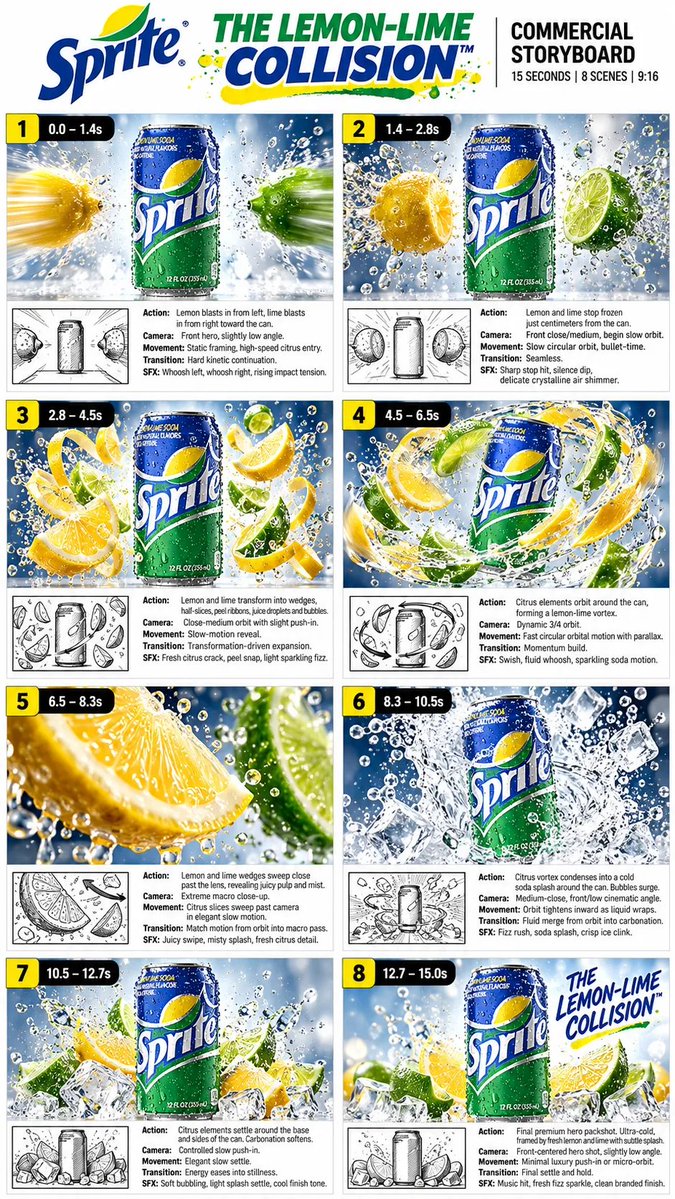
A structured prompting workflow for directing photorealistic 15-second vertical (9:16) beverage commercials in Seedance 2.5 has been shared by AI creator Dua Fatima (@DuaFatimaAi).
Image source: @DuaFatimaAi on X
In generative video models, relying solely on loose natural language descriptions often causes scene transitions, pacing, and product consistency to drift. The “Lemon-Lime Collision” prompt framework solves this by breaking down the full 15-second runtime (0.0s–15.0s) into eight timestamped stages, pairing second-by-second action beats with high-speed Phantom camera aesthetics and physics-based liquid simulation directives.
Prompt Specifications and Master Prompt Structure
The prompt is designed specifically for 9:16 vertical short-form platforms with a 15-second duration, focusing purely on product presentation and commercial visual effects without human subjects or background music.
Format and Style Specifications
- Format: 9:16 vertical
- Duration: 15 seconds
- Style Parameters: Ultra-photorealistic premium beverage commercial, cinematic macro photography, high-speed liquid simulation, crisp studio lighting, icy condensation, dynamic splash physics, commercial-grade VFX, 4K/8K detail, no people, no music
Master Prompt
The master prompt establishes visual consistency rules for the featured beverage container across all generated frames.
Create a premium 15-second vertical Sprite commercial titled “The Lemon-Lime Collision.” Keep the Sprite can perfectly consistent throughout the entire video: centered branding, realistic green aluminum, condensation, authentic proportions and label details.
- Centered Branding: Locks the brand logo and label position in the center of the frame.
- Material Fidelity: Directs realistic green aluminum textures paired with glistening condensation droplets.
- Proportions and Labeling: Enforces accurate physical proportions and legible packaging details across transitions.
8-Stage Second-by-Second Timestamp Sequence
The 15-second timeline progresses through eight distinct dramatic phases. Each stage specifies exact timing, camera moves, and physical interactions.
1. Impact (0.0–1.4s — IMPACT)
A chilled can stands centered against a crisp icy-blue studio background. A fresh yellow lemon blasts in from the left while a green lime enters rapidly from the right, triggering explosive water droplets as they approach the can.
0.0–1.4s — IMPACT
A cold Sprite can stands centered against a bright icy-blue studio background. A fresh yellow lemon rapidly blasts in from the left while a vibrant green lime blasts in from the right. Water droplets explode outward as the citrus approaches the can. High-speed cinematic capture, dramatic impact energy, sharp frozen droplets.
2. Freeze Frame (1.4–2.8s — FREEZE)
The lemon and lime abruptly freeze in mid-air on opposite flanks of the can, with thousands of tiny water droplets suspended in space. A slow-motion macro push-in captures sparkling condensation and crisp frozen detail.
1.4–2.8s — FREEZE
The lemon and lime stop in mid-air on opposite sides of the Sprite can. Thousands of tiny water droplets remain suspended around them. Slow-motion macro camera push-in, sparkling condensation, crisp frozen moment.
3. Transformation (2.8–4.5s — TRANSFORMATION)
The suspended citrus fruits dynamically slice and uncurl into fresh wedges. Multiple pieces arrange themselves around the can, enveloped in sparkling droplets and fine juice mist.
2.8–4.5s — TRANSFORMATION
The lemon and lime dynamically transform into beautiful fresh citrus wedges and curling slices. Multiple lemon and lime pieces appear around the can, surrounded by sparkling droplets and fine mist. Smooth transformation with realistic fruit textures and juice particles.
4. Citrus Orbit (4.5–6.5s — CITRUS ORBIT)
The citrus wedges accelerate into a rapid circular orbit around the can. A dynamic 3/4 camera orbit with strong parallax, swirling liquid trails, carbonated soda bubbles, and flying droplets creates a sense of high-velocity motion.
4.5–6.5s — CITRUS ORBIT
The lemon and lime slices begin orbiting rapidly around the Sprite can in a powerful circular motion. Dynamic 3/4 camera orbit, strong parallax, swirling liquid trails, fizzy soda bubbles and flying droplets create a sense of acceleration.
5. Macro Close-Up (6.5–8.3s — MACRO)
An extreme macro shot captures juicy lemon and lime wedges sweeping directly in front of the lens, highlighting citrus pulp, translucent membranes, bursting juice droplets, and glistening highlights before pulling back toward the can.
6.5–8.3s — MACRO
Extreme macro close-up of juicy lemon and lime wedges sweeping past the camera. Show detailed citrus pulp, translucent membranes, fresh juice bursting from the fruit, tiny water droplets and sparkling highlights. Transition smoothly back toward the can.
6. Vortex Collision (8.3–10.5s — VORTEX COLLISION)
The orbiting citrus vortex collapses inward toward the center. Lemon, lime, ice cubes, bubbles, and water converge into a cold soda splash while maintaining a sharp focus on the centered product.
8.3–10.5s — VORTEX COLLISION
The entire citrus vortex rapidly collapses toward the Sprite can. Lemon, lime, ice cubes, bubbles and water converge into a spectacular cold soda splash. The can remains clearly visible and sharply focused in the center.
7. Settling Phase (10.5–12.7s — SETTLE)
The splash energy dissipates as the fruit wedges and crystal-clear ice cubes settle neatly around the base of the can. Water droplets fall in gentle slow motion, shifting the scene into a calm, refreshing state.
10.5–12.7s — SETTLE
The energetic splash settles into a beautiful arrangement of lemon wedges, lime wedges and crystal-clear ice cubes around the base of the Sprite can. Droplets gently fall in slow motion. The scene becomes calm, cold and refreshing.
8. Hero Shot (12.7–15.0s — HERO SHOT)
The final hero shot locks onto the chilled can resting on a clean icy surface, framed by fresh citrus and ice cubes. Glistening condensation and floating droplets accompany elegant branded typography reading “THE LEMON-LIME COLLISION™” before holding the frame.
12.7–15.0s — HERO SHOT
Final premium product hero shot. The perfectly chilled Sprite can stands centered on a clean icy surface, surrounded by fresh lemon, lime and ice cubes. Condensation glistens on the can. A few sparkling droplets float through the air. Add elegant branded typography reading:

“THE LEMON-LIME COLLISION™”

Hold the final composition cleanly for several seconds.
Camera Directing and Commercial VFX Directives
Following the timestamp sequence, camera physics and rendering attributes are defined to replicate high-speed commercial studio cinematography.
Camera & VFX:
High-speed Phantom-camera aesthetic, macro lens, shallow depth of field, smooth dolly movements, controlled 3/4 orbit, realistic motion blur, physically accurate liquid simulation, photorealistic citrus textures, detailed ice refraction, sparkling soda carbonation, cinematic commercial lighting, premium beverage advertising aesthetic.
- Phantom Camera Aesthetic: Imparts high-speed motion capture qualities with crisp frame freezes and realistic motion blur.
- Lens and Motion Control: Employs macro optics, shallow depth of field (DOF), smooth dolly pushes, and controlled 3/4 orbit arcs.
- Physics Simulation: Enforces accurate liquid splashing, fruit pulp textures, ice light refraction, and carbonation bubble particles under studio lighting.
Negative Prompt and Quality Control
To prevent common video generation artifacts—such as packaging distortion, warped typography, or stray elements—a targeted negative prompt is appended.
Negative prompt: distorted can, warped logo, changing packaging, misspelled text, duplicate cans, deformed fruit, artificial-looking liquid, cartoon style, CGI-looking fruit, shaky camera, flicker, frame inconsistency, low resolution, oversaturated colors, people, hands, extra objects.
Maintaining brand identity is critical in commercial workflows. Specifying negative tokens like distorted can, warped logo, and changing packaging prevents the generative model from hallucinating altered labels or morphing the product across cuts.
Original source
- Dua Fatima on X (@DuaFatimaAi): Seedance 2.5 15-Second Sprite Commercial Prompt Guide