Retro Anime Production with Opus 5.5, Blender, and Seedance 2.5: The Grayscale Blockout Technique
A complete breakdown of @AIWarper's pipeline pairing Claude Opus 5.5, Blender MCP, Seedance 2.5, and DaVinci Resolve Studio, and why 100% grayscale blockouts ar
On October 4, 2026, digital artist and video creator A.I.Warper (@AIWarper) revealed a multi-stage production pipeline combining Claude Opus 5.5, Blender, Seedance 2.5, and DaVinci Resolve Studio 21.1+ to produce a retro anime sequence, highlighting practical techniques in reference-driven AI video generation.
Image source: @AIWarper via X
Generative video workflows often struggle with spatial consistency and precise camera control when relying solely on text prompts or static reference images. A.I.Warper’s workflow addresses these challenges by establishing a hybrid pipeline where an LLM coordinates 3D scene blocking in Blender via Blender MCP, feeds that rough spatial layout into a video generation model (Seedance 2.5) as a driving video reference, and finishes with post-processing and color grading in DaVinci Resolve Studio. Central to this setup is the 'grayscale blockout' technique—a practical finding discovered after multiple failed trials that prevents the AI video model from latching onto placeholder colors.
The Four-Stage Hybrid Architecture
The end-to-end pipeline connects four specialized tools into a cohesive production chain:
- Claude Opus 5.5 and Blender MCP: Staging the scene through natural language instructions, Opus 5.5 interacts with Blender via the Blender MCP server, setting up rough 3D geometry, camera trajectories, and object movements.
- 3D Rough Blockout Export: Without needing detailed modeling or textures, Blender exports a lightweight previs animation that captures spatial depth, camera angles, and motion.
- Seedance 2.5 Video Generation: The blockout video serves as the structural driving video. Seedance 2.5 adheres to the 3D camera trajectory and motion while rendering retro anime styling and details conditioned on the prompt.
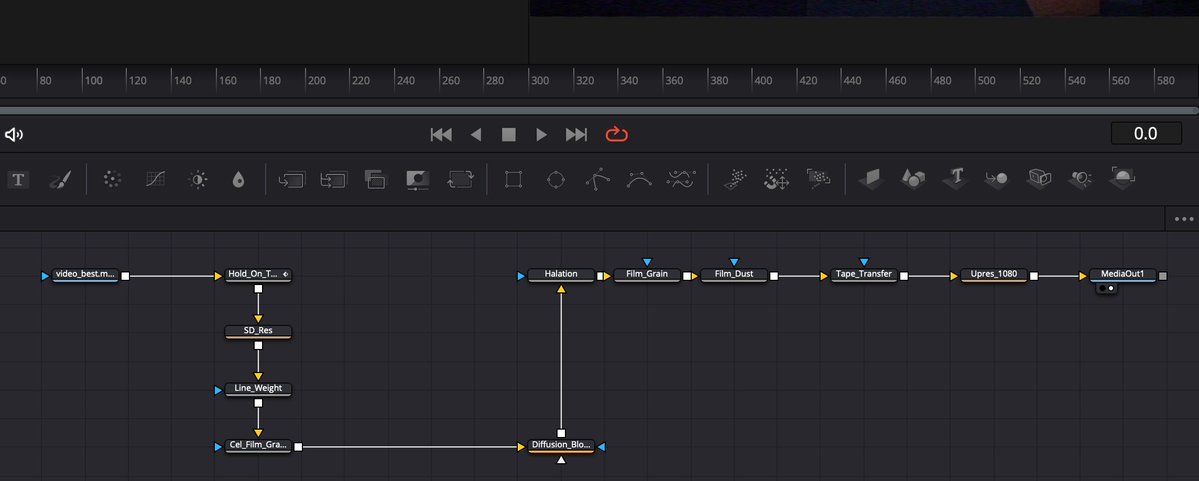
- Post-Processing in DaVinci Resolve Studio 21.1+: Driven by Opus 5.5 using a mix of MCP tooling and direct Python scripting, DaVinci Resolve constructs a Fusion node graph for post-processing and color grading to complete the final aesthetic.
The Critical Breakthrough: Why 3D Blockouts Must Be 100% Grayscale
The most significant practical takeaway from A.I.Warper’s testing was the strict requirement to make 3D blockout videos completely gray, stripped of all color.
During initial trials, placeholder colors on the blockout caused severe issues. Seedance 2.5 exhibited a strong tendency to adhere 1:1 with the driving blockout video, attempting to reproduce placeholder colors in the generated video and corrupting the intended anime styling.
Switching the entire blockout to a pure grayscale format (fully gray, no color) resolved the problem. With zero chromatic noise in the driving footage, the video diffusion model interpreted the input strictly as physical volume, camera angles, and motion vectors. Visual styling and coloring were left entirely to the prompt, producing clean retro anime visuals without color interference from the blockout.
Rethinking 3D Previs: Prioritizing Composition Over Polygon Detail
Community feedback and the comparison footage highlighted another major efficiency gain: creators do not need high-poly modeling or finished assets in Blender to guide generative video.
In this hybrid workflow, Blender's primary responsibility is establishing spatial grounding—camera angles, staging, and mass motion.
Fine surface details and cel-shaded rendering are handled by Seedance 2.5 conditioned on the grayscale geometry and prompt. By delegating surface complexity to the AI video model while retaining precise control over camera framing and staging via 3D blocking, creators can produce complex animated sequences without heavy asset modeling.
Automating DaVinci Resolve Studio: Fusion Node Graph Assembly via MCP and Python
To finalize the anime sequence, A.I.Warper utilized a combination of DaVinci Resolve MCP and direct Python scripting driven by Opus 5.5. Running this automated setup requires DaVinci Resolve Studio version 21.1 or greater, but because the Studio edition operates under a perpetual license, utilizing the scripting pipeline incurs no ongoing subscription burden.
Opus 5.5 programmatically built the Fusion node graph for post-processing and color grading. While the creator noted that they personally rearranged the spatial layout of the nodes on the canvas for visual clarity, having Opus 5.5 build the underlying node graph demonstrated how LLMs can automate repetitive node-graph assembly in NLEs.
Practical Guidelines for Building Generative 3D-to-Video Pipelines
For creators aiming to replicate this workflow, several technical principles should guide implementation:
- Enforce Neutral Gray Shading: Always render Blender previs passes as fully gray with no color to isolate geometry and motion from chromatic conditioning and prevent 1:1 color clinging.
- Focus on Camera Dynamics and Silhouettes: Invest iteration time in camera timing, dynamic angles, and motion blocking rather than high-polygon modeling.
- Balance Prompt Specificity with Reference Motion: Allow the driving reference video to handle composition and movement, while dedicating prompt tokens to aesthetic styling and cel anime texture.
- Leverage DaVinci Resolve Studio 21.1+ Automation: Use a mix of MCP and direct Python scripting to construct Fusion post-processing and color grading graphs efficiently.
Original source
- A.I.Warper (@AIWarper) on X: Retro Anime Sequence created with OPUS 5.5 + Blender MCP + Seedance 2.5 + DaVinci Resolve Studio