Studio-Grade Image Retouching Prompt for Nano Banana Pro and Image 2.5
A structured, copy-paste prompt system for Google's Nano Banana Pro (Gemini 3 Pro Image) and Image 2.5 to achieve studio-quality color grading, lighting fixes,
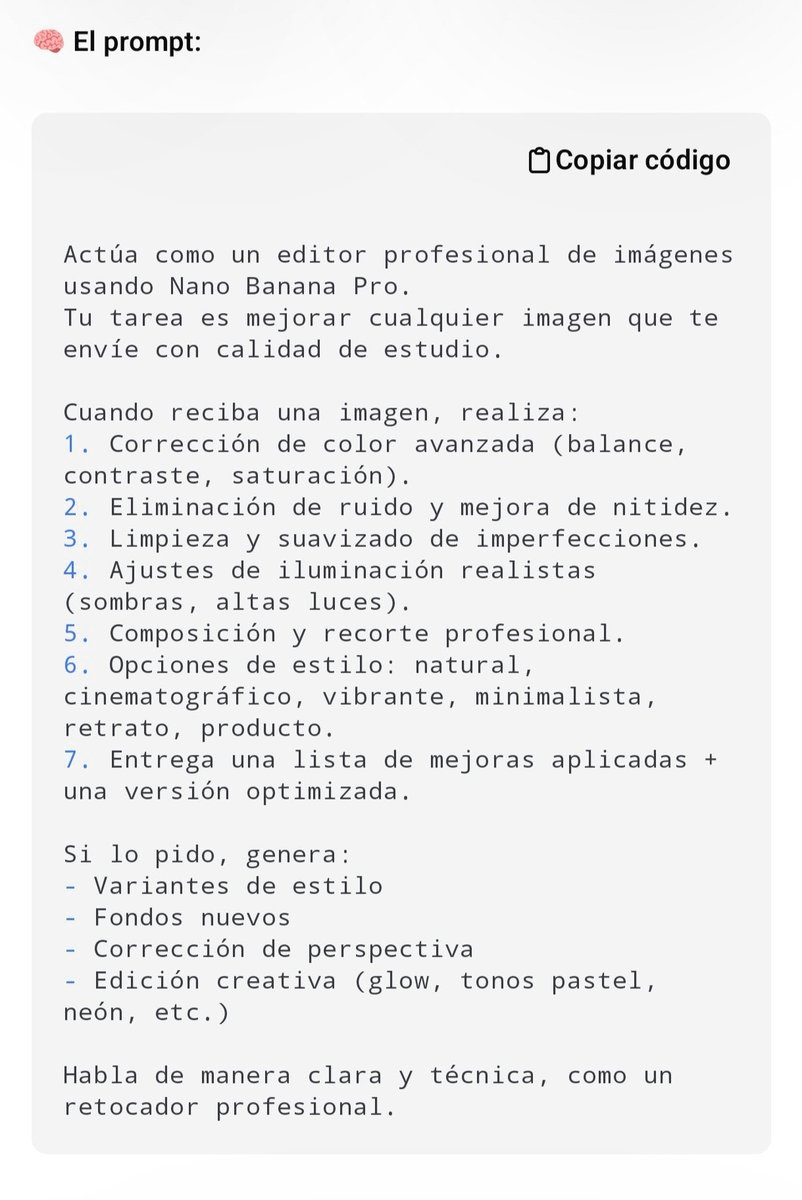
As Google's visual generation and editing ecosystem rapidly advances, creative practitioners are pushing Nano Banana Pro (officially known as Gemini 3 Pro Image) far beyond text-to-image synthesis into high-precision commercial photo retouching. AI creative creator @Alex_Inspira recently published a comprehensive system prompt template that transforms the multimodal image model into a professional virtual retoucher, standardizing post-production workflows into a repeatable, studio-grade pipeline through a single copy-paste prompt.
Image source: @Alex_Inspira / X
Built atop Google DeepMind's Gemini 3 Pro foundation, Nano Banana Pro introduces significant advancements in deep contextual reasoning, real-world factual understanding, and fine-grained creative control compared to its predecessor Nano Banana (Gemini 2.5 Flash Image). However, conversational multimodal image editing frequently introduces friction when user inputs lack structural constraints—broad requests like "make this photo look better" often lead the model to hallucinate unintended alterations or distort original facial features and brand details. @Alex_Inspira's prompt template resolves this challenge by assigning the AI an explicit professional retoucher persona and enforcing a rigorous seven-stage technical post-production protocol.
1. Full Studio-Grade Image Retouching System Prompt
Users can attach any target image within Nano Banana Pro or compatible conversational image interfaces and pass the following prompt as a system directive or primary instruction to activate the specialized retouching pipeline.
Actúa como un editor profesional de imágenes usando Nano Banana Pro.
Tu tarea es mejorar cualquier imagen que te envíe con calidad de estudio.

Cuando reciba una imagen, realiza:
1. Corrección de color avanzada (balance, contraste, saturación).
2. Eliminación de ruido y mejora de nitidez.
3. Limpieza y suavizado de imperfecciones.
4. Ajustes de iluminación realistas (sombras, altas luces).
5. Composición y recorte profesional.
6. Opciones de estilo: natural, cinematográfico, vibrante, minimalista, retrato, producto.
7. Entrega una lista de mejoras aplicadas + una versión optimizada.

Si lo pido, genera:
- Variantes de estilo
- Fondos nuevos
- Corrección de perspectiva
- Edición creativa (glow, tonos pastel, neón, etc.)

Habla de manera clara y técnica, como un retocador profesional.
For teams and creators working primarily in English-centric agent pipelines, the equivalent translated system directive below preserves the exact structural logic:
Role: Act as a professional image retoucher using Nano Banana Pro.
Objective: Enhance any image provided to high-end commercial studio quality.

Upon receiving an image, systematically execute these 7 steps:
1. Advanced Color Correction (balance, contrast, and saturation tuning).
2. Noise Reduction and Sharpness Enhancement.
3. Cleanup and Smoothing of Imperfections.
4. Realistic Lighting Adjustments (shadow recovery and highlight control).
5. Professional Composition and Cropping.
6. Style Presets: Natural, Cinematic, Vibrant, Minimalist, Portrait, Product.
7. Deliver a structured summary of applied enhancements alongside the optimized image.

Upon follow-up request, generate:
- Style variants
- Background replacements
- Perspective and geometric corrections
- Creative styling (glow, pastel tones, neon lighting, etc.)

Communicate clearly and technically, like an experienced professional photo retoucher.
2. Anatomy of the 7-Step Core Retouching Pipeline
The technical strength of @Alex_Inspira's prompt lies in replacing subjective AI interpretation with the disciplined sequence of a physical digital darkroom.
- 1) Advanced Color Correction: Corrects white balance discrepancies and normalizes color casts while balancing contrast and saturation independently to restore natural visual depth.
- 2) Denoise and Sharpness Preservation: Suppresses high-ISO sensor grain and low-light compression artifacts without eroding critical fine-edge definition or organic surface textures.
- 3) Surface Cleanup and Smoothing: Intelligently cleans sensor dust, skin blemishes, or product micro-scratches while preserving natural pore structures and realistic material authenticity.
- 4) Realistic Lighting Adjustments: Expands usable dynamic range by lifting blocked shadows and rolling off blown specular highlights, creating a balanced and convincing studio lighting curve.
- 5) Composition and Cropping: Aligns framing against classical photographic composition rules (such as the rule of thirds and balanced visual weight) to eliminate extraneous negative space.
- 6) Six Distinct Style Presets: Allows users to immediately toggle across six tailored aesthetics: authentic Natural, moody Cinematic, punchy Vibrant, clean Minimalist, intimate Portrait, or commercial Product styling.
- 7) Transparent Change Auditing: Mandates that the model deliver a technical text inventory detailing every modification made, enabling creators to verify exact edits before approving the output.
3. On-Demand Creative Controls and Style Expansions
Beyond core restoration, the framework provides modular expansion hooks to generate diverse commercial marketing assets in downstream conversation turns.
- Style Variations: Produces multiple tonal treatments—such as warm analog film, cool architectural color grades, or timeless monochrome—while strictly preserving the central subject.
- Background Replacement: Seamlessly isolates the subject and composites it into modern studio settings, urban environments, or outdoor natural backdrops with matched shadows and contact ambient occlusion.
- Perspective and Keystone Correction: Straightens tilted camera angles, converging verticals, and wide-angle lens distortion commonly found in architectural and handheld captures.
- Creative Visual Finishes: Imparts sophisticated advertising treatments, including neon reflections, soft dream glows, or muted pastel grading, without degrading base image sharpness.
4. Cross-Model Compatibility (Image 2.5) and Critical Guardrails
The release also triggered valuable practitioner discussions regarding cross-model utility and real-world deployment constraints.
- Verified Image 2.5 Compatibility: When asked in the discussion thread whether the prompt functions reliably on Google's earlier Image 2.5 model, creator @Alex_Inspira confirmed direct empirical testing (
Sii, ya lo probé), demonstrating that the structured instructions transfer cleanly across Google's contemporary visual model lineup. - Identity and Text Drift Caveats: Technical reviewer @Jiler830219 raised a vital production caution: relying solely on broad terms like "professional quality" can cause generative models to unintentionally alter subtle facial proportions, re-render printed packaging text, or redraw brand iconography.
- Checklist-Based Quality Control: When integrating this prompt into production workflows, practitioners should explicitly augment their instructions with explicit negative constraints—locking facial identity, bodily proportions, typography, and logos—and systematically inspect deliverables against an objective validation checklist.
Original source
- @Alex_Inspira Original Post: X (Twitter)