Applying 424 Cinematography Techniques and Camera Movements to AI Video Prompts: A Guide to Melies
A practical guide to Melies, an online archive of 424 filmmaking techniques, 86 camera movements, lighting setups, and ready-to-copy prompt templates that repla
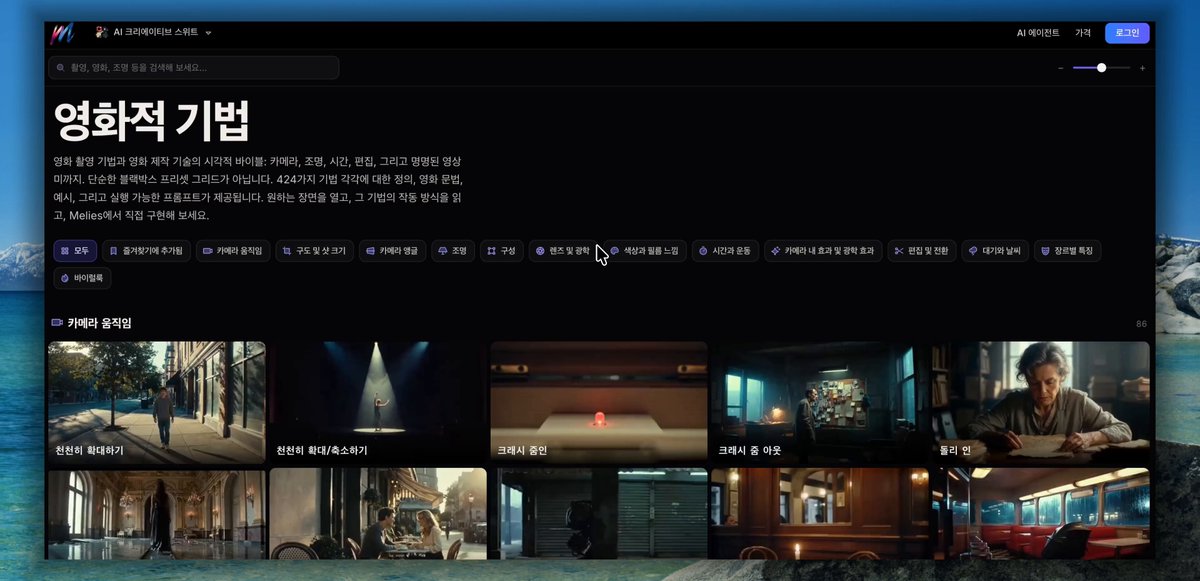
AI creator and tech tip curator @AI_Caffeine has shared practical insights on using 'Melies', a specialized web archive that organizes 424 filmmaking and directing techniques—including 86 distinct camera movements, lighting setups, framing rules, and copyable prompt templates—to help creators craft precise, intentional AI video prompts.
Image source: @AI_Caffeine via X
When generating clips with modern AI video models such as Seedance, Kling, Runway, or Veo, writing generic adjectives like "cinematic" or "movie-like" often results in clichés: slow-motion motion blur, simulated film grain, or heavy color grading filters. The crucial element that actually drives narrative tension—deliberate physical camera motion and lighting geometry—is frequently missed. Melies addresses this limitation by breaking down cinematography into actionable, search-friendly building blocks.
An Archive of 424 Filmmaking Techniques and 86 Camera Movements
Melies provides a structured catalog of 424 professional filmmaking and camera techniques, allowing creators to quickly search and reference specific cinematic grammar.
- Camera Movements (86 Types): Beyond simple zoom or pan commands, the catalog categorizes physical camera paths including dolly in/out, tracking shots, crane moves, arc shots, pedestals, and whip pans.
- Camera Angles and Positions: Covers low angles, high angles, Dutch tilts, over-the-shoulder perspectives, eye-level framing, and bird's-eye views to establish spatial relationships and character dominance.
- Lighting and Aesthetic Looks: Details directional key, fill, and backlighting setups, alongside Rembrandt lighting, silhouette framing, volumetric light rays, and chiaroscuro contrast.
- Composition and Framing: Explains the rule of thirds, leading lines, golden ratio framing, symmetrical composition, and negative space to guide the viewer's eye.
- Color Grading and Transitions: Spans warm/cool color palettes, cross-dissolves, match cuts, jump cuts, and continuity-preserving scene transitions.
- Weather and Atmosphere: Offers prompts for fog, heavy rain, golden hour sunlight, twilight, and atmospheric haze to heighten emotional tone.
Visual Mechanics, Film Case Studies, and Ready-to-Use Prompt Templates
Selecting any technique in Melies opens a practical breakdown designed for immediate application rather than abstract theory.
- Visual Effect and Mechanical Action: Clearly explains what happens on screen and how the camera or optical lens physically moves to achieve the shot.
- Context and Best-Fit Scenarios: Describes the narrative situations, genres, and dramatic beats where the technique works best.
- Film Examples and Common Mistakes: Highlights real-world scenes from cinema history while flagging frequent framing errors and unnatural camera maneuvers to avoid.
- Copyable Prompt Templates: Provides tested, copy-pasteable English prompt blocks formatted for immediate use in AI video generators.
For instance, when examining the Dolly Zoom (Vertigo effect), Melies details the optical principle of simultaneously moving the camera forward while zooming out (or vice versa), maintaining a constant subject size while dynamically warping background perspective and depth. It then translates that mechanical relationship into clear prompt instructions that AI video engines can reliably interpret.
Practical Applications for AI Video and Live-Action Filmmaking
Melies serves as a versatile reference tool across both generative AI pipelines and traditional production workflows.
- Refining AI Video Prompts: Instead of relying on vague descriptors like "cinematic shot of a runner," creators can combine precise terms: "tracking shot following a runner through a rainy alley at dusk, low angle, anamorphic lens flare, shallow depth of field, neon reflections."
- Storyboarding and Shot Listing: Live-action filmmakers, directors, and content creators can browse through the 86 camera movement patterns and diverse angle options to brainstorm fresh visual ideas during pre-production.
Original source
- @AI_Caffeine on X: Original Post on Cinematic AI Video Prompts and Melies
- Melies Filmmaking Techniques Archive: Melies Platform