Machine Skill: Building 3D Physics Simulation Machines with a Single Claude Code Prompt
An overview of Machine Skill (AirsupHQ/machine-skill), an open-source Claude Code tool that generates physics-based, interactive 3D machine simulations as self-
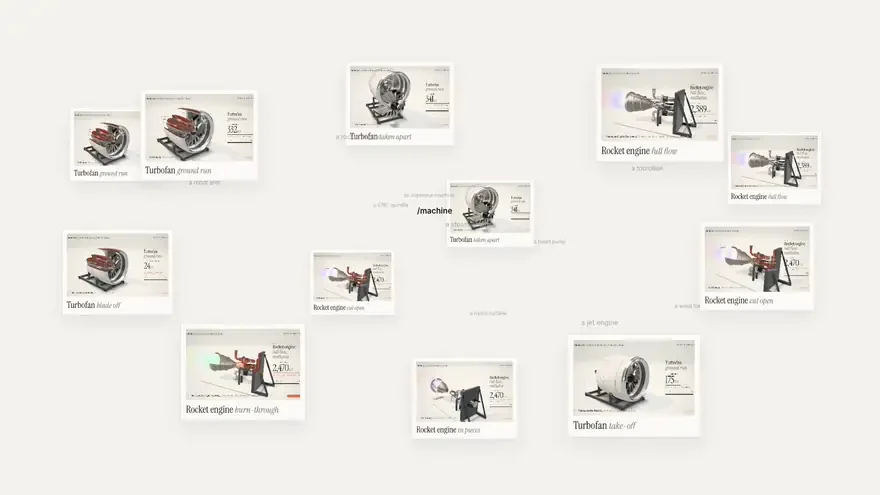
Machine Skill (AirsupHQ/machine-skill), an open-source tool for Anthropic's Claude Code agent, has emerged as a compelling demonstration of generative engineering visualization by turning single-line natural language prompts into photorealistic, interactive 3D machine simulations inside a standalone HTML file.
Image source: https://github.com/AirsupHQ/machine-skill
Released under the permissive MIT license, this skill generates Three.js 0.170-based 3D simulations that run directly in any modern browser without requiring traditional CAD suites, complex asset loaders, or dedicated build steps. First released in October 2026, the project has attracted attention across developer and engineering communities for its rapid assembly of complex mechanical systems and physics solvers.
Standalone HTML and Build-Free Three.js Simulation Architecture
The defining technical feature of Machine Skill is its zero-dependency, self-contained architecture.
When a user requests a machine inside a Claude Code session, the agent gathers real-world mechanical dimensions, sets up an assembly parts list, and writes out a single HTML file containing embedded Three.js scene logic. No bundlers or compilation steps are needed; developers can open the file directly from disk into a browser.
- Interactive Inspection Modes: Supports Explode view to separate parts along assembly axes, Cutaway views with solid section faces, X-ray mode to inspect interior cavities, slow-motion playback, and real-time component labeling.
- Computed Failure Simulation ('break it'): Features scenario-specific breakdown mechanics, such as simulating an ejected fan blade to compute the containment casing load, or cutting regenerative coolant to melt the copper throat of a rocket engine nozzle.
- Automated Video Recording Pipeline: Includes
scripts/record.mjs, which drives a headless browser using a deterministic render clock (?film=1) and packages the scene into social-ready MP4 video via ffmpeg.
Brayton Cycle Solvers and Reference Machine Examples
The showcase example provided in the repository is a high-bypass turbofan jet engine assembled from 3,597 parts—predominantly individual compressor and turbine blades.
Rather than relying on static geometry, the simulation embeds a lightweight Brayton cycle solver. Manipulating the on-screen throttle dynamically calculates roughly 340 kN of takeoff thrust (with 83% generated by the bypass fan) along with real-time turbine stage temperatures. Additional reference machines include a methalox rocket engine firing on a test stand, an API 610 refinery process pump demonstrating cavitation, and an API 617 multi-stage barrel compressor demonstrating aerodynamic surge.
However, users must note that the bundled physics logic consists of simplified mathematical models (small solvers) rather than rigorous computational fluid dynamics (CFD) or finite element analysis (FEA) solvers.
Installation Requirements and Usage Workflow
Machine Skill adheres to the standard Agent Skills specification and runs on Node 22.20 or later. It can be installed globally for Claude Code using the skills CLI:
# 1. Register the skill globally for Claude Code
npx skills add AirsupHQ/machine-skill -g -a claude-code

# 2. Install Playwright dependencies for headless capture
cd ~/.claude/skills/machine && npm i && npx playwright install chromium
Once installed, users initiate generation within any Claude Code session by calling the /machine slash command:
/machine a turbofan jet engine, the kind that pushes a widebody off the runway
The agent processes real-world dimensions and writes the simulation file (e.g., turbofan.html). To export an MP4 video clip, developers run the included recording script, which requires Node, Playwright, and ffmpeg installed on the host machine.
Sources
- GitHub Repository: AirsupHQ/machine-skill
- Original Post: @plusxbt on X