How Model Context Protocol (MCP) Works: A 6-Step Tool Execution Lifecycle
A step-by-step breakdown of how AI applications and MCP clients interact with MCP servers to execute tools, plus essential tips for precise LLM tool description
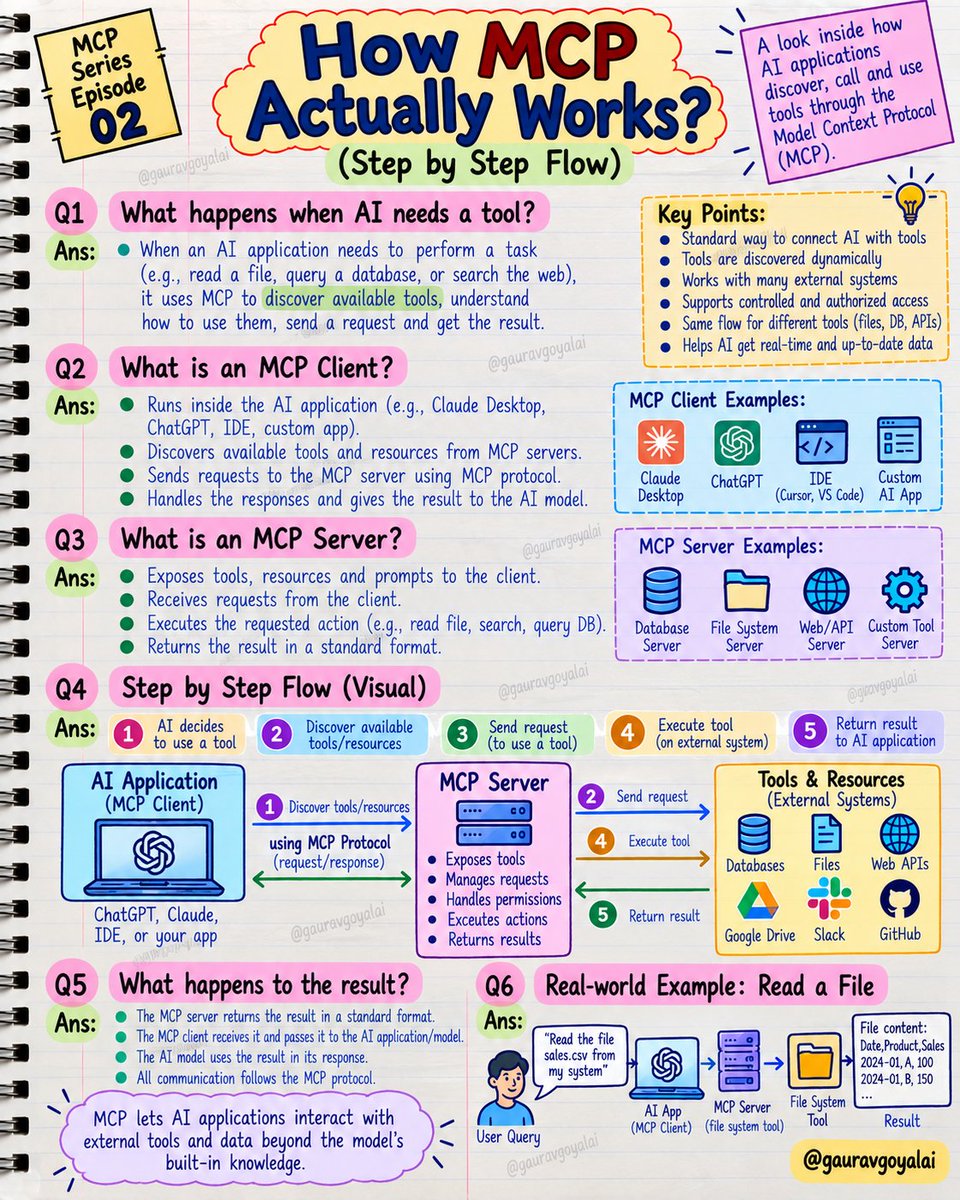
AI engineer Gaurav Goyal (@GauravGoyalAI) shared a practical technical guide on October 5, 2026, breaking down the operational mechanics of the Model Context Protocol (MCP)—the open standard connecting Large Language Models (LLMs) to external tools, APIs, and data sources—into a clear 6-step execution lifecycle.
Image source: @GauravGoyalAI via X
When an AI agent needs to query an external database, inspect a local file, or call a third-party API, MCP establishes a clean, predictable sequence of communication and data transfer across the entire system.
MCP Communication Architecture and Core Entities
The core interaction pipeline when an AI application invokes an external capability follows a clean linear flow:
AI Application → MCP Client → MCP Server → Tool / Data → Result
This tiered architecture cleanly decouples concerns, ensuring host applications do not need custom integration code for every proprietary API endpoint.
- AI Application (Host): The primary application coordinating user interaction and AI reasoning, such as Claude Desktop, Claude Code, or Microsoft Copilot Studio.
- MCP Client: An internal component inside the host application that manages dedicated 1:1 connections with designated MCP servers and handles JSON-RPC request-response cycles.
- MCP Server: An independent service exposing capabilities to clients, specifically executable Tools, passive read-only Resources, and prompt templates.
- Tool / Data: The underlying external systems being operated on, such as local file systems, enterprise databases, or third-party web endpoints.
- Result: The payload returned from tool execution or data retrieval, routed back through the client to the reasoning model.
Detailed Analysis of the 6-Step Tool Execution Lifecycle
Gaurav Goyal outlines the end-to-end execution path through six distinct stages:
- Information or Action Requirement: The AI application analyzes user intent and determines that fulfilling the prompt requires external knowledge or an explicit action.
- Client-Server Communication Initiation: The host application's MCP client opens or activates a dedicated channel with the appropriate MCP server.
- Capability Discovery: The MCP server exposes its available inventory of tools, argument schemas, read-only resources, and prompt templates to the client.
- Targeted Execution Request: Based on the model's function selection, the MCP client packages and dispatches a structured execution request containing validated arguments.
- Execution and Data Access: The MCP server receives the request, validates the parameters, and invokes the target tool or accesses the specified data store.
- Result Delivery and Synthesis: The server returns the raw output or status back to the MCP client, allowing the LLM to integrate the context into its final response.
Practical Walkthrough: Reading and Summarizing a sales.csv File
To demonstrate how the 6-step pipeline functions in daily development, Goyal illustrates a typical scenario: "Read my sales.csv file and summarize it."
- Prompt Ingestion: The user requests a summary of their local sales record.
- Server Handshake: The AI client communicates with the local filesystem MCP server.
- Capability Exposure: The filesystem MCP server exposes access to the local file and its supported operations to the client.
- Request Dispatch: The AI client dispatches a structured request to read
sales.csvto the MCP server. - Local Data Read: The MCP server accesses the physical file
sales.csvand reads the raw data. - Synthesis and Response: The data is handed back through the client to the AI application, where the LLM computes the summary and delivers the final response.
Through this unified protocol, developers eliminate the friction of building bespoke API adapters for every tool and data source.
Community Insights: Eliminating Failed Tool Calls in Production
Following Goyal's breakdown, software engineers and practitioners added crucial observations on making tool execution reliable in real-world environments:
- The Model Never Sees the Server (@sunsetsyntax): A commonly overlooked reality is that the reasoning model never inspects the server code itself; it only inspects the tool names and descriptions returned during discovery. When an agent fails to call a tool, the culprit is almost always a vague or ambiguous tool description. The recommended practice: "Write your tool description exactly like you are explaining to a new teammate when and why to use it."
- Precision in Descriptions Is Critical (@GauravGoyalAI): Goyal affirmed this observation, emphasizing that clear, unambiguous functional documentation remains the single most important factor for reliable tool calling.
- Discovery and Authentication in Practice (@shuizhuyu): While the six conceptual steps are straightforward, production deployments often encounter friction during dynamic tool discovery across multi-server fleets and handling granular authentication between clients and remote servers.
- Overlooking the Result Return Step (@An_yhl): Practitioners noted that step 6—where the tool returns its result to the AI application—is often the most easily overlooked stage in the workflow, an observation Gaurav Goyal agreed with.
Original source
- Gaurav Goyal on X: MCP Series — Episode 02: How MCP Actually Works — Step by Step
- Model Context Protocol Official Documentation: Model Context Protocol Architecture Specification
- Microsoft MCP for Beginners: Microsoft MCP for Beginners