Creating Video Soundtracks with Grok Imagine: Hands-on Tips for 'Grok Music' Generation and Editing
A practical guide to the rolling-out 'Grok Music' feature in Grok Imagine on the web, enabling creators to generate and edit custom soundtrack prompts directly
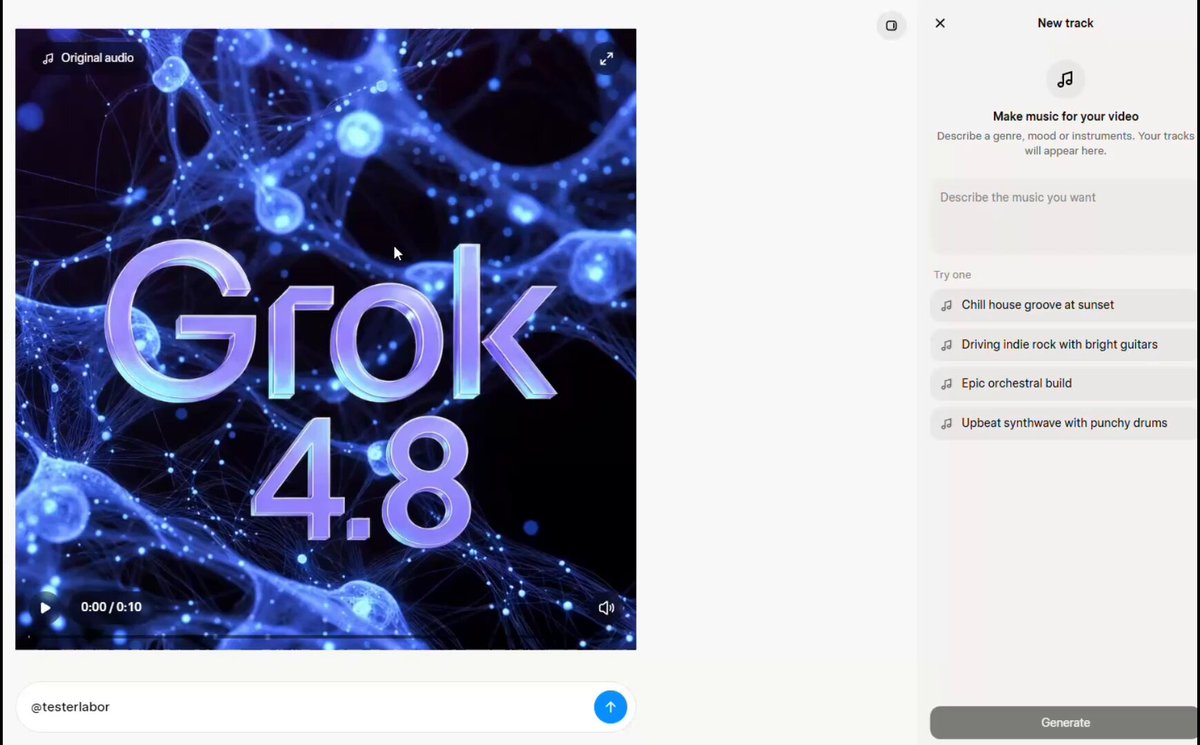
Shared by creator and tester Testlabor (@testerlabor) on X, xAI has begun a phased rollout of a new music generation capability called 'Grok Music' directly inside the Grok Imagine video creation interface on Grok web, offering a streamlined workflow to generate and edit custom video soundtracks with user-written prompts.
Image source: @testerlabor via X
'Grok Music' Emerges in Grok Imagine: Native Video Soundtrack Generation
xAI is quietly introducing native music generation into Grok Imagine on Grok web. Previously, video creators working with AI video tools had to generate video clips first, source or produce standalone music tracks via dedicated services like Suno or Udio, and manually splice them together in external editing software.
The newly surfaced Grok Music integration consolidates this pipeline into a single, self-contained workspace. According to initial testing by @testerlabor, the generated tracks deliver striking sound quality that rivals standalone generative music platforms like Suno, significantly reducing production friction for creators needing tailored background tracks.
How to Access and Use Grok Music: Step-by-Step Workflow
Creators who have received the rollout can activate and prompt Grok Music using the following procedure:
- Access Grok Web: Navigate to the Grok web interface and open the Grok Imagine video generation workspace.
- Locate 'Original Audio': On the top-left area of the interface, look for and select the option labeled "Original Audio".
- Draft Custom Music Prompts: Enter your own descriptive prompt specifying the desired musical genre, mood, instrumentation, and pacing to match your video concept.
- Generate and Edit: Create the audio track, preview how it complements the video clip, and adjust the track directly within the interface.
By routing music generation through the top-left toggle, users can keep the creative iteration loop entirely inside Grok without leaving the browser tab.
Practical Caveats and Current Limitations
Key constraints and observations gathered from the initial user thread include:
- Phased Rollout in Progress: The feature is not yet universally available to all accounts. If the "Original Audio" option is missing from your Grok Imagine view, your account has not yet received this deployment wave.
- Lip-Syncing Considerations: While the music quality and atmospheric fidelity are high, precise lip-sync synchronization with speaking human subjects in the video has not yet been established and requires dedicated testing.
- Unconfirmed Backend Speculation: Community discussions noted that Google's Lyria 3 model may be powering the underlying music generation engine. However, xAI has not issued an official technical brief or architecture confirmation, so this remains unverified community speculation.
Original source
- Testlabor (@testerlabor) post on X: https://x.com/testerlabor/status/2110018283357220966