8 Essential Open-Source Tools for AI Video and Voiceover Creators: From Offline Voice Cloning to Local Video Generation
A complete local workflow featuring 8 essential open-source tools for AI video and voiceover production without recurring subscriptions, spanning offline voice
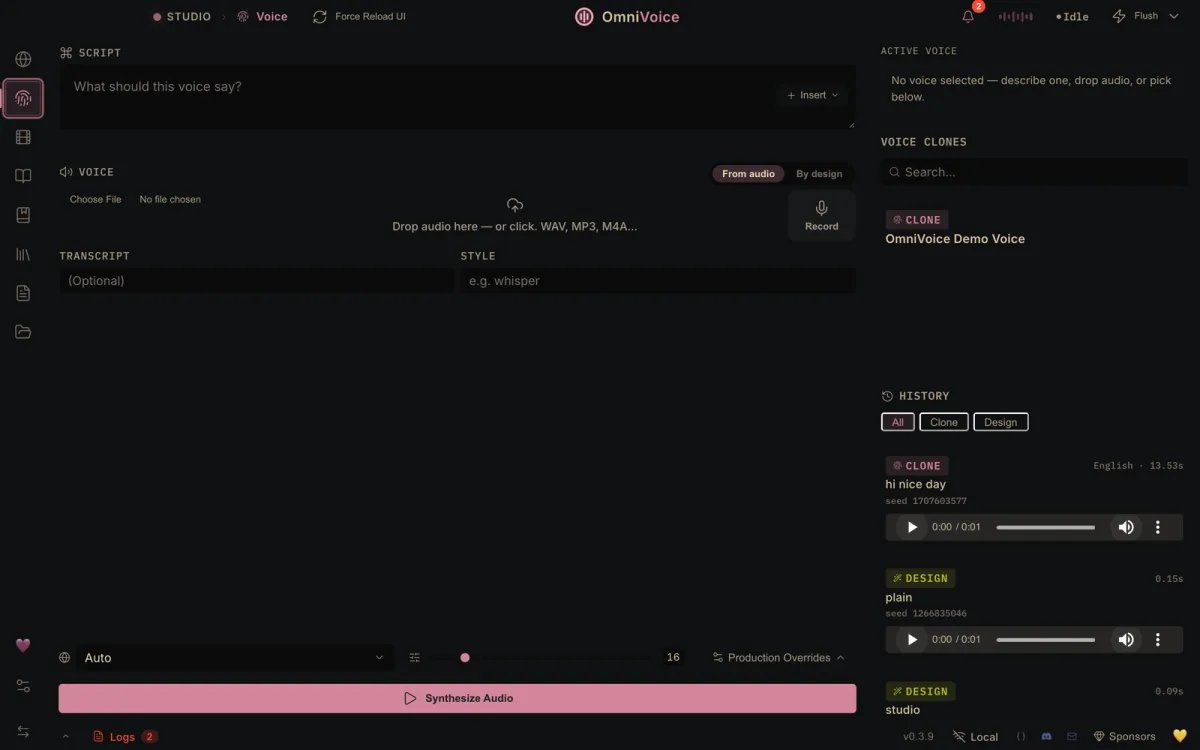
Brendan Jowett (@jowettbrendan), an AI automation educator and creator, has shared a curated stack of 8 essential open-source tools for building high-quality AI videos and voiceovers directly on local hardware without paying recurring cloud subscription fees (such as ElevenLabs).
Image source: @jowettbrendan via X
While cloud-based generative AI platforms are convenient, their monthly subscription fees scale quickly with volume, and uploading proprietary voice and video assets often raises significant data privacy and training audit concerns. This curated set of 8 open-source tools establishes a self-contained production pipeline covering offline voice cloning, natural text-to-speech, local video synthesis, automatic captioning, silence cutting, and watermark-free video assembly.
Voiceover Production: Offline Voice Cloning and Human-Sounding TTS
The initial bottleneck in AI video production is generating expressive, convincing narration. Two primary open-source speech tools serve as practical alternatives to commercial voice APIs:
-
VoiceStudio (github.com/debpalash/VoiceStudio)
- Core Functionality: An open-source ElevenLabs alternative designed for offline voice cloning.
- Key Advantages: Operates entirely on local hardware without an active network connection, cloning target voices without routing proprietary voice samples to external cloud infrastructure. This ensures complete privacy and data custody for sensitive personal voice models.
-
Chatterbox (github.com/resemble-ai/chatterbox)
- Core Functionality: An open-source speech synthesis model engineered to sound human and expressive.
- Key Advantages: Developed by Resemble AI, Chatterbox moves beyond mechanical robotic intonation by rendering natural cadence, pacing, and human conversational nuances for voiceover narrations.
Video Generation and Post-Production: From Local Video Models to Automated Editing
Following narration synthesis, the remaining six tools complete the visual generation, timeline editing, caption alignment, and asset sourcing stages of the production pipeline:
-
Wan2.1 (github.com/Wan-Video/Wan2.1)
- Core Functionality: An open-source foundation video generation model that runs directly on your personal computer.
- Key Advantages: Generates high-fidelity text-to-video and image-to-video sequences using local GPU compute, removing dependency on commercial cloud video generation APIs.
-
Fast AI Video Clip Generator (t.co/SSg8LNqMup)
- Core Functionality: An open-source AI video tool optimized to render short video clips within seconds.
- Key Advantages: Accelerates B-roll assembly and rapid scene transitions without waiting through prolonged rendering queues.
-
Multilingual Auto-Captioning Tool (t.co/m1Pqdp2gjS)
- Core Functionality: An open-source speech recognition and subtitling utility supporting captions in any language.
- Key Advantages: Streamlines subtitle generation and timing synchronization across international distribution channels.
-
Automated Silence Cutter (t.co/LqfrM2ZGvm)
- Core Functionality: A utility that automatically detects and excises dead air and silent pauses from audio and video tracks.
- Key Advantages: Significantly reduces editing overhead for tutorials, explainers, and long-form spoken-word content by tightening pacing automatically.
-
Watermark-Free Open-Source Video Editor (t.co/rkjC9Ms5qW)
- Core Functionality: A non-linear video editor (NLE) that exports without forced watermarks or artificial feature paywalls.
- Key Advantages: Provides a reliable editing canvas to composite generated AI clips, synchronized voiceovers, and title overlays into final master deliverables.
-
Free Video Clips, Music, and Sound Effects Library (t.co/9edI1D2opu)
- Core Functionality: A repository providing free video clips, background music (BGM), and sound effects (SFX).
- Key Advantages: Supplies supplementary acoustic and visual assets to enrich scene atmosphere without licensing friction.
Hardware Constraints and Practical Considerations for Local Deployments
While open-source pipelines eliminate SaaS subscriptions and ensure data sovereignty, creators must evaluate specific operational trade-offs before deploying locally:
- GPU VRAM and Compute Boundaries: Foundation video models like Wan2.1 impose substantial hardware demands. Generating video locally requires high-capacity VRAM and powerful graphics cards; running on standard consumer hardware without sufficient video memory may restrict execution or cause severe generation latencies.
- Technical Environment Setup: Setting up these tools requires baseline development environment skills, including managing Python virtual environments, installing package dependencies, and building project dependencies via the command line.
- License Compliance: Each open-source project maintains distinct license terms (such as permissions regarding commercial use). Creators must verify each repository's specific license terms prior to deploying models in commercial client projects or monetized channels.
- Auditability and Privacy Advantages: Operating entirely on local hardware ensures full transparency. Workflows remain auditable, and creator voice data is never ingested into third-party cloud datasets without permission.
Original source
- Brendan Jowett (@jowettbrendan) on X: AI Video & Voiceover Open Source Tools