How to Create 3D Gaussian Splats with GPT-6 Astra, Blender MCP, and Lichtfeld Studio
A practical guide to generating a 3D Gaussian Splat of a ChatGPT agent character by connecting GPT-6 Astra with Blender MCP and Lichtfeld Studio, and reviewing
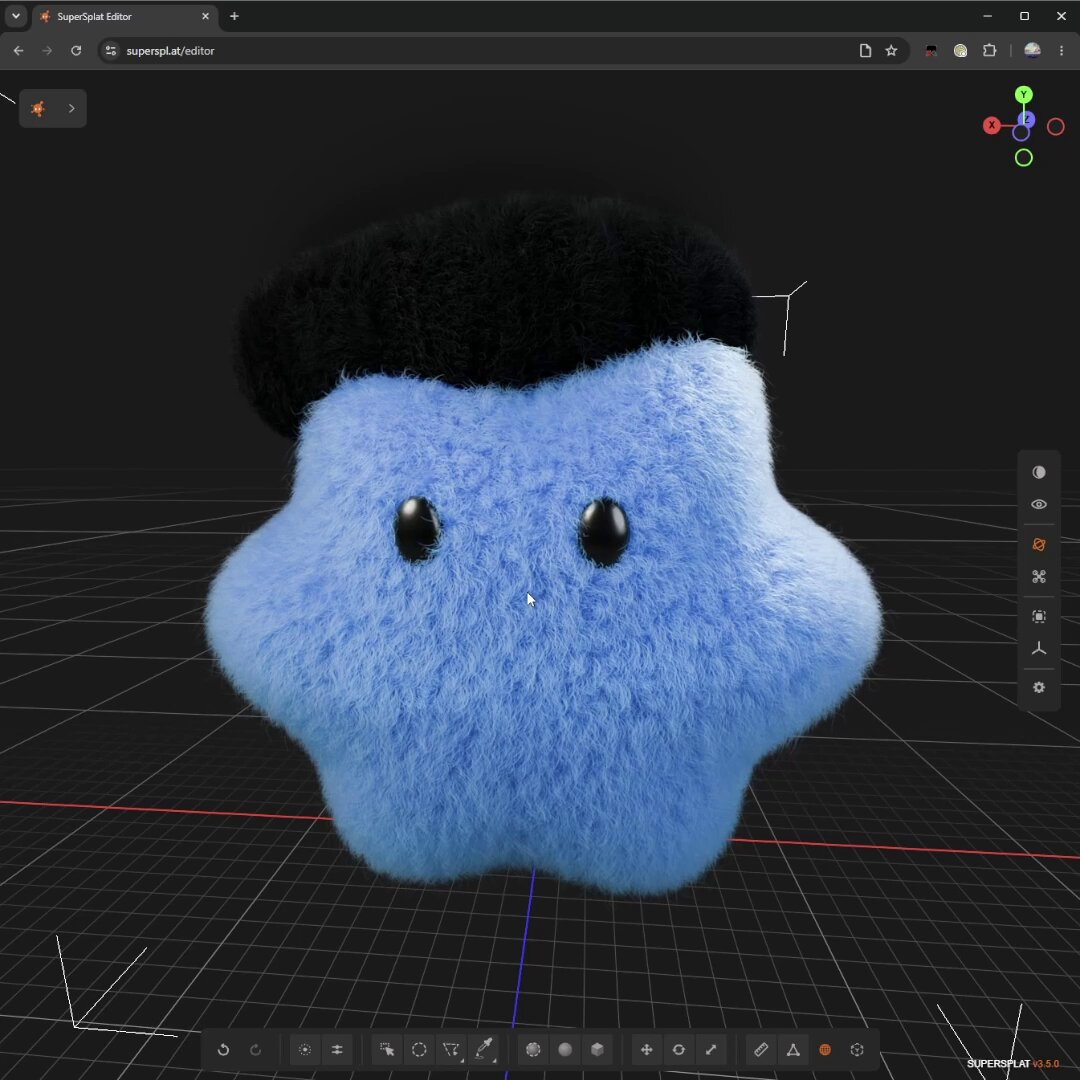
3D tech creator @abstrakt314 has shared a practical workflow combining the GPT-6 Astra LLM agent (clarified as 6.0 Astra after an initial typo mentioning 6.1), Blender MCP (Model Context Protocol), and Lichtfeld Studio to recreate the ChatGPT agent dot character as a crisp 3D Gaussian Splat viewed natively in PlayCanvas SuperSplat.
Image source: @abstrakt314
Even without access to official 3D mesh assets, developers and 3D creators can leverage natural language prompting and reference images to build a base 3D model, render multi-angle synthetic training datasets, and produce an interactive Gaussian Splat (.ply) ready for real-time web deployment.
Workflow Overview and Pipeline Architecture
3D Gaussian Splatting (3DGS) represents a major paradigm shift in real-time computer graphics, delivering photorealistic rendering and complex specular reflections in web environments with minimal overhead. This workflow bridges agentic 3D modeling with deterministic rendering and dedicated splat training software across four stages:
- Intelligent 3D Modeling (GPT-6 Astra + Blender MCP): Using natural language instructions to drive Blender via MCP, generating and refining geometry and materials procedurally.
- Multi-Angle Synthetic Dataset Rendering (Blender Cycles): Scripting automated camera trajectories around the 3D model to render approximately 1,000 multi-angle high-fidelity images.
- Gaussian Splat Training and Optimization (Lichtfeld Studio): Feeding the 1,000 synthetic multi-view images into Lichtfeld Studio to train a 3D Gaussian Splat point cloud and export a
.plyfile. - Web Inspection and Scene Distribution (PlayCanvas SuperSplat): Loading the trained
.plyfile into the open-source web editor SuperSplat to inspect visual fidelity and publish interactive 3D scenes.
4-Step Setup and Execution Guide
Here is the step-by-step breakdown of how the pipeline was constructed and executed:
Step 1: Prompt-Driven 3D Base Modeling (~15 Minutes)
Connect your coding agent environment to Blender via Blender MCP and initiate the model creation session with reference imagery.
- Provide reference images of the ChatGPT agent dot character and instruct GPT-6 Astra to build the corresponding 3D mesh structure.
- Review the generated output and issue iterative refinement prompts to adjust shape proportions and details based on the reference images (~15 minutes).
- Achieve a clean, production-ready base 3D model without manual mesh manipulation in the Blender UI.
Step 2: Multi-Angle Cycles Synthetic Dataset Generation
Once the base 3D geometry is locked, prompt the agent to set up automated multi-angle rendering.
- Instruct the agent to run camera trajectory scripts rendering the asset from various angles.
- Render approximately 1,000 multi-angle high-resolution synthetic images using the Blender Cycles engine.
- Note that roughly 95% of the overall turnaround time (~6 to 7 hours) is spent on this compute-heavy Cycles rendering stage.
Step 3: Train the Gaussian Splat in Lichtfeld Studio
Import the rendered multi-angle image sequence into dedicated 3DGS training software.
- Ingest the 1,000 rendered views and camera extrinsic matrices into the Lichtfeld Studio training pipeline.
- Run the optimization passes to train the 3D Gaussian Splat representation, exporting the final scene as a
.plyfile.
Step 4: Inspect and Share via PlayCanvas SuperSplat Web Editor
Examine and share the trained splat in a web browser without local software installation.
- Drag and drop the exported
.plyfile directly into the PlayCanvas SuperSplat browser editor (superspl.at/editor). - Inspect the crisp real-time rendering in the web viewport and share or download the scene. (Public demo and download available at
https://superspl.at/scene/ca6a4c9b.)
Practical Insights and Production Tradeoffs
When evaluating this workflow for broader asset production pipelines, keep the following considerations in mind:
- Dramatically Lowered Modeling Barrier: Coupling GPT-6 Astra with Blender MCP allows creators to turn 2D visual references into textured 3D models in minutes using iterative natural language adjustments.
- Real-Time Web Performance: 3D Gaussian Splats bypass complex polygon rasterization and heavy shader pipelines, rendering crisp, interactive 3D assets natively on the web via PlayCanvas SuperSplat without plugins.
- Compute and Rendering Bottlenecks: While the prompting phase takes only ~15 minutes, generating the necessary synthetic dataset (1,000 Cycles renders) represents the bulk of the turnaround (~6-7 hours, ~95% of total time), requiring adequate GPU rendering capacity.
Original source
- @abstrakt314 on X: @abstrakt314 (@abstrakt314)