dsh-workbuddy-connect: Connecting WorkBuddy Models Directly to DeepSeek Harness
An overview of dsh-workbuddy-connect, an open-source plugin bridging local WorkBuddy desktop sessions to DeepSeek Harness (DSH) models with essential setup cave
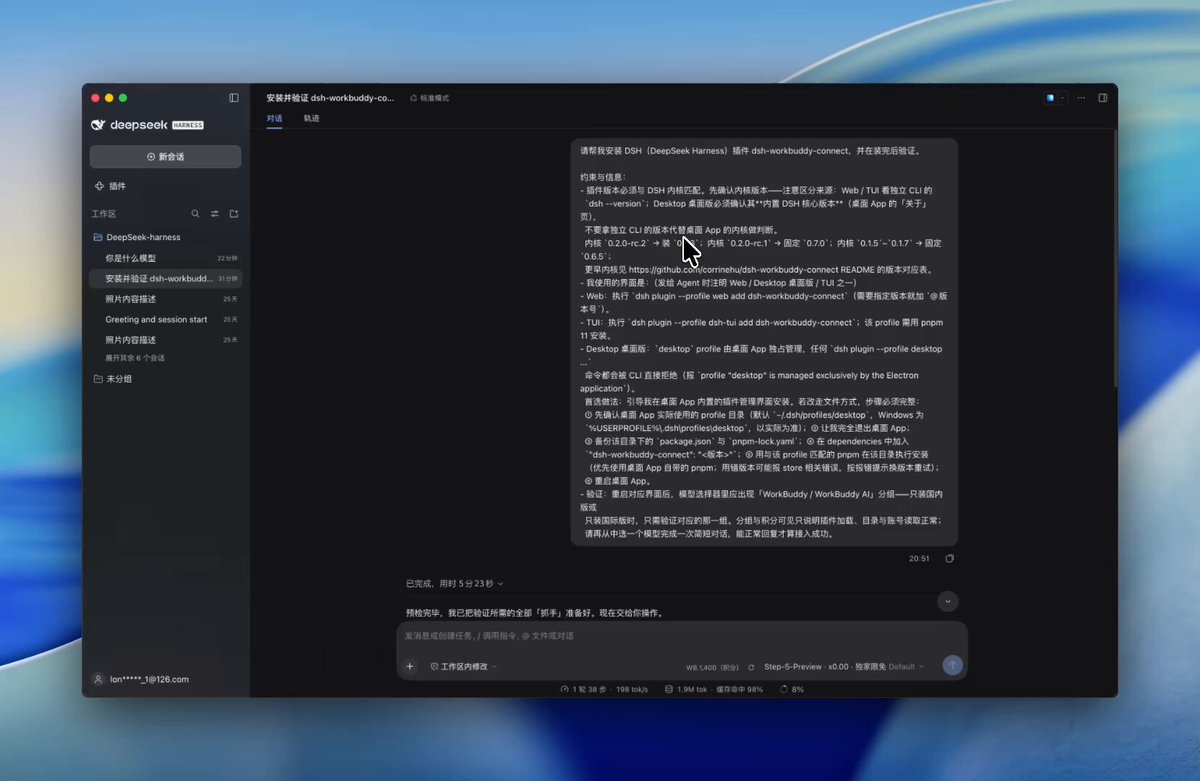
A new extension has emerged within the DeepSeek Harness (DSH) ecosystem, expanding how developers manage and orchestrate diverse foundation models locally. Open-sourced by developer and AI creator @aehyok, the 'dsh-workbuddy-connect' plugin reads the active authentication session from a local WorkBuddy desktop client and bridges its roster of large language models directly into the DSH runtime.
Image source: X @aehyok
By utilizing existing local client credentials without requiring separate API key configurations or external proxy middleware, developers gain streamlined access to multiple models—including GLM, DeepSeek-V4, and Kimi—within a unified local harness workspace.
Local Desktop Session Integration and Multi-Model Roster
The core architecture of dsh-workbuddy-connect relies on capturing the logged-in session of the local WorkBuddy desktop application via its client interface and mounting those models directly into DSH.
- Supported Model Lineup: Connects a broad range of major Chinese-origin foundation models, including the GLM series, DeepSeek-V4, Kimi, MiniMax, and Tencent Hunyuan.
- Dual Support for Regional and Global Editions: Supports both the mainland China edition and the global edition of WorkBuddy; when both client variants are installed on the same host, DSH partitions them into separate, coexisting model groups.
- Unified Workspace Switching: Within the central DSH interface, engineers can switch between diverse vendor models on demand based on specific reasoning, coding, or text analysis tasks.
By synchronizing the active desktop client session directly rather than requiring ongoing browser interaction or manual token copying, the plugin offers a cohesive operational workflow for local model testing.
Points Multiplier Indicators and Three-Step Installation
Once connected, each model entry within the DSH model selection menu explicitly displays its real-time points multiplier alongside the model name.
- Promotional Free Multiplier (x0.00): Models marked with 'x0.00' indicate an active temporary promotional campaign from WorkBuddy, allowing developers to query them without deducting account points.
- Point Consumption Visibility: Models with multipliers above zero consume account points proportionally, allowing users to evaluate cost efficiency and pick budget-friendly options directly from the roster.
- Three-Step Installation Flow:
- Install the WorkBuddy desktop client (either the mainland China or global edition) and log into your account.
- Open the Plugin Manager within the DSH desktop interface, search for
dsh-workbuddy-connect, and install it (or feed the installation instructions from the project README directly into DSH for automated setup). - Restart DSH completely, navigate to the 'WorkBuddy' group in the model selector, and choose your target model (such as an x0.00 promotional model) to begin querying.
Kernel Version Compatibility Requirements and Account Risk Considerations
Before adopting dsh-workbuddy-connect in daily workflows, developers should carefully evaluate specific technical dependencies and account safety considerations.
- Strict DSH Kernel Version Alignment: The plugin version must match the internal kernel version of DeepSeek Harness exactly. A version mismatch will prevent DSH from launching altogether; developers must compare the built-in kernel version displayed on the desktop app's 'About' page against the compatibility matrix in the repository README.
- Unofficial Client API and Account Policies: Because the plugin interfaces with WorkBuddy through an unofficial desktop client bridge, usage consumes personal account points and carries potential risks of account flagging or service restrictions under upstream provider terms.
- Promotional Multiplier Volatility: The 'x0.00' free multiplier reflects promotional pricing subject to upstream policy updates, which may revert to standard paid point consumption at any time. The tool is suited primarily for personal experimentation and light exploration rather than high-throughput automated workloads.