Dual-Image Consistent Character Sheet Prompt for Gemini, Grok, and GPT Image 2.0
A prompt workflow combining two reference images into a unified character sheet with 4 full-body views, 8 expressions, and 6 poses across Gemini, Grok, and GPT
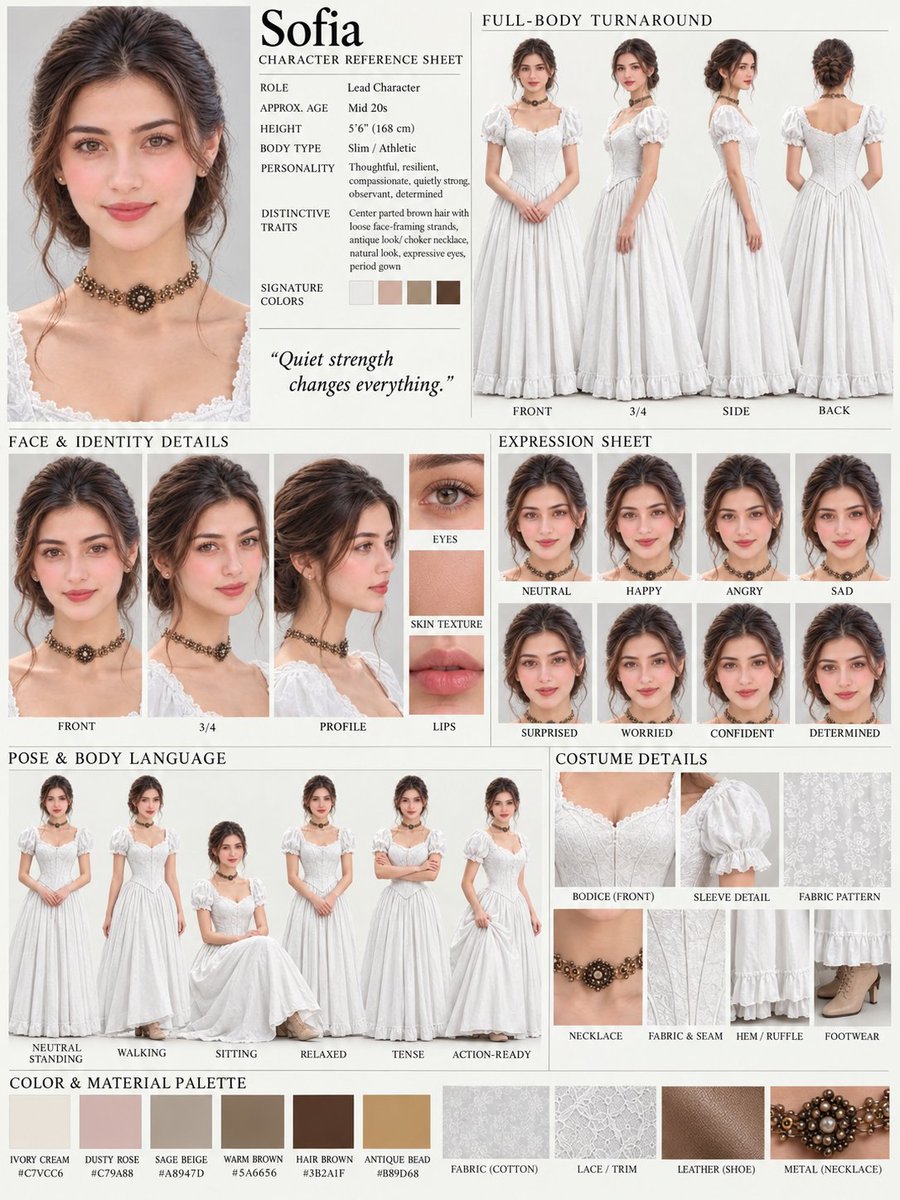
AI image creator Soaima (@Soaima_Ai) shared a dual-reference prompt workflow on October 5, 2026, designed to generate a comprehensive, high-resolution character sheet with 4 full-body views, 8 facial expressions, and 6 body poses while maintaining strict facial identity and stylistic consistency.
Image source: @Soaima_Ai / X
A persistent pain point when generating visual assets for webtoons, game development, 3D modeling, and video production is 'identity drift'—the subtle shifting of facial features, body proportions, and outfit details across varying angles and expressions. The newly shared technique tackles this challenge by decoupling identity and layout: the first reference image supplies the character's facial identity and visual elegance, while the second image dictates the structured, multi-panel editorial layout. This allows vision-capable generative models such as Gemini, Grok, and GPT Image 2.0 to synthesize a professional character turnaround sheet on a single canvas.
Dual-Reference Workflow and Generation Steps
The author outlines an accessible four-step pipeline for building the character sheet:
- Launch the Generative Model: Open Gemini, Grok, or GPT Image 2.0 in your browser or application interface, selecting a model configuration that supports multimodal image uploads and high-resolution output.
- Upload Dual Reference Images: Attach two distinct reference images—first, a portrait or ID-photo image establishing the subject's facial structure and identity; second, a sample layout sheet demonstrating the desired multi-section grid arrangement.
- Paste the Unified Prompt: Insert the structured prompt directing the model to merge the character identity from the first reference with the presentation format of the second.
- Generate the Image and Downstream Video: Execute the image generation pass to inspect turnaround consistency, and optionally bring the resulting turnaround sheet into video models for downstream animation workflows.
By explicitly separating the visual roles of the two references, the prompt prevents the model from conflating the artistic style of the layout template with the subject's facial identity. The first image acts as a biometric identity baseline—fixing features such as brown eyes, long dark-brown wavy hair, and natural makeup—while the second image provides structural guidance, including thin dividers, beige/cream backgrounds, and clean black typography headers.
The Full Character Reference Sheet Prompt
The complete prompt shared by the original creator is provided below. Creators can apply it directly or adjust descriptive parameters—such as hairstyle, eye color, and clothing palette—to fit their project specifications:
Create one unified, high-resolution character reference sheet by combining both provided reference images into a single cohesive design. Use the same woman and the same ID-photo facial identity consistently across every image, keeping her facial features, brown eyes, long dark-brown wavy hair, natural makeup, and overall appearance unchanged.

Show her in a clean white outfit, with front, 3/4, side, and back full-body views, plus close-up face and identity details, eight facial expressions, six body poses, and detailed clothing/accessory close-ups. Preserve the elegant visual style of the first reference while using the structured multi-section layout of the second reference, with clean black headings, thin dividers, neutral beige/cream backgrounds, soft natural lighting, realistic skin texture, sharp facial details, and professional character-sheet presentation.

Make all views look like the exact same person, with consistent face, hairstyle, body proportions, outfit, accessories, and lighting throughout. Do not change the identity or facial structure between panels, and do not introduce any unrelated person or different face.
The prompt relies heavily on explicit negative constraints expressed in natural prose. By instructing the model to reject facial structure shifts and prevent the introduction of any unrelated face across panels, it preempts common multi-panel hallucination issues. This natural-language constraint narrowing helps keep the model's cross-attention focused on the primary facial features across the entire output grid.
Prompt Anatomy and Resolution Tradeoffs
The effectiveness of this prompt stems from three deliberate structural mechanisms:
- Identity Anchoring: Specifying 'the same ID-photo facial identity' establishes a rigorous geometric anchor for the subject's features across all subpanels.
- Turnaround Coverage: Incorporating front, 3/4, side, and back full-body perspectives alongside 8 distinct facial expressions and 6 poses provides the foundational assets required for 3D modeling and animation pipelines.
- Style and Layout Decoupling: Instructing the system to borrow aesthetics from the first image and layout mechanics from the second allows clean editorial presentation without distorting the character's core appearance.
However, creators should remain aware of an important practical caveat. Packing four full-body perspectives, eight expressions, six poses, and garment close-ups into a single canvas places heavy demands on canvas resolution limits. Depending on the model's native output resolution (such as 1024x1024 or 2048x2048), individual subpanels may suffer from reduced pixel density or softer facial textures. For production-grade pipelines, this sheet serves best as a rapid ideation and turnaround blueprint, followed by selective upscaling or cropped single-panel passes for final production assets.
Original source
- Soaima Official Post on X: Soaima_Ai (2026-10-05) - Character Reference Sheet Prompt