Designing Motion Graphics Prompts and Structuring CLAUDE.md with Claude Opus 5.5
A practical guide to organizing Anthropic Claude Opus 5.5 motion design prompt blueprints and audio/motion workflows into a persistent CLAUDE.md studio environm
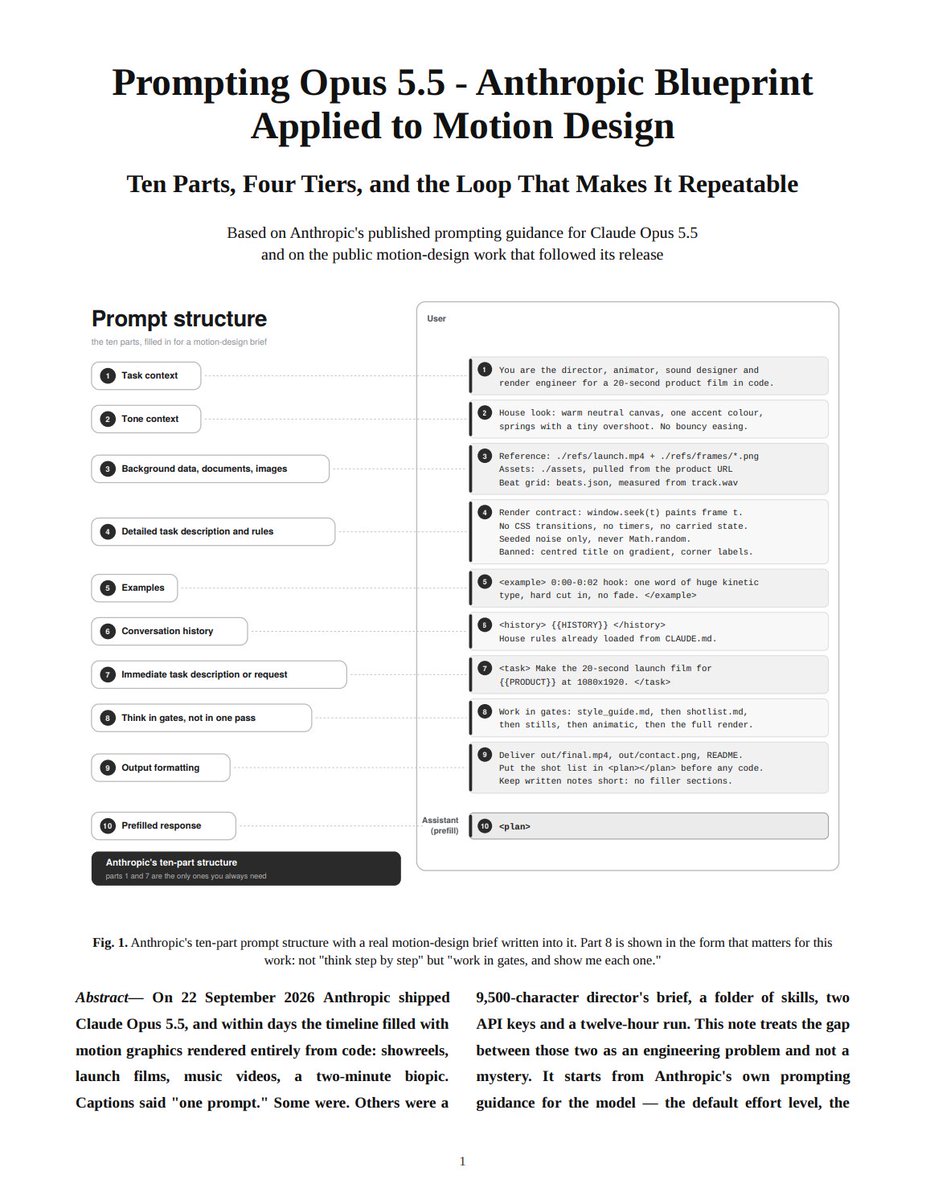
Creator @0xMovez shared a practical workflow on X detailing how to turn Anthropic's Claude Opus 5.5 into a dedicated motion graphics studio using a 17-page motion design blueprint PDF and structuring persistent project rules in CLAUDE.md.
Image source: @0xMovez on X
Standard AI motion graphics workflows often rely on simple, unconstrained prompts like "create a dynamic 15-second motion graphics video." However, achieving production-grade motion assets requires explicit specifications: fixed stage resolutions, timed scene structures, curated color palettes, defined typography, deterministic easing curves, and built-in self-review validation loops. The shared blueprint outlines these prompt engineering techniques and explains how codifying them into CLAUDE.md creates a reusable, high-fidelity motion graphics studio.
Core Pillars of the 17-Page Motion Design Blueprint
The blueprint outlines three foundational areas for generating programmatic motion graphics within Claude Opus 5.5 environments:
-
Structured Prompt Engineering Techniques
- Fixed Stage Dimensions and Duration: Explicitly declaring stage sizes (such as 1920×1080 for widescreen or 1080×1920 for vertical video) and fixed runtimes (e.g., 15 or 30 seconds) prevents uncontrolled canvas reflows across browsers.
- Timed Scene Breakdowns: Structuring the animation into second-by-second segments—such as
0:00–0:03logo resolution,0:03–0:08primary feature interaction,0:08–0:12key takeaway, and0:12–0:15end-card hold. - Predefined Visual Systems: Establishing brand color palettes (2–4 colors), typographic hierarchies, and tight easing curves ensures consistent visual language across all scenes.
-
Motion and Audio Design Workflows
- Self-Contained Code Formats: Requesting single, standalone HTML/CSS/JavaScript implementations with no external asset dependencies, powered by libraries such as GSAP, Canvas, SVG, or Three.js.
- Deterministic Animation Control: Eliminating unbounded random generators so that animations render identically on every execution pass.
- Audio Synchronization: Binding visual cues and scene transitions directly to voiceover or background audio timestamps via
audio.currentTime.
-
Director Prompts
- Elevating the model's role beyond raw coding by instructing it to handle visual metaphors, mobile composition hierarchy, and post-render self-review checks.
Systematizing the Motion Studio via CLAUDE.md
Rather than re-pasting complex system instructions on every prompt, the blueprint's rules can be integrated into a persistent CLAUDE.md configuration.
-
Blueprint Ingestion and Rule Extraction
- Upload the 17-page PDF blueprint alongside project reference briefs to Claude Opus 5.5 to extract standing design systems, supported tech stacks, and rendering constraints.
-
Configuring the Project
CLAUDE.md- Place a
CLAUDE.mdfile in the project root containing persistent instructions: allowed libraries (e.g., GSAP/Canvas/SVG), scene template schemas, brand tokens, and required acceptance gates (such as holding on the final frame without external asset dependencies).
- Place a
-
Context Compaction Resilience and Session Continuity
- In Claude Code workflows, the project-root
CLAUDE.mdis automatically re-read from disk and re-injected after context compaction (/compact). This guarantees that motion design constraints and quality baselines remain active across long-running development and iterative review sessions.
- In Claude Code workflows, the project-root
Practical Considerations and Production Tips
- Explicit Stopping Criteria: Clearly define what "done" looks like in the prompt and
CLAUDE.md—such as outputting a single self-contained HTML file that holds cleanly on the final frame—preventing incomplete or meandering code outputs. - Iterative Directorial Feedback: Treat the first render as an editable draft and provide focused directorial notes (e.g., "declutter scene 2", "extend end card by 1 second", "tighten easing curve") to refine the output.
Original source
- @0xMovez on X: Anthropic Opus 5.5 prompting blueprint for motion design
- Opus 5.5 Motion Design Blueprint: Google Drive Shared Document