Claude Code Pre-Ship QA: 5 Subagents, 20 Checks, and a Single-Pass Fix Prompt
A Claude Code Opus 5.5 workflow running five read-only subagents across 20 pre-ship checks to audit and resolve vibe-coded site defects in a single collision-fr
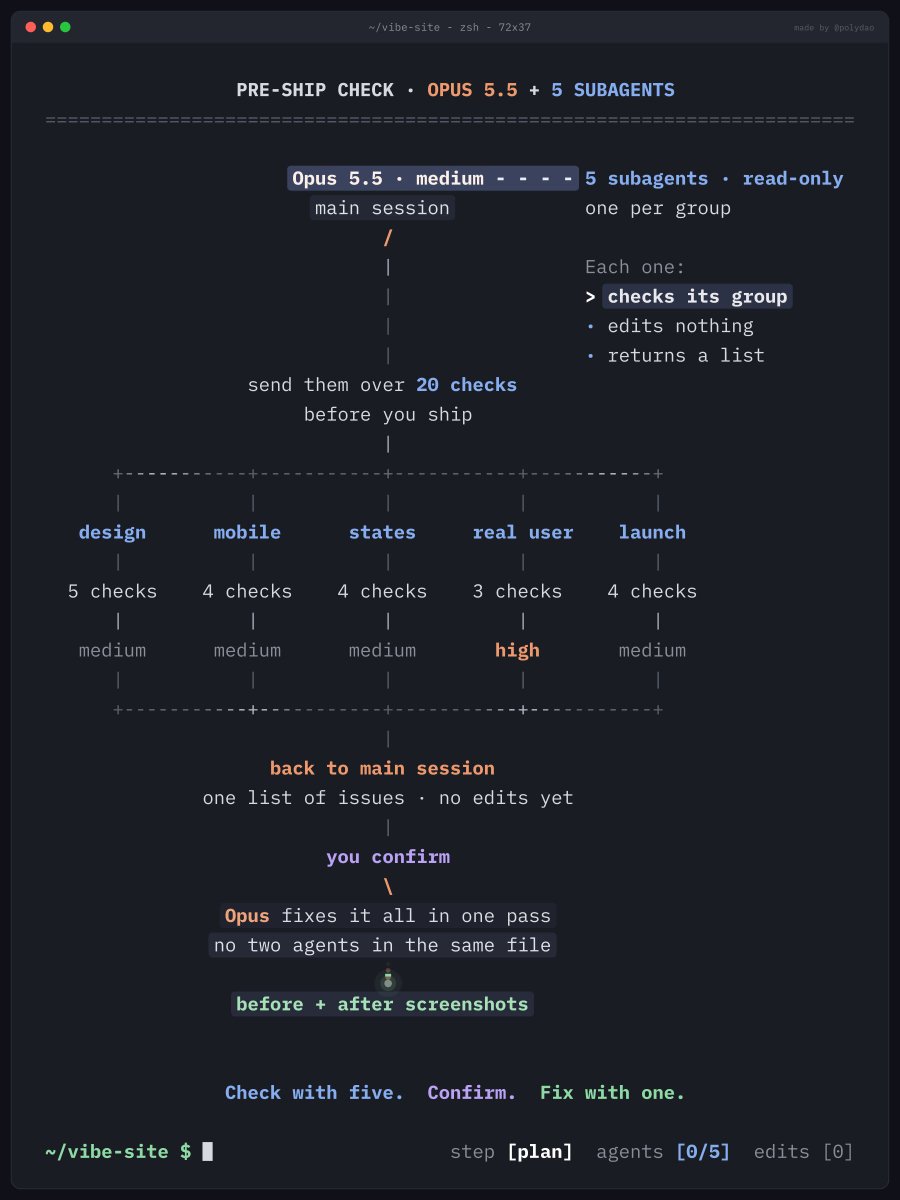
As vibe coding with AI assistants enables developers to rapidly build web prototypes and products, catching overlooked UI inconsistencies, broken mobile layouts, and missing interaction states before shipping has become a major operational priority. AI engineer @polydao shared a pre-deployment QA workflow for Claude Code running Opus 5.5, orchestrating five read-only subagents across 20 targeted checks before remediating all discovered issues in a single, coordinated pass.
Image source: @polydao
When multiple AI subagents attempt to modify source code concurrently, they frequently create merge conflicts, overwrite changes, and introduce subtle regressions. This workflow eliminates that risk by decoupling inspection from modification: specialized read-only subagents identify defects without editing files, and the main session subsequently applies all fixes in one unified pass.
20 Pre-Ship QA Checklist Items Across 5 Core Domains
The 20 checklist items defined by @polydao cover five essential areas that must be verified before releasing a web project.
1. Design Cohesion
- Define a DESIGN File First: Establish a central DESIGN document and tie all colors, font sizes, spacing, and border radii strictly to its rules.
- Tight Palette and Clear Type Hierarchy: Maintain a disciplined color palette and establish clear typographic size and weight relationships.
- Component Consistency: Ensure buttons, cards, and input fields of the same type share an identical visual presentation.
- Balance Visual Weight: Add emphasis to overly flat pages and remove clutter from crowded layouts.
- High-Contrast Readability: Verify that all text remains readable across both dark and light background surfaces.
2. Mobile Responsiveness
- Eliminate Horizontal Spill: Ensure no elements cause unwanted horizontal scrolling or extend past the viewport boundary.
- Dedicated Mobile Navigation: Provide a fully functional, properly styled mobile navigation menu.
- Touch Target Sizing: Maintain touch targets large enough for comfortable thumb interaction.
- Resilient Text Scaling: Ensure layouts remain intact and usable when browser text size is enlarged.
3. Comprehensive UI States
- Dedicated View States: Implement distinct, well-crafted views for loading, empty, and error conditions.
- Interactive Button States: Assign unique visual styles for hover, pressed, and disabled button states.
- Inline Form Validation: Display form validation errors directly beside their corresponding fields, alongside submitting, success, and failure notifications.
- Smooth State Transitions: Apply fluid transition animations when opening modals, expanding dropdowns, or switching tabs.
4. Real-User Flow Verification
- End-to-End Funnel Testing: Execute critical user journeys, including signup and checkout flows, from beginning to end.
- Audit Inactive Elements: Track down and resolve unresponsive buttons, dead links, and missing handlers.
- Full Keyboard Accessibility: Confirm that the entire application can be navigated and operated using only a keyboard.
5. Pre-Launch Readiness & Metadata
- Single-Sentence Value Proposition: State clearly on the landing page hero what the service delivers in one concise line.
- Single Primary CTA per Page: Provide one distinct primary action button per view.
- Essential Metadata: Configure unique page titles, descriptions, and a valid favicon across all routes.
- Purge Placeholder Content: Remove all temporary placeholder text, mock labels, and placeholder assets.
Reasoning Effort Strategy: Medium Baseline and Targeted High Effort
When configuring subagents in Claude Code, reasoning effort should be allocated purposefully based on task scope and cost efficiency.
- Anthropic Cost Guidance: Medium effort is designed for well-scoped everyday engineering tasks and provides sufficient reasoning depth for the standard 20 inspection points.
- Thariq's Benchmark Insights: Raising effort to high primarily delivers benefits in edge-case exploration and rigorous multi-step verification. Consequently, high effort is reserved specifically for the real-user flow subagent covering complex checkout and signup funnels, while other subagents operate at medium effort.
The Claude Code Execution Prompt
To execute this automated audit and remediation cycle, provide the full checklist context to Claude Code and append the following structured prompt at the end:
Run a pre-ship check on this repo.

You: main session, Opus 5.5, medium effort.
Spawn 5 read-only subagents, one per group:

design (medium) - DESIGN file, styles/globals.css, tailwind.config.ts, components/ui/
mobile (medium) - app/layout.tsx, components/nav/, every page at 375px
states (medium) - components/forms/, every loading, empty and error view
real user (high) - app/signup/, app/checkout/, every link and button
launch (medium) - app/page.tsx, page metadata, public/favicon.ico

Each subagent:
- checks only its group
- edits nothing
- returns issue, file:line, severity

Then:
1. merge all five lists into .claude/preship/issues.json, grouped by file, no duplicates
2. stop and show me the list - no edits until I confirm
3. after I confirm, fix everything yourself in one pass, so no two agents touch the same file
4. save before and after screenshots to .claude/preship/screens/
Execution Lifecycle
- Parallel Read-Only Audits: Five subagents scan their respective target files in parallel, logging issues with file paths, line numbers, and severity ratings without modifying any files.
- Deduplicated Issue Aggregation: Discovered defects are compiled and deduplicated into
.claude/preship/issues.json, organized by affected file. - Human Confirmation Gate: The main session halts execution to present the aggregated issue list, waiting for explicit user confirmation before applying modifications.
- Single-Pass Resolution: Upon approval, the primary Opus 5.5 session addresses all flagged issues in a single sequential pass, preventing file write collisions between agents.
- Visual Verification Capture: Pre- and post-remediation screenshots are saved to
.claude/preship/screens/to provide clear visual proof of fixes.
Original source
- Mr. Buzzoni (@polydao) on X: Claude Code tip: before you ship a vibe-coded site, let Opus 5.5 send 5 subagents through these 20 checks