Preventing Token Spikes in Claude Code: Managing Prompt Cache Expiration with /clear
Why resuming idle Claude Code sessions triggers massive uncached token usage due to KV cache expiration, and how using /clear protects your usage limits.
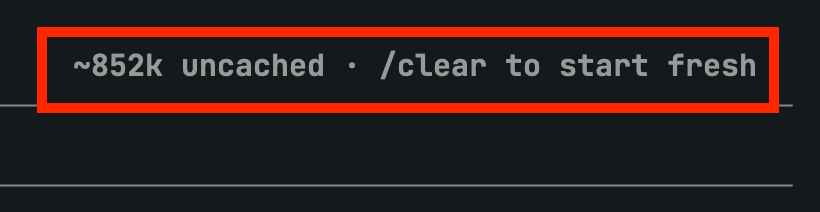
Tech creator lucian (@lucian__03) on X has shared a crucial workflow tip for Claude Code users: how long-running, idle sessions suffer from prompt cache expiration, leading to unexpected surges in uncached token usage and rapid depletion of rolling usage limits.
Image source: X @lucian__03
Leaving a Claude Code session inactive for extended periods and subsequently sending a simple one-line prompt like "continue" can force Anthropic's backend to process hundreds of thousands of accumulated tokens from scratch without cache benefits, burning 20% to 30% of a 5-hour limit in a single turn.
KV Cache Expiration Mechanics and the Uncached Token Spike
Claude Code relies heavily on prompt caching to keep interactions fast and cost-effective, caching system prompts, CLAUDE.md guidelines, conversation history, and tool execution outputs across consecutive turns.
However, when a session remains idle without active turns, the server-side cache is invalidated and purged.
- Server-Side KV Cache Memory Overhead: Computed Key-Value (KV) cache tensors reside directly in Anthropic's GPU memory clusters. Holding inactive session state indefinitely incurs prohibitive infrastructure costs, necessitating strict cache time-to-live (TTL) policies.
- Cache Eviction Thresholds:
- Main session cache: Purged after approximately 1 hour of inactivity without cache reuse.
- API additional usage credit caching: Purged after approximately 5 minutes without reuse.
- The Uncached Recomputation Spike: If a long session accumulates approximately 852k tokens and sits idle past its expiration window, sending a trivial follow-up like "continue where we left off" requires the model to re-read all 852,000 tokens as fresh, uncached input. This single turn can consume 20% to 30% of a user's 5-hour rolling usage allowance at once.
Why /clear Beats /compact for Expired Sessions
While developers often rely on /compact to manage growing session lengths, using it on an already expired session can trigger the very token burn they are trying to avoid.
- The /compact Recomputation Trap: When
/compactis executed on a session whose prompt cache has expired, the model must read the entire accumulated conversation history from scratch as uncached tokens simply to generate the summary. - Resetting Context with /clear: Unless preserving the exact blow-by-blow dialogue is strictly necessary, resetting the session via
/clearstarts a fresh, empty context window, completely bypassing the uncached token re-read penalty. - Recommended Practical Workflow:
- At the completion of a development milestone or refactoring step, document architectural decisions and remaining tasks in
CLAUDE.mdor a lightweight handoff file. - Avoid leaving large, active sessions idle for hours with the intention of resuming them blindly.
- Upon returning from a break or when switching tasks, run
/clearto start fresh with a clean context window and preserve your 5-hour usage allowance.
- At the completion of a development milestone or refactoring step, document architectural decisions and remaining tasks in
Original source
- lucian (@lucian__03) X Post: How to Save Claude Code Tokens - Prompt Cache Expiration and /clear Guide