How to Build a Cost Tracking and Intelligent Model Routing Dashboard with Claude Code Mods
A 4-step guide to build 'run-ledger', combining Claude Code mods with TypeSafe Jev for subagent tracking, API cost estimation, and model routing.
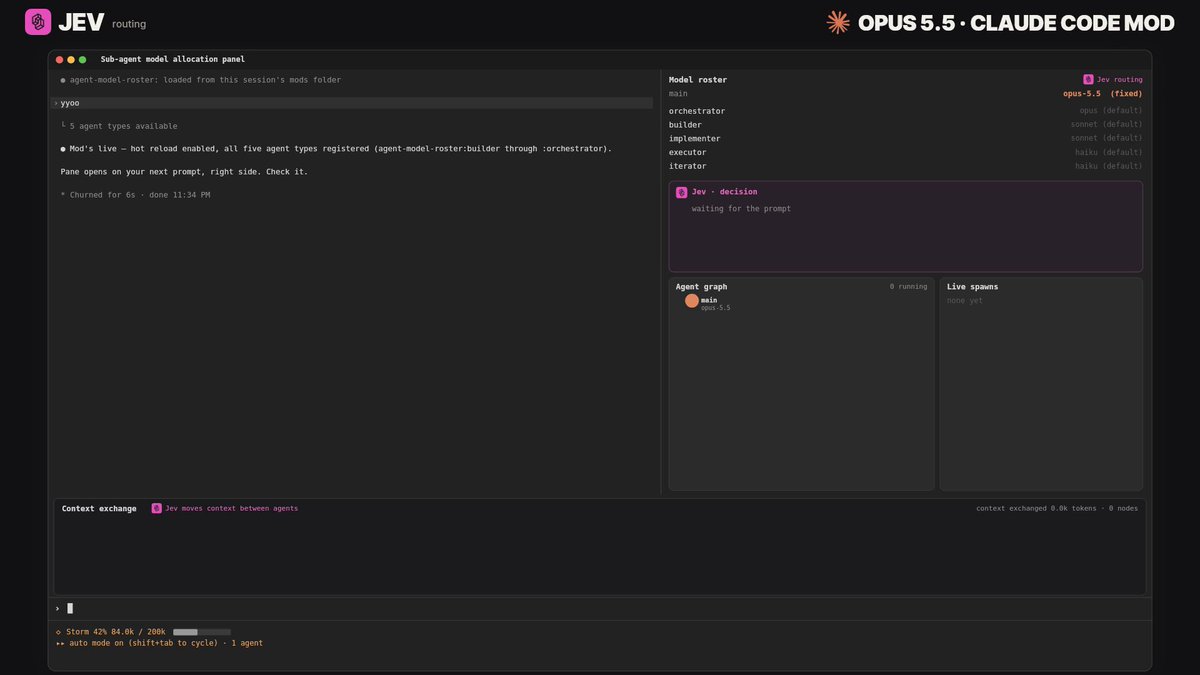
As multi-agent workflows in Claude Code grow in complexity, managing token consumption, monitoring subagent execution, and assigning the most cost-effective models have become critical challenges for agent developers. AI developer @Av1dlive (Avid) has shared a step-by-step 4-stage guide demonstrating how to combine the mod system introduced in Claude Code 2.1.287+ with TypeSafe's lightweight decision engine Jev to build run-ledger—a custom dashboard mod for subagent oversight, estimated run costs, and intelligent model routing recommendations.
Image source: Avid (@Av1dlive)
This workflow automates the plugin scaffolding process with a single comprehensive prompt, establishing a "recommendation-first" model routing architecture that prevents unintended expenditures while maintaining optimal task completion quality.
Step 1: Set Up Jev and Connect the Model Registry
The first step is preparing the Jev decision engine within your development environment and linking it to your target model registry.
Unlike full generative language models, Jev functions as a high-speed, structured micro-decision primitive. In this architecture, it acts as an evaluator that assesses incoming subtasks to determine whether they genuinely demand high-tier frontier reasoning models or can be solved reliably by smaller, cheaper options.
- Connect Model Registry: Link Jev to the list of models you intend to route across (including model identifiers, current pricing tables, and capabilities).
- Verify Connection: Ensure that endpoints respond properly and that all listed models are accessible before handing tasks over to the agent.
Step 2: Build the Claude Code Mod with the Scaffold Prompt
Launch Claude Code 2.1.287 or later, load the plugin-authoring capability, and supply the following prompt to scaffold the run-ledger mod:
build a mod called run-ledger. load plugin-authoring and use the API types for my installed version.

create a dashboard that shows:
- estimated cost per run, model, and source plugin where known
- which model handles each task
- each subagent’s status, latest action, and elapsed time

include token counts, cache usage, and reported retries. count each request once. keep background tasks linked to their original run.

use dated prices. label costs as API estimates, not subscription charges. show unknown when data is missing.

connect the mod to my existing Jev setup. give Jev the task, available models, prices, budget, and relevant past results. ask it to recommend a model and explain why.

start with recommendations. make automatic routing optional for eligible subagents. show the recommended model, actual model, result, and cost. include Jev’s own cost.

keep state across hot reloads. add details and export. the dashboard itself must make no model calls.

validate the plugin. test rendering, costs, attribution, and duplicate counting. give me steps for a live test.
Architectural Invariants and Dashboard Requirements
The scaffolding prompt enforces several critical design constraints:
- Zero Model Calls by the Dashboard: The dashboard interface itself must never trigger model invocations or generate additional token overhead simply to render its views.
- Strict Deduplication: Token usage, cache hits, and retries must count each underlying API request exactly once, while background tasks remain anchored to their initiating run.
- Transparent Cost Attribution: All figures must be labeled as estimated API costs with dated pricing, rather than subscription fees, marking unavailable metrics explicitly as
unknown. - Recommendation-First Progression: The system defaults to presenting Jev's model recommendation and rationale first, allowing automatic routing only as an explicit opt-in for verified subagents. Jev's own operational cost is tracked transparently.
- Hot-Reload Persistence and CSV Export: State is preserved across hot reloads during active development, and all captured ledger records can be exported to CSV.
Step 3: Test the Setup via Hot Reload and Verification
When prompted by Claude Code, permit hot reloading and validate the newly built mod through three sequential checks:
- Run a Simple Task: Verify that single direct requests are accurately logged on the dashboard and counted only once.
- Run a Subagent Task: Confirm that subagent states, ongoing actions, and elapsed runtimes update in real time.
- Trigger a Model-Routed Call: Ensure that Jev evaluates the task complexity, provides a reasoned model recommendation, and verifies that the selected model can successfully complete the assignment.
Step 4: Install the Working Mod as a Persistent Plugin
Once verification passes, instruct Claude Code to copy the mod from the temporary workspace into your persistent plugin directory.
With the plugin active, you gain continuous visibility into estimated per-run costs, actionable subagent telemetry, and intelligent model selection tailored to each task's operational requirements.
Original source
- Avid (@Av1dlive) on X: how to use claude code mods like a top 1% user, step by step