Crafting Viral Short-Form AI Videos with ChatGPT and Seedance 2.5: A 23.6M View Character Workflow
How a 4-step AI workflow combining ChatGPT character design, scale-contrast environments, and Seedance 2.5 video generation drove 23.6 million views on social m
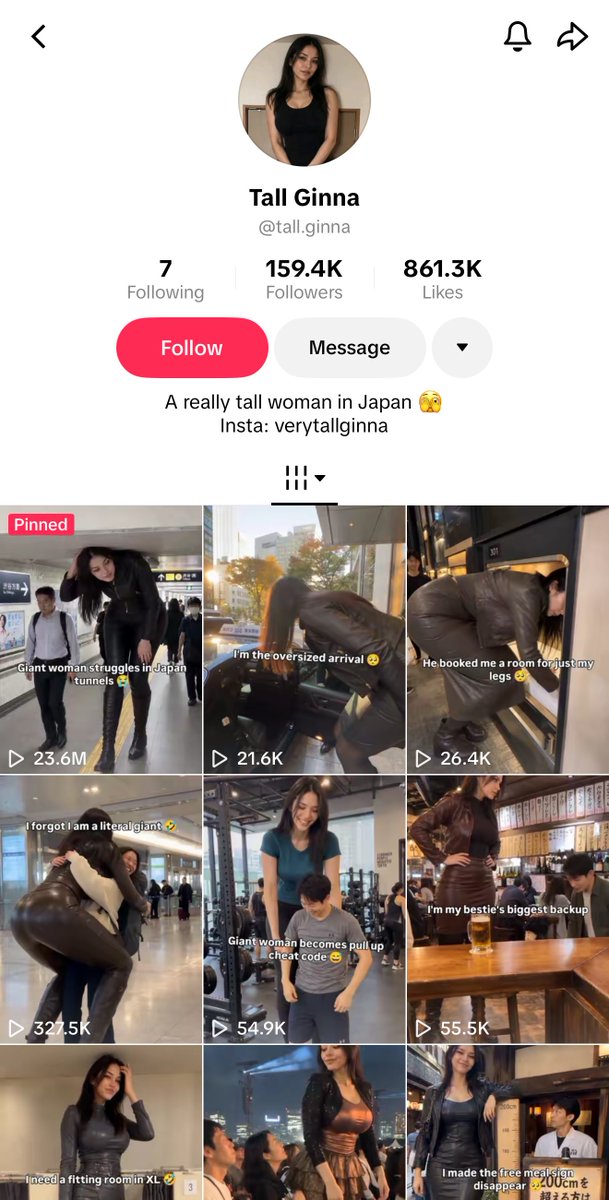
A 4-step workflow for creating viral short-form AI character videos using ChatGPT and ByteDance's Seedance 2.5—generating 23.6 million views and $11,200 in revenue from a single clip—has been shared by AI creator kazurai (@k4zxbt).
Image source: X / @k4zxbt
Rather than relying on traditional physical filming or complex 3D character pipelines, this workflow combines LLM-assisted character design with Seedance 2.5's reference-to-video capabilities, optimizing for algorithmic engagement through scale contrast and storytelling captions.
The 4-Step Viral Video Workflow: Scale Contrast and Character Swapping
The production system detailed by kazurai relies on a repeatable formula combining visual scale disparity with relatable captions:
Step 1: Design a Tall Character with ChatGPT
- Use structured prompts to define a distinct tall woman character.
- Prepare a comprehensive reference sheet featuring multiple full-body angles and facial close-ups to maintain visual identity in downstream generation.
Step 2: Select Scale-Constraining Locations
- Choose environments that naturally emphasize extreme height differences and scale contrast.
- Effective settings include low-clearance pedestrian tunnels in Japan, subway trains, and low-ceiling bars—spaces built around standard human proportions that highlight the character's size immediately.
Step 3: Video Generation and Character Swapping with Seedance 2.5
- Input the base scene and character reference sheet into Seedance 2.5.
- Utilize the model's multimodal reference capabilities to blend the character into the environment, aligning lighting, perspective, and shadow dynamics for a seamless composite.
Step 4: Story-Driven Struggle Captions
- Pair the visual hook with a narrative caption that frames the video around relatable, humorous difficulties.
- Example caption:
"giant woman struggles in Japan tunnels" - This framing sparks immediate curiosity, encourages comments, and increases average watch time across social feeds.
Seedance 2.5 Multimodal Reference and Consistency Architecture
The technical foundation enabling this workflow is Seedance 2.5's advanced visual consistency engine:
- Native 30-Second Single-Take Generation: Generates full 30-second continuous takes without the drift or boundary seam artifacts typical of multi-clip stitching.
- Support for Up to 50 Multimodal References: Ingests images, video clips, and audio tracks simultaneously to lock facial features, hairstyle, costume elements, and spatial direction across frames.
- Reference-to-Video Pipelines: Maintains consistent character identity when transferring the subject across disparate environments (from tunnels and trains to urban streets).
Expansion to Virtual Creators and Short-Form Monetization
The creator community has highlighted parallel monetization models built on similar LLM and video generation foundations.
In context shared by AI creator @Mnilax, a virtual AI music artist project powered by GPT Astra and Seedance 2.5 achieved:
- 1.3 Million TikTok Followers and Debut EP: Generating over $150,000 monthly revenue from a completely synthetic persona.
- Structured Character Sheet Prompting: Prompting ChatGPT for 5 body angles and 3 close-up expressions to anchor the visual identity.
- Viral Format Swapping: Applying the locked character identity to proven short-form video pacing and framing via Seedance 2.5, ensuring recognizable facial continuity across every published post.
Practical Tips for Production
- Establish the Scale Hook Instantly: Use low-angle camera framing or low ceiling frames so the scale contrast is immediately apparent in the opening frame (the hook).
- Post-Process Captions: Add text overlays in a dedicated video editor (such as CapCut) within standard 9:16 mobile safe zones rather than burning text directly into the generative video model.
- Control Reference Lighting: Keep lighting and color grading consistent across character reference images to prevent model drift when generating sequences across different scene backgrounds.
Original source
- kazurai Official X (@k4zxbt): Tokyo Giant Girl Viral Workflow