Faceless Viral Short-Form Workflow: Swapping Characters with ChatGPT and Seedance 2.5
A 3-step AI video production tip demonstrating how to replace subjects in proven viral short-form videos with ChatGPT character sheets and Seedance 2.5 Omni Ref
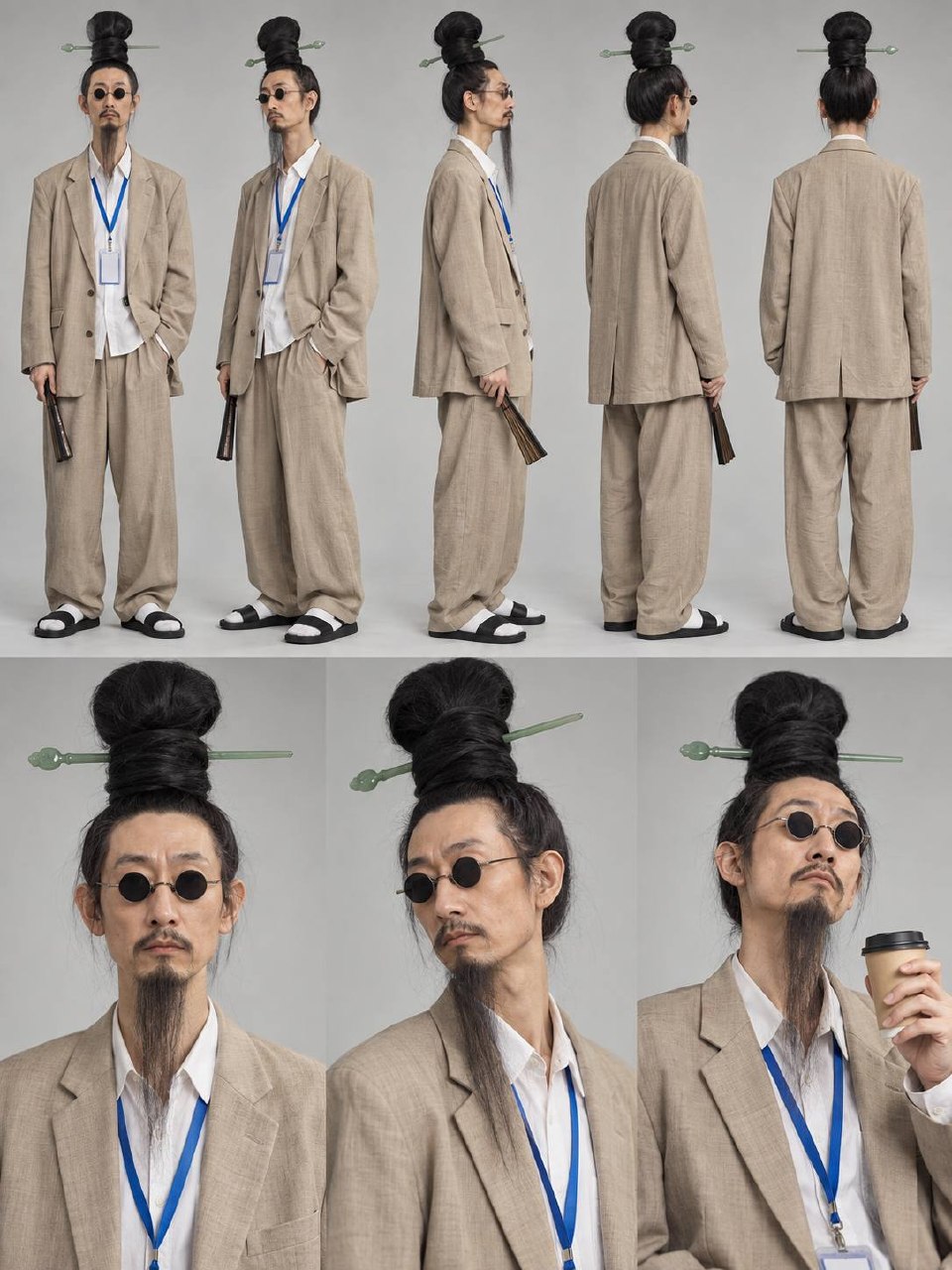
A practical workflow for generating fresh viral short-form video content without appearing on camera or organizing on-location shoots is gaining traction. Shared by AI creator @DDJCXX on X, this approach outlines a 3-step production pipeline that designs grounded, distinct characters using ChatGPT and seamlessly replaces the subject in proven viral footage using Seedance 2.5's Omni Reference feature.
Image source: X @DDJCXX
Step 1: Generating a Consistent Character Sheet with ChatGPT
When designing a character for video replacement, the key is to exaggerate only one or two distinct physical traits while keeping all other features realistic and ordinary. Piling on excessive accessories or exaggerated outfits often leads to rendering artifacts during downstream video synthesis.
- Prompt Parameters: Instruct ChatGPT (DALL-E) to use a neutral gray background and a photorealistic photo style.
- Multi-Angle Character Sheet: Generate a single comprehensive turnaround sheet containing 5 full-body angles on the upper half and 3 close-up portraits on the lower half.
- Front-Facing Reference: Generate an additional front-facing half-body portrait to anchor facial features, skin texture, and expression consistency during motion synthesis.
Step 2: Selecting Optimal Source Footage (Under 30 Seconds)
Not every viral video is suitable for AI character replacement. To prevent visual drift and tracking errors, choose proven viral clips that meet four strict criteria:
- Solo Subject: The clip must feature only one person with no overlapping background figures.
- Stable Framing: Camera movement should be smooth and controlled, avoiding extreme handheld jitter.
- Adequate Headroom: Ample space above the subject's head ensures new hairstyles and head proportions are not cropped out of frame.
- Duration Constraint: Keep clips under 30 seconds to maintain tracking fidelity and manage compute costs.
Step 3: Executing the Character Swap in Seedance 2.5 Omni Reference
Upload the prepared media assets into Seedance 2.5's Omni Reference interface and apply an explicit replacement prompt:
- Asset Reference Mapping: Assign the original viral clip as
@video1, the 8-panel character sheet as@image1, and the front-facing portrait as@image2. - Production Prompt Template:
Video editing: Replace [the subject] in @video1 with the character from @image1 and @image2.
[Explicitly describe character hairstyle, facial features, and clothing]
Strictly preserve the exact movement, facial expression, lip-sync, scene background, lighting, and camera motion of @video1. Do not add or remove any persons or objects.
Audio: Retain original sound of @video1.
Production Costs and Model Performance Considerations
- Cost per Video: Generating a complete short-form replacement clip with Seedance 2.5 costs approximately 10 to 20 RMB (roughly $1.50–$3.00 USD) in generation credits.
- Model Selection: While lower-cost video generation alternatives exist, testing shows they frequently suffer from identity distortion, flickering, and loss of subtle lip-sync synchronization. Seedance 2.5's Omni Reference currently delivers the necessary balance of motion fidelity and character consistency for viral video remakes.