Awesome Opus 5.5 Videos: 475+ Motion Graphics, 3D Demos, and Prompts Collection
Explore over 475 executable Claude Opus 5.5 animation demos rendered in HTML, Canvas, Three.js, and GLSL, complete with exact prompts in awesome-opus5-5-videos.
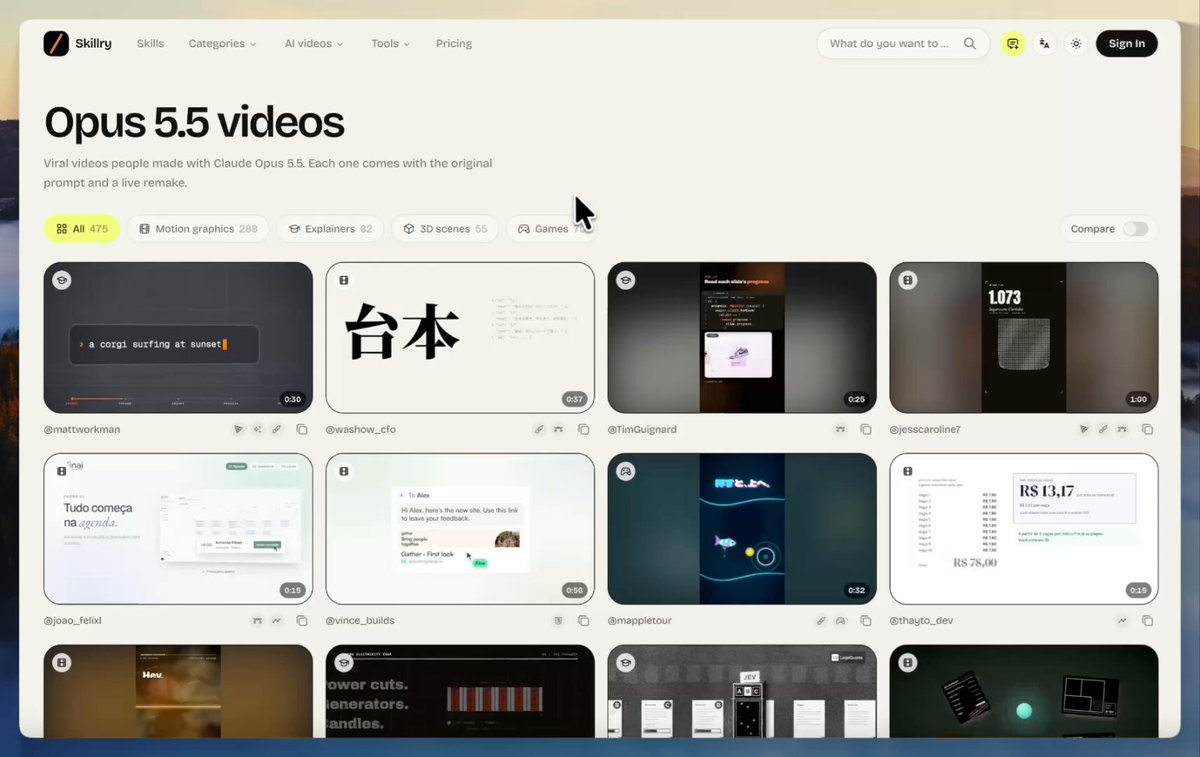
On October 4, 2026, AI researcher and creator Aymen (@aymenpursue) highlighted an open-source repository gathering more than 475 Claude Opus 5.5 video and animation demonstrations alongside their exact reproduction prompts. Released under the MIT License by developer yihui-dev, the 'awesome-opus5-5-videos' project curates viral generative experiments spanning procedural 3D environments, motion graphics showreels, browser mini-games, and dynamic visual simulations.
Image source: @aymenpursue (X) / yihui-dev (GitHub)
While impressive AI-generated visual animations frequently circulate across social media, the vast majority share only flattened video captures, leaving designers and developers without a reproducible path to study or adapt the underlying mechanics. This curated repository addresses that limitation by mapping each demonstrated animation directly to the creator's exact natural language prompt, enabling immediate reproduction and iterative modification within standard browser-based execution environments.
Code-Driven Animation Architecture: HTML, Canvas, Three.js, and GLSL
A core technical distinction of the demonstrations collected in awesome-opus5-5-videos is that they bypass heavy diffusion-based video files in favor of real-time, executable code.
- Native Web Technology Stack: Demonstrations across the collection are rendered using standard web building blocks, including HTML, HTML5 Canvas, SVG vectors, the Three.js 3D library, GSAP, Web Audio, and WebGL/GLSL shaders.
- Resolution-Independent Rendering: Because visuals are synthesized directly through procedural code and mathematical vector rendering rather than pre-rendered video rasters, they display crisply across client viewports without video compression artifacts.
- Real-Time Physics and User Interaction: Rather than producing static video playbacks, the code supports interactive input, responding to user actions with physics calculations, simulations, and real-time state changes.
- Compute and Cost Efficiency: Running procedural animations directly inside a browser or client-side runtime eliminates reliance on expensive video diffusion rendering infrastructure, accelerating iteration speed for creative prototyping.
Catalog Breakdown: 475+ Demonstrations Across 3D Worlds and Motion Graphics
While the repository's README highlights 100 representative works, the complete collection of 475 prompts is preserved in the prompts/ directory and browsable alongside side-by-side video remakes on the project's Skillry showcase page:
- 3D Worlds and Spatial Environments: Demonstrations utilizing Three.js and GLSL shaders, procedural 3D geometry, lighting, and particle systems to construct three-dimensional scenes and explorable environments.
- Motion Graphics Showreels: Sequences featuring text animations, kinetic typography, UI showcases, infographics, and science explainers incorporating GSAP, GLSL, and Web Audio to achieve studio-grade visual effects.
- Interactive Experiments and Mini-Games: Playable browser prototypes rendered in Canvas and WebGL, ranging from physics interactions to casual mini-games generated from a single descriptive prompt.
- Product Promotions and Visual Displays: Visual assets covering product ads, music video effects, and data visualizers suited for creative prototyping and web integrations.
Step-by-Step Reproduction and Customization in Claude Code and Artifacts
The prompt recipes contained within the repository are structured for immediate execution inside Claude Artifacts or CLI-based agent environments like Claude Code.
- Browse the Prompt Catalog: Explore the repository's
prompts/directory, README showcase, or the Skillry catalog to select an animation style, such as a 3D scene, kinetic typography sequence, or interactive experiment. - Copy the Verbatim Prompt: Extract the creator's exact prompt text preserved alongside the target demo.
- Execute in Claude Environment: Paste the prompt into a Claude Opus 5.5 conversation or Claude Code session, requesting a standalone, single-file HTML bundle with necessary CDN dependencies (such as Three.js).
- Inspect in Real-Time Preview: Run the generated code in the Artifacts window or open the resulting file in a local browser to evaluate visual composition and motion, comparing against the original post or Skillry remake.
- Tune Parameters and Visual Assets: Directly adjust variables inside the generated code—including color palettes, particle counts, and motion speeds—to tailor the output to specific project requirements.
This procedural approach establishes a reproducible bridge between natural language prompting and production-ready interactive visual assets without requiring traditional 3D DCC suites or cloud render farms.
Original source
- Original X Post: @aymenpursue on X (2106725123151794477)
- GitHub Repository: yihui-dev/awesome-opus5-5-videos
- Online Showcase: Skillry Opus 5.5 Showcase