How to Use Anthropic's Open-Source Knowledge Work Plugins with Claude Code and Cowork
A practical guide to Anthropic's knowledge-work-plugins repository: exploring 11 job-function plugins, Claude Code installation steps, directory structure, and
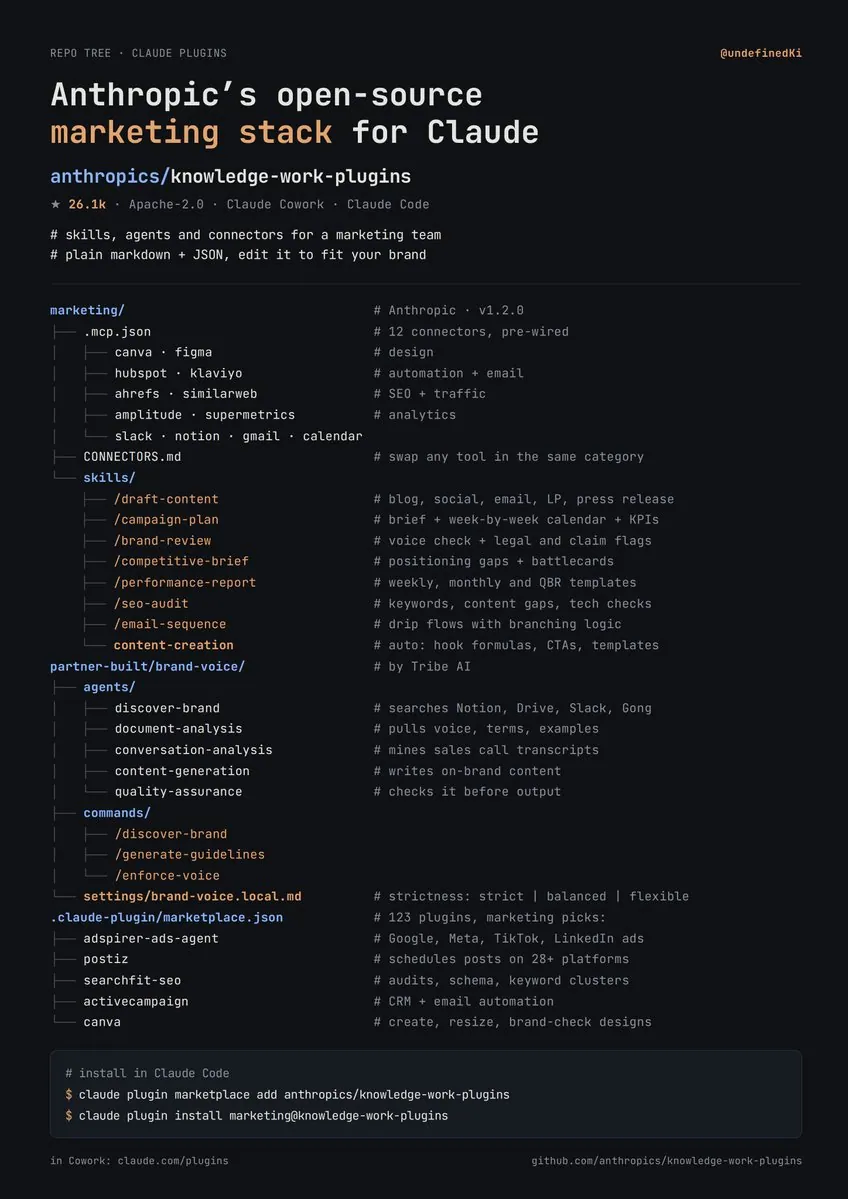
Tech creator Yarchi (@undefinedKi) shared an in-depth breakdown on X highlighting Anthropic's official open-source repository, knowledge-work-plugins. Built without compilation or runtime build steps, this repository provides role-specific AI workflow plugins for marketing, sales, finance, and legal teams using plain Markdown and JSON files.
Image source: https://x.com/undefinedKi/status/2111845284187713847
Released by Anthropic under the permissive Apache-2.0 license, the anthropics/knowledge-work-plugins repository has gathered over 35,600 stars on GitHub. Its primary mission is to provide plug-and-play role templates for Claude Cowork (Anthropic's team-oriented AI workspace) while remaining fully compatible with Claude Code (the developer CLI environment). Instead of forcing teams to build complex Python middleware or host standalone API services, the framework enables teams to customize AI behavior and connect enterprise tooling by editing simple text files.
The 11 Core Role Plugins and Capabilities
According to the official repository README, Anthropic open-sourced 11 role-focused plugins designed from internal practices. Each package bundles relevant SaaS integrations with tailored prompting skills:
- Productivity (
productivity): Streamlines task management, calendar sync, and daily contextual workflows. Connectors include Slack, Notion, Asana, Linear, Jira, Monday, ClickUp, and Microsoft 365. - Sales (
sales): Facilitates prospect research, call preparation, pipeline review, outreach generation, and competitive battlecards. Connectors include HubSpot, Close, Clay, ZoomInfo, Notion, Jira, Fireflies, and Microsoft 365. - Customer Support (
customer-support): Assists ticket triage, response drafting, issue escalation packaging, and turning solved tickets into internal knowledge base articles via Intercom, HubSpot, Guru, and Jira. - Product Management (
product-management): Assists specification writing, roadmap prioritization, user research synthesis, and cross-functional updates using Figma, Amplitude, Pendo, Linear, and Jira. - Marketing (
marketing): Handles content drafts, campaign blueprints, brand voice compliance, competitor briefings, and performance reporting. It integrates with 9 core tools: Slack, Canva, Figma, HubSpot, Amplitude, Notion, Ahrefs, SimilarWeb, and Klaviyo. - Legal (
legal): Covers contract evaluation, NDA triage, compliance assessments, risk scoring, and standardized meeting prep with Box, Egnyte, and Jira. - Finance (
finance): Prepares journal entries, performs account reconciliations, generates financial statements, models variance, and supports audit readiness. Connects to data warehouses like Snowflake, Databricks, and Google BigQuery alongside Slack and Microsoft 365. - Data Analysis (
data): Assists analytical querying, SQL generation, statistical validation, and dashboard creation via Snowflake, Databricks, BigQuery, Definite, Hex, Amplitude, and Jira. - Enterprise Search (
enterprise-search): Executes cross-platform search queries across company email, chats, and wikis in a single prompt. - Bio Research (
bio-research): Accelerates preclinical life sciences R&D by connecting literature search and target prioritization databases including PubMed, BioRender, bioRxiv, ClinicalTrials.gov, and Open Targets. - Cowork Plugin Management (
cowork-plugin-management): A meta-plugin used to generate new internal plugins or customize existing role definitions.
While social discussions highlighted broader marketplace figures, the official open-source repository centers on these 11 maintained plugin packages.
File-Based Plugin Architecture
The technical appeal of knowledge-work-plugins lies in its zero-code, zero-infrastructure design. Every plugin adheres to a standardized directory layout:
plugin-name/
├── .claude-plugin/plugin.json   # Manifest defining plugin identity
├── .mcp.json                    # Tool connectors via Model Context Protocol
├── commands/                    # Explicit slash commands triggered by users
└── skills/                      # Domain knowledge Claude pulls automatically
- Manifest (
.claude-plugin/plugin.json): Declares the plugin identifier, display name, version, and general metadata. - MCP Configuration (
.mcp.json): Defines endpoints for Model Context Protocol (MCP) servers, allowing Claude to securely fetch data from external CRMs, analytics hubs, and databases. - Commands (
commands/): Markdown files defining explicit user-triggered routines (such as/sales:call-prepor/finance:reconciliation). - Skills (
skills/): Instructional Markdown documents containing specialized domain rules. Claude queries these files autonomously whenever a related task appears in the conversation.
Installation in Claude Code
Users can install plugins through the graphical directory in Claude Cowork (claude.com/plugins), but CLI users running Claude Code can install and configure them directly from the terminal.
Step 1: Add the Marketplace Repository
Open your terminal in your Claude Code workspace and add the official Anthropic repository to your plugin marketplace list:
claude plugin marketplace add anthropics/knowledge-work-plugins
Step 2: Install the Target Plugin
Install your selected plugin by referencing its name and the marketplace tag. To install the sales package:
claude plugin install sales@knowledge-work-plugins
Once installed, Claude loads the skill rules automatically. Slash commands become active in your interactive session, allowing immediate execution of role workflows such as /sales:call-prep.
Adapting Plugins to Your Company Setup
Out-of-the-box plugins provide generic foundations. To extract genuine utility, teams should customize them to mirror real-world operational guidelines:
- Swap Connectors: Edit
.mcp.jsonto link the MCP servers representing your team's specific SaaS stack. - Inject Brand Guides and Vocabulary: Place your internal glossary, voice guidelines, and team conventions into the
skills/directory. For example, the marketing plugin's/brand-reviewcommand naturally identifies unverified superlative claims (such as "best" or "fastest"); adding your company's editorial rubric ensures automated draft reviews stay tightly aligned with corporate policy. - Refine Operational Workflows: Adjust instructional markdown files in
skills/to reflect internal sign-off chains and documentation standards instead of generic textbook steps.
Because the entire repository uses text files, maintaining custom plugins follows standard Git workflows: fork the repository, commit organization-specific files, and distribute updates across your engineering and business teams.
Original source
- Yarchi (@undefinedKi) on X: https://x.com/undefinedKi/status/2111845284187713847
- Anthropic Official GitHub Repository (knowledge-work-plugins): https://github.com/anthropics/knowledge-work-plugins