Turn One Photo into an AI Character Reference Sheet with a 4-Step Prompt
A practical workflow using Gemini, Grok, or GPT Image 2.0: upload one photo, paste an identity-locking prompt, and get a front, three-quarter, side, and back tu
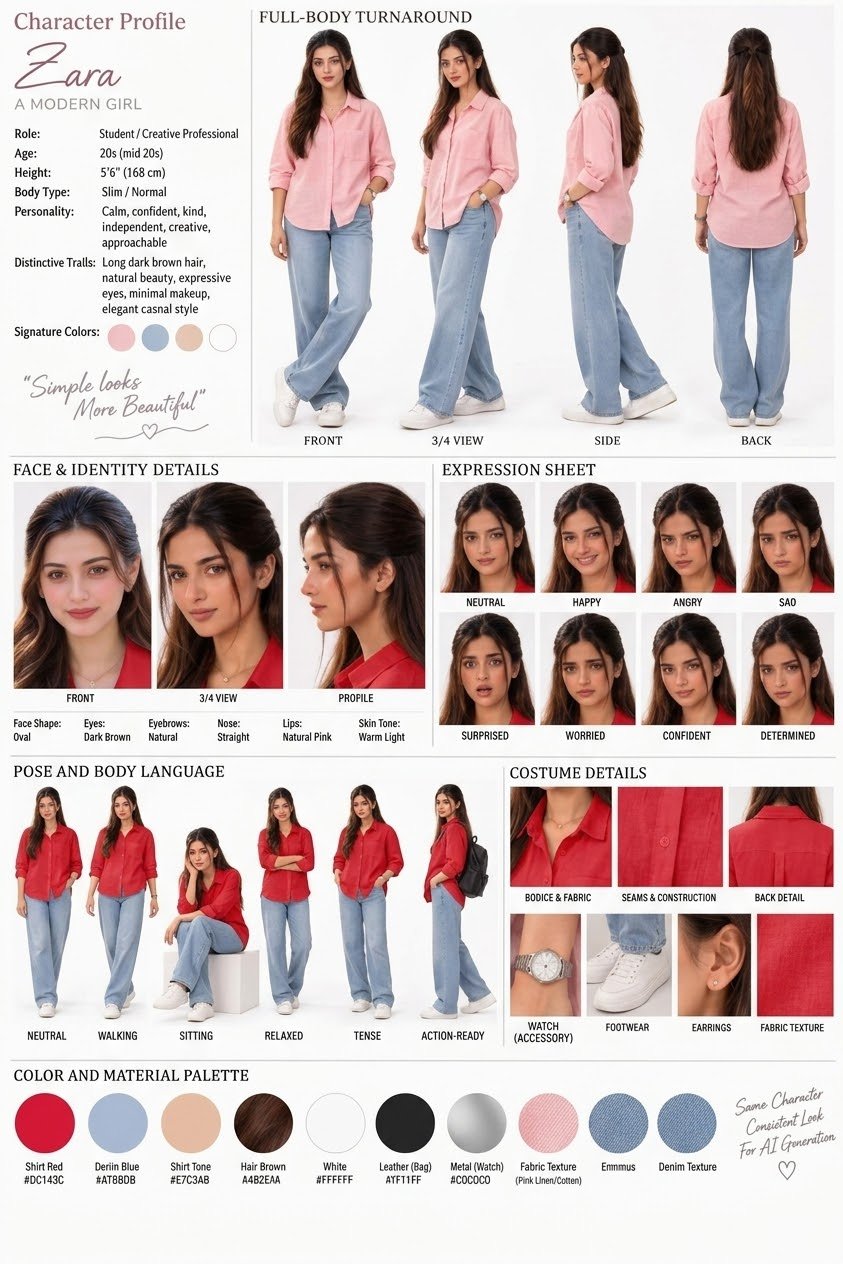
X creator Soaima (@Soaima_Ai) shared a 4-step workflow on October 3, 2026 that turns a single photo into a consistent AI character reference sheet. Open Gemini, Grok, or GPT Image 2.0, upload a photo, paste the identity-locking prompt, and generate.
Image source: @Soaima_Ai on X
The key idea is to state face, build, hairstyle, and skin-tone consistency explicitly in the prompt and to request four views at once: front, three-quarter, side profile, and back. The two attached example photos (843×1264) show the resulting turnaround sheet for the same character.
The 4-step workflow
The author's steps, in order:
- Open Gemini, Grok, or GPT Image 2.0.
- Upload your image.
- Paste the prompt.
- Generate your image and video.
The original post gives no per-model settings (aspect ratio, resolution, seed), so use your model's default image-generation screen as is.
The identity-locking prompt, verbatim
The confirmed portion of the prompt from the author's follow-up post reads:
Create a professional AI character reference sheet for a modern young woman named Zara. Keep the character's face, facial features, hairstyle, body proportions, skin tone, and overall identity highly consistent across every image.
Character: Zara, a beautiful woman in her late 20s, slim/athletic build, warm light skin tone, oval face, expressive dark brown eyes, natural eyebrows, straight nose, natural pink lips, long textured dark-brown hair with soft waves, elegant contemporary appearance, confident and approachable personality.
Create a clean full-body turnaround sheet showing Zara from:
- Front view
- 3/4 view
- Side profile
- Back view
Also include:
- Face & identity details: front face, 3/4 face, a…
Everything after that last line is truncated in the acquired source bundle and cannot be verified. Do not guess the missing part; copy only the confirmed text and swap in your own character's name and appearance. In practice, replace "Zara" and her description with your own character.
Caveats
- Uploading your own face subjects it to that service's image-processing and privacy policies. One reply to the original post asked in Chinese whether an uploaded portrait becomes reusable by other users; no author answer was captured. Check each model's privacy policy before uploading a sensitive portrait.
- Most replies to the original post are short praise with no additional verified settings or prompt variants.
- The workflow assumes an image-generation feature in the Gemini, Grok, or GPT image family; the original post mentions no specific paid tier or paywalled feature.
Original source
- Soaima (@Soaima_Ai), original post: ① Open Gemini, Grok or GPT Image 2.0…