8 Essential Web UI/UX Design Resources Worth Bookmarking
A curated collection of 8 web UI/UX design resources, covering component-specific inspiration from navbars and footers to 404 pages, bento layouts, and design p
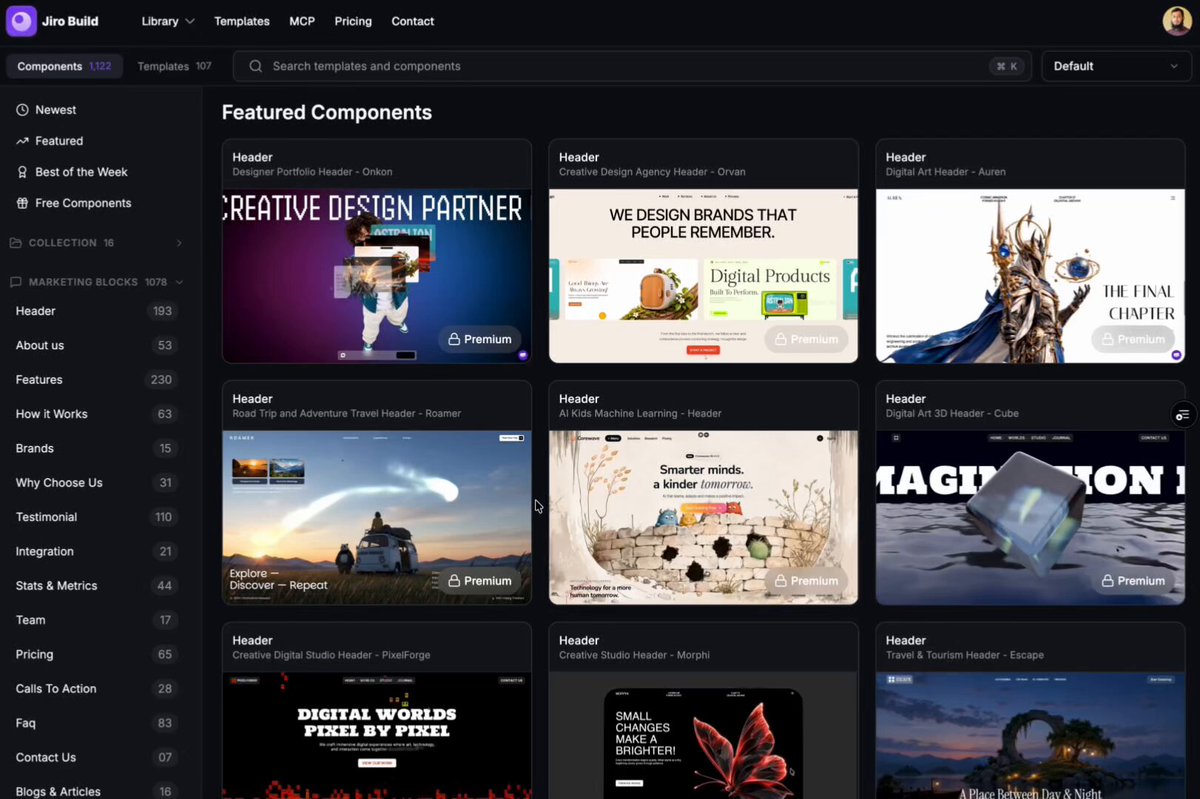
On October 4, 2026, product designer Tanzil Chowdhury (@iamtanzil_) shared a curated collection of eight essential design resources designed to streamline web interface development, offering curated component inspiration and ready-to-use prompt libraries.
Image source: @iamtanzil_ via X
When building modern web applications and landing pages from scratch, developers and designers frequently expend excessive time searching for suitable layout patterns across disjointed galleries. Unlike traditional full-site showcases that present finished landing pages without granular structural breakdowns, this curated compilation focuses specifically on individual micro-components—ranging from primary navigation bars and conversion-driven call-to-action blocks to expressive 404 error states and structured bento grids. Combined with an extensive database of AI-ready design prompts and refined interaction references, these resources provide immediate practical utility for rapid prototyping and production polish.
8 Essential Web UI/UX Design Resources to Bookmark
The eight featured resources target specific structural zones across the modern web stack, allowing creators to pinpoint inspiration exactly where it is needed:
-
Jiro (https://jiro.build) — 1,200+ Design Prompts & Animated UI Components An extensive catalog featuring over 1,200 tested design prompts paired with animated interface components. By copying structured descriptions into generative coding tools and AI agents such as v0, Bolt, and Cursor, developers can rapidly scaffold responsive layouts, complex card arrangements, and interactive transitions without starting from an empty screen.
-
Navbar Gallery (https://navbar.gallery) — Dedicated Navigation Header Inspiration A focused showcase dedicated exclusively to top navigation bars across web applications and consumer sites. It indexes diverse navigation architectures, including minimalist text header links, multi-column interactive mega menus, mobile-optimized floating pill navigations, and vertical collapsible sidebars, helping designers match header mechanics with brand identity.
-
Footer Design (https://footer.design) — Thoughtful Footer Layouts & Micro-details An archive celebrating effective footer design, an area frequently relegated to an afterthought during sprint delivery. This collection highlights footers with clear hierarchical multi-column site maps, bold typographic statements, integrated newsletter capture blocks, and subtle brand illustrations that reinforce trust and complete the user journey.
-
CTA Gallery (https://cta.gallery) — High-Impact Call-to-Action Patterns A specialized library analyzing the anatomy of effective Call-to-Action (CTA) sections. From micro-animated primary buttons and sticky bottom action banners to tiered pricing tables and non-intrusive modal overlays, this resource demonstrates proven spatial arrangements and visual contrast techniques that drive user conversion.
-
404s Design (https://404s.design) — Creative & Memorable 404 Error Pages A curated directory showing how unexpected broken links and dead ends can be transformed into memorable brand moments. Featuring interactive browser mini-games, witty illustrations, and clear path-recovery buttons, these examples illustrate how thoughtful error handling retains visitor engagement rather than causing immediate bounce.
-
Ready-made Sections (https://t.co/OJIyyfQaC4) — Modular Landing Page Building Blocks A comprehensive inventory of pre-assembled marketing sections designed to combat blank-page paralysis. It offers modular blueprints for hero units, feature comparison matrices, social proof grids, and FAQ accordions that can be adapted and combined into production-ready landing pages.
-
Bento Grid Ideas (https://t.co/45HBFMxgiU) — Modular Bento Card Visualizations A collection showcasing the bento-box grid aesthetic popularized by modern tech and hardware marketing. By organizing disparate product capabilities, metrics, and interactive widgets into harmonious rectangular cards, creators can present complex feature sets in an approachable, visually balanced layout.
-
Premium Motion Details (https://t.co/d5EKWv4jOV) — Refined Micro-Interactions & Transitions A reference hub spotlighting the micro-interactions that elevate functional websites into polished digital experiences. It provides references for smooth inertial scroll behaviors, text-mask reveal animations, refined hover physics, and tactile button feedback that impart tactile depth to web applications.
Practical Workflow: Combining Component Galleries with AI Prototyping
Leveraging component-specific repositories provides concrete advantages across contemporary frontend workflows:
- Component-First Composition: Rather than attempting to visualize an entire page at once, developers can assemble pages modularly—pairing a curated header from Navbar Gallery with a feature section from Bento Grid Ideas and a conversion block from CTA Gallery—ensuring structural consistency throughout.
- Precision Prompting for Code Assistants: Replacing vague prompts like "create a modern landing page" with explicit architectural terms (such as "a floating pill navigation bar with frosted-glass backdrop filter" or "a 3-column asymmetric bento grid") significantly improves the fidelity of generated code from LLMs.
- Polishing Overlooked Surfaces Early: By integrating references for edge-case states like 404 pages and editorial footers from the outset, development teams avoid shipping unstyled placeholders during final delivery sprints.
Original source
- Tanzil Chowdhury on X: Here are 8 design resources worth bookmarking (2026-10-04)