8 Specialized Web Design Reference Sites to Overcome Creative Block
A curated directory of 8 focused UI reference websites covering AI prompts, navigation bars, footers, high-converting CTAs, creative 404 pages, ready-to-use sec
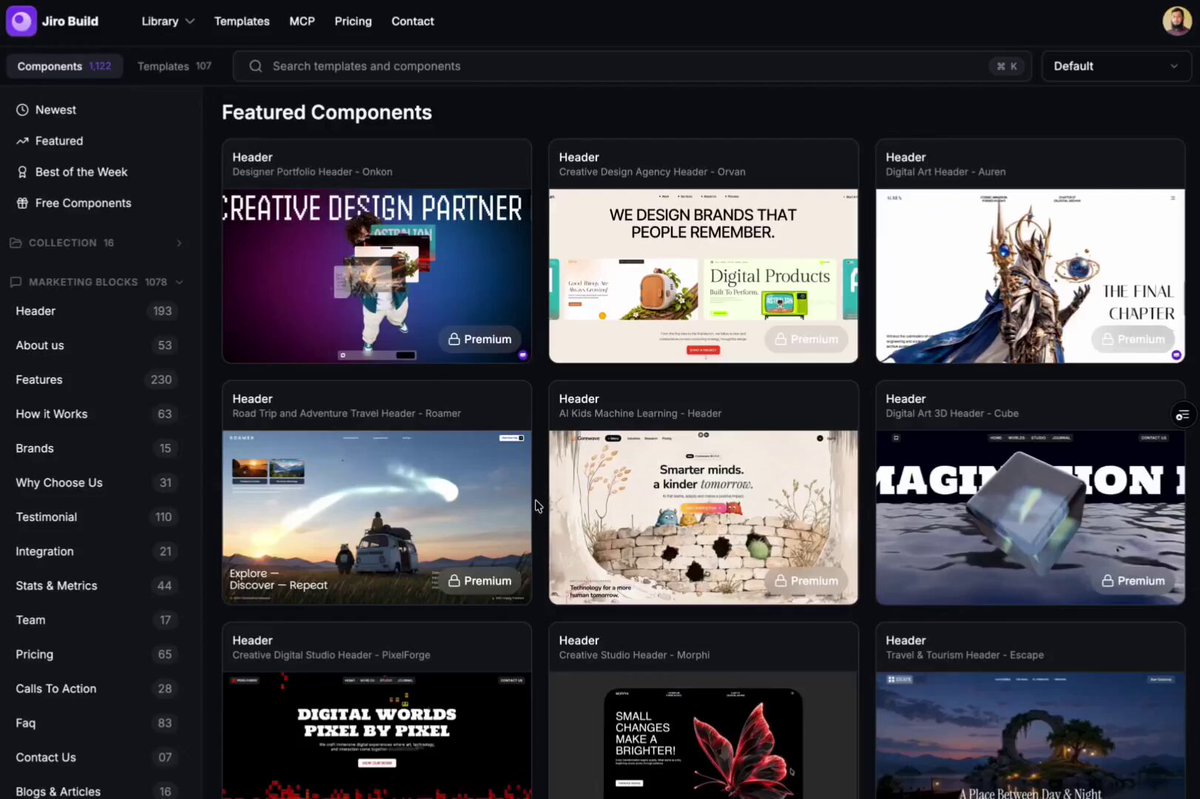
When designing and engineering modern websites or SaaS landing pages, creators and frontend developers often hit creative bottlenecks not on broad conceptual themes, but on concrete UI components. Even with a defined brand identity and typography system in place, building high-converting navigation bars, structured footers, impactful call-to-action blocks, and polished interaction details can stall momentum if relevant references are scattered. Web creator and designer @abir35627 (sanzida) shared a curated selection of 8 specialized web design reference websites that bypass generic visual galleries in favor of hyper-focused component archives.
Image source: @abir35627 (X)
Here is a breakdown of these 8 practical reference platforms to bookmark and leverage across upcoming web design and development sprints.
1. Over 1,200 Ready-Made AI Design Prompts: Jiro (jiro.build)
When generating UI mockups and layout wireframes with generative AI tools, formulating precise prompt syntax for intentional layouts and color schemes is often the slowest step.
- Site link: https://jiro.build (Original short link: https://t.co/weF6tkyAJX)
- Core offering: Over 1,200 tested, production-ready design prompts tailored for AI interface generation
- Practical takeaway: Designers can drop these prompt structures directly into Claude, ChatGPT, v0, or Midjourney to produce cohesive color palettes, responsive web layouts, and component specs without starting from an empty prompt buffer.
2. Dedicated Global Navigation Bar Archive: Navbar Gallery (navbar.gallery)
The navigation bar serves as the primary gateway for user orientation, establishing visual credibility and shaping initial interaction flows.
- Site link: https://navbar.gallery (Original short link: https://t.co/tspvgteGW3)
- Core offering: An extensive showcase of innovative and polished navigation bar (Navbar) designs from leading digital products
- Practical takeaway: Explore beyond standard logo-menu-button headers with references for floating island navbars, frosted glassmorphism overlays, responsive drawer transitions, and dynamic contextual submenus.
3. Advanced Footer Layout Concepts: Footer Design (footer.design)
Situated at the end of the page, the footer acts as the final anchor of the information architecture and a cornerstone of product legitimacy.
- Site link: https://footer.design (Original short link: https://t.co/tqwNN6iJxC)
- Core offering: A specialized reference repository dedicated entirely to website footer structures and layout improvements
- Practical takeaway: Move past plain copyright strings by analyzing high-impact footer patterns: bold brand wordmarks, organized multi-column sitemaps, integrated newsletter subscription inputs, and clean legal compliance groupings.
4. High-Converting Call-to-Action (CTA) Inspiration
The ultimate metric for landing page efficacy lies in prompting visitors toward decisive actions—signing up, requesting demos, or making purchases.
- Site link: https://t.co/xlHLvj4ONB
- Core offering: A focused collection of conversion-oriented Call-to-Action (CTA) sections, banners, and modal layouts
- Practical takeaway: Study proven conversion rate optimization (CRO) techniques including high-contrast button styling, friction-reducing microcopy, directional cues, and trust badge placements.
5. Imaginative and Engaging 404 Error Pages
Reaching a missing route or broken link can create user frustration, but an intentional 404 screen transforms an error state into an opportunity for brand affinity.
- Site link: https://t.co/CpBZxQ2Tmr
- Core offering: A gallery of creative, witty, and unconventional 404 error page implementations
- Practical takeaway: Replace generic technical warnings with lighthearted illustrations, interactive micro-games, and intuitive search bars that smoothly guide visitors back to core content rather than bouncing.
6. Ready-to-Apply Page Sections and Component Patterns
Assembling full-page wireframes requires maintaining consistent visual cadence and component spacing across every viewport.
- Site link: https://t.co/Bt99KCjDfY
- Core offering: Pre-structured, modular section patterns ready for immediate adaptation in modern web builds
- Practical takeaway: Evaluate plug-and-play architectural patterns for hero headers, feature matrices, transparent pricing tiers, and testimonial grids that maintain balanced visual proportions across viewports.
7. Bento Grid Style Layout Ideas and Card Structures
Popularized by Apple hardware launches and modern SaaS design languages, the bento grid arrangement provides structured clarity for complex feature sets.
- Site link: https://t.co/v2NMypUZgC
- Core offering: A targeted inspiration directory for bento-box-style modular card layouts and asymmetric grid hierarchies
- Practical takeaway: Learn how to assemble cards of varying aspect ratios into a balanced, rhythmic grid system that highlights primary product capabilities while organizing supplementary features cleanly.
8. Microinteractions and Fine-Grained Animation Details
The difference between functional software and a delightful digital product often lies in responsiveness to tactile user input.
- Site link: https://t.co/0NUrEDeX1Y
- Core offering: Curated references for subtle motion design, hover effects, interactive state transitions, and loading feedback
- Practical takeaway: Gain precision insights for CSS animations and modern interaction libraries (such as Framer Motion or GSAP), observing optimal easing curves, hover reactions, and scroll-triggered transitions.
Original source
- @abir35627 on X: https://x.com/abir35627/status/2107607562623529111