Uptime Kuma: Open-Source Self-Hosted Monitoring with 20-Second Checks and 90+ Alerts
An overview of Uptime Kuma, a self-hosted open-source monitoring dashboard supporting 20-second interval checks across HTTP(s), TCP, Ping, and Docker containers
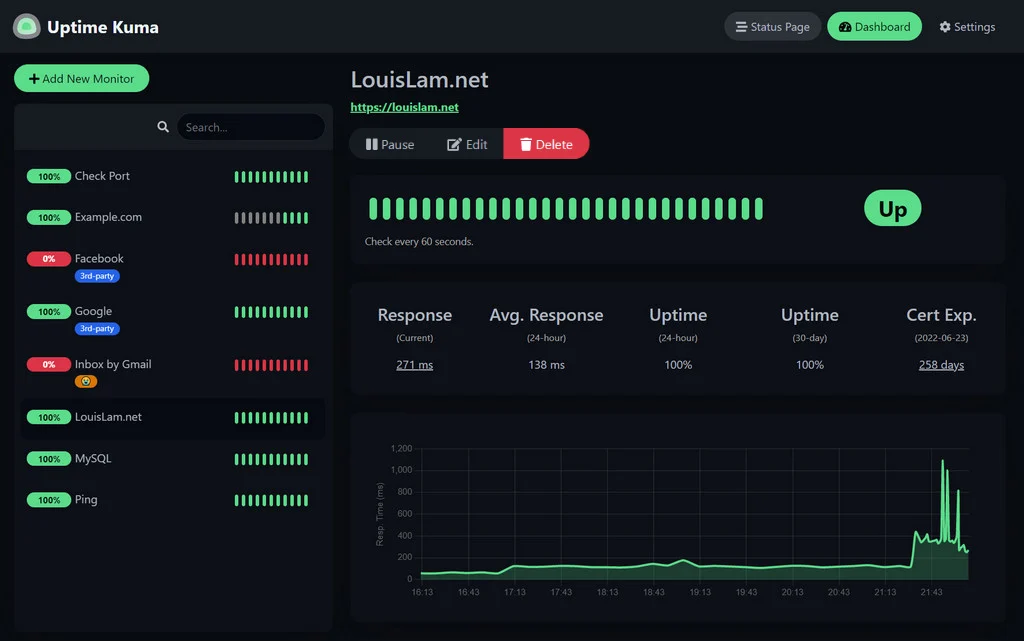
Uptime Kuma is an open-source, self-hosted monitoring tool designed to track the availability of web services, network ports, and Docker containers directly from infrastructure you control. Released under the MIT License at louislam/uptime-kuma, the repository has accumulated 93,613 GitHub stars and remains actively maintained, with release v2.5.11 published on November 12, 2026.
Image source: louislam/uptime-kuma GitHub repository
Rather than relying on external SaaS uptime vendors, self-hosting Uptime Kuma gives administrators and developers 20-second health check intervals, customizable public or private status pages, and built-in alerting across more than 90 messaging and email platforms inside a single web interface.
Core Monitoring Protocols and Alerting Architecture
Built as a responsive single-page application (SPA) backed by WebSocket communication rather than traditional polling REST endpoints, Uptime Kuma updates service statuses and latency (ping) charts in real time as checks complete.
The tool covers a wide range of protocol and infrastructure checks out of the box:
- Web and API Endpoints: Standard HTTP(s) status checks alongside HTTP(s) Keyword matching, HTTP(s) JSON Query validation, and WebSocket availability monitoring.
- Network, Containers, and Game Servers: TCP port checks, ICMP Ping, DNS record queries, inbound Push heartbeats (useful for cron jobs or internal scripts behind NAT), Steam game servers, and local Docker container status monitoring.
- Status Pages and Operational Controls: Support for multiple status pages mapped to custom domains, TLS/SSL certificate expiration tracking, proxy routing, two-factor authentication (2FA), and multi-language localization.
When an endpoint becomes unreachable or fails validation, Uptime Kuma dispatches alerts without requiring external webhook bridges. Over 90 notification integrations are built directly into the codebase, including Telegram, Discord, Slack, Gotify, Pushover, and SMTP email.
Verified Installation Paths: Docker and Node.js
According to the official repository README, Uptime Kuma listens on port 3001 by default and supports both containerized and bare-metal Node.js deployments.
To launch a standalone container with persistent local volume storage:
docker run -d --restart=always -p 3001:3001 -v uptime-kuma:/app/data --name uptime-kuma louislam/uptime-kuma:2
For Docker Compose setups, download the official compose.yaml manifest into a dedicated directory and start the service in detached mode:
mkdir uptime-kuma
cd uptime-kuma
curl -o compose.yaml https://raw.githubusercontent.com/louislam/uptime-kuma/master/compose.yaml
docker compose up -d
If you prefer running without Docker, Uptime Kuma supports major Linux distributions (such as Debian, Ubuntu, Fedora, and Arch Linux), Windows 10 (x64) or Windows Server 2012 R2 (x64) and higher, as well as FreeBSD, OpenBSD, and NetBSD. This path requires Git and Node.js 20.4 or newer, with pm2 recommended for background process management:
git clone https://github.com/louislam/uptime-kuma.git
cd uptime-kuma
npm run setup

# Recommended: run in the background with PM2
npm install pm2 -g && pm2 install pm2-logrotate
pm2 start server/server.js --name uptime-kuma
Once running, the dashboard is accessible at http://localhost:3001 (or your host IP on port 3001). If you plan to place Uptime Kuma behind a reverse proxy, the documentation notes binding the container port to 127.0.0.1:3001:3001 so it is not exposed directly on all network interfaces.
Storage Caveats and Official Domain Verification
Before deploying Uptime Kuma in production, two explicit warnings in the official documentation warrant attention:
First, network file systems such as NFS are not supported for /app/data. Because Uptime Kuma relies on local database file locking, mounting /app/data over NFS can cause corruption or instability; always map storage to a local host directory or a standard local Docker volume.
Second, the maintainers warn that third-party domains appearing in search results—specifically uptimekuma.co—are not affiliated with the project. Always reference the official GitHub repository ([https://github.com/louislam/uptime-kuma](https://github.com/louislam/uptime-kuma)) or the official homepage ([https://uptime.kuma.pet](https://uptime.kuma.pet)) for installation instructions and release artifacts. A temporary live demo ([https://demo.kuma.pet/start-demo](https://demo.kuma.pet/start-demo)) is also available for quick evaluation, though all demo data is automatically wiped after 10 minutes.
Sources
- Official GitHub Repository: louislam/uptime-kuma