Uptime Kuma: Self-Hosted Uptime Monitoring with 90+ Notification Integrations
A comprehensive look at Uptime Kuma, an open-source self-hosted monitoring tool that tracks HTTP(s), TCP, Ping, and Docker containers at 20-second intervals and
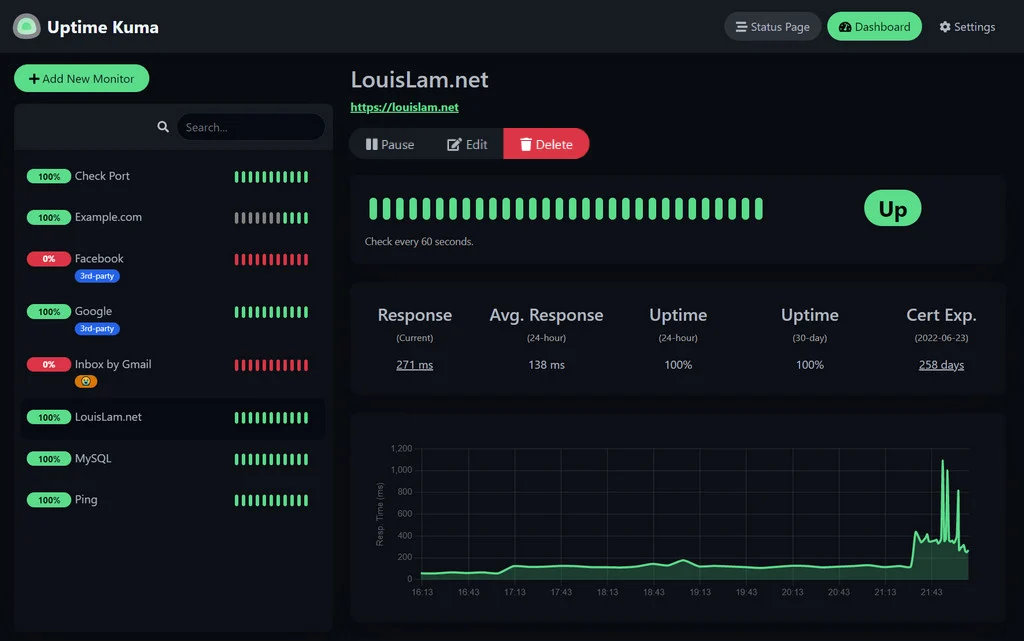
Maintaining reliable online services requires real-time visibility into whether servers, APIs, and background daemons are responsive. While commercial software-as-a-service (SaaS) monitoring platforms offer turn-key setups, their recurring subscription tiers scale aggressively with host counts, and they cannot easily monitor machines tucked behind private network perimeters. Uptime Kuma is an open-source, self-hosted uptime monitoring dashboard that runs entirely on user-controlled hardware without reliance on external cloud vendors.
Image source: louislam/uptime-kuma GitHub repository
Designed as a self-hosted alternative to platforms like Uptime Robot, Uptime Kuma provides an intuitive web interface for registering targets and receiving instant alerts when outages occur. The project has gathered more than 93,000 GitHub stars and maintains steady development activity, releasing version 2.5.11 on November 12, 2026. Thanks to its responsive Single Page Application (SPA) dashboard and comprehensive alert system, it has become a staple across home labs, DevOps teams, and enterprise internal networks.
Flexible Protocols and 20-Second Verification Cycles
The core strength of Uptime Kuma lies in its broad range of supported check types and verification strategies. Rather than limiting checks to basic web pings, it accommodates network-layer probes and application-specific validations.
- Web and API Verification: Beyond verifying standard HTTP(s) status codes, operators can configure HTTP(s) Keyword checks to confirm expected text strings in web responses, or execute HTTP(s) JSON Queries to evaluate structured REST API payloads.
- Network Layer Inspection: Network diagnostics include TCP port checks to test service availability on arbitrary ports, ICMP Ping checks for host reachability, and DNS Record validation to verify name resolution integrity.
- Containers and Real-Time Connections: The tool monitors bidirectional WebSocket connections and can inspect the execution state of Docker containers running on the host system.
- Heartbeat Push Monitoring: For scheduled cron jobs, background workers, or backup scripts, Uptime Kuma supports incoming Push heartbeats. If a script fails to report back within the expected timeframe, the system flags an outage.
Checks can run at intervals as brief as 20 seconds, ensuring minimal latency between an incident and its detection. The user interface displays uptime percentage badges, interactive latency history charts (Ping charts), and SSL/TLS certificate expiration countdowns, giving operations teams immediate operational clarity.
Over 90 Notification Services and Public Status Pages
Incident detection is only effective when alerting systems reliably reach on-call personnel. Uptime Kuma includes out-of-the-box integration with more than 90 notification channels, including Telegram, Discord, Slack, Gotify, Pushover, and standard SMTP email.
Configuring an alert channel requires only entering a webhook URL or bot API token directly inside the settings panel, eliminating the need to write custom notification scripts. Teams can establish tailored notification policies—for example, routing general warnings to a shared Slack channel during business hours while triggering high-priority mobile push alerts via Telegram or Pushover for overnight outages.
In addition to internal monitoring, Uptime Kuma includes a customizable Status Page generator. Operators can deploy multiple read-only status pages detached from the administrative dashboard, assign them to distinct public domain names, and customize branding. Administrative access is secured with Two-Factor Authentication (2FA) and reverse proxy compatibility, allowing safe exposure over public networks.
Deployment Workflows and Operational Considerations
Uptime Kuma is lightweight and ships as a container image as well as a standard Node.js application. The most common deployment path relies on Docker Compose:
mkdir uptime-kuma
cd uptime-kuma
curl -o compose.yaml https://raw.githubusercontent.com/louislam/uptime-kuma/master/compose.yaml
docker compose up -d
Operators can also launch the container with a single Docker command, binding to port 3001:
docker run -d --restart=always -p 3001:3001 -v uptime-kuma:/app/data --name uptime-kuma louislam/uptime-kuma:2
For bare-metal or virtual machine environments running without Docker, Uptime Kuma supports Node.js 20.4 or higher on Linux distributions, Windows 10/Server, and BSD. Background execution is managed via process managers such as pm2:
git clone https://github.com/louislam/uptime-kuma.git
cd uptime-kuma
npm run setup
npm install pm2 -g && pm2 install pm2-logrotate
pm2 start server/server.js --name uptime-kuma
When provisioning storage, operators must observe a critical architectural constraint: Network File Systems such as NFS are explicitly unsupported due to database concurrency and locking characteristics. Volume mounts must target local host storage or internal Docker volumes to prevent database corruption. Furthermore, users should note that certain third-party domains appearing in search engine rankings (such as uptimekuma.co) are unaffiliated with the development team. All software downloads, documentation, and configuration references should originate exclusively from the official GitHub repository.
Sources
- GitHub Repository: louislam/uptime-kuma
- Official Website: uptime.kuma.pet
- Latest Release Notes: v2.5.11 Release