unslop: Open-Source Agent Skill for Polishing Vibecoded AI UI
A deep dive into unslop, an open-source agent skill for Claude Code, Codex, and Google Antigravity that audits telltale purple gradients, emoji labels, and shou
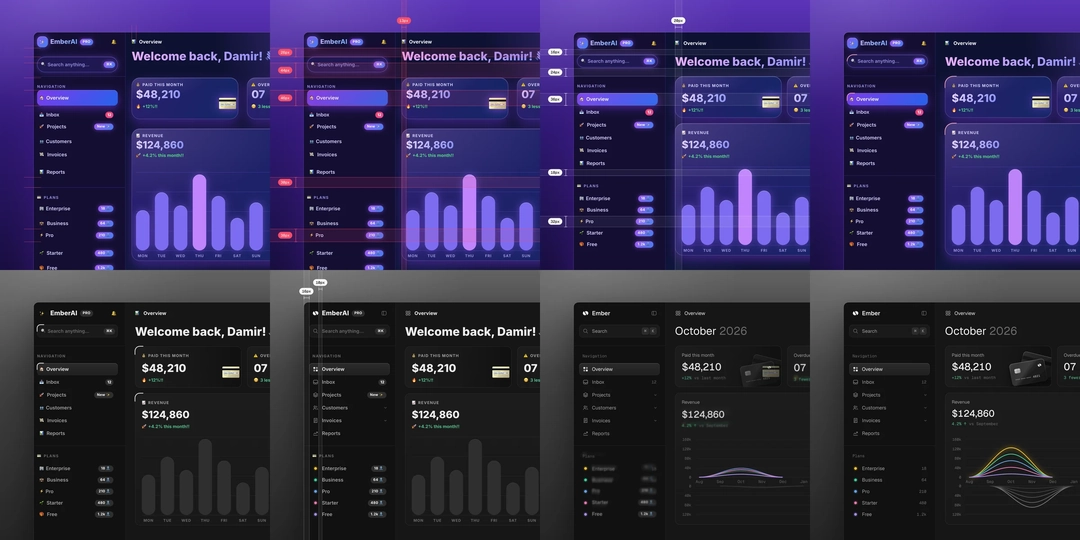
As LLM-driven vibecoding gains widespread adoption for rapid interface prototyping, developers frequently encounter recurring visual artifacts: generic purple gradients, neon glows, emoji-heavy button labels, and uneven padding. Created by designer and developer Damir Sokolovsky, the open-source skill 'unslop' directly addresses this issue by auditing AI-generated UI clichés and systematically restructuring them into production-ready frontends with distinct product character.
Image source: https://github.com/heydamir/unslop
Rather than acting as a standalone software package, unslop functions as an agent skill specification. It plugs directly into local workflows for Claude Code, OpenAI Codex CLI, and Google Antigravity, guiding autonomous agents through structured design revisions.
Systematic Diagnostic and 9-Stage Refinement Passes
When prompted with generic redesign commands, conversational coding agents often overwrite critical codebases or introduce unexpected layout regressions. unslop mitigates this by enforcing an audit-first phase: before altering a single line of code, the skill identifies concrete UI flaws and proposes an explicit design direction tailored to the product's identity.
If an interface is already structurally sound, unslop avoids disruptive redesigns and suggests minimal refinements. When execution begins, it proceeds through 9 sequential passes modelled after a professional design redline review:
- Spacing: Normalizes erratic margins and padding into consistent 8px grids or design token structures.
- Color: Strips out generic purple glows and limits the palette to one or two intentional brand accent moments.
- Icons: Replaces out-of-context decorative emojis and mismatched SVG sets with functional iconography.
- Copy: Condenses verbose, exaggerated AI marketing copy into direct product language.
- Type: Balances typographical hierarchy, contrast, line-heights, and font weights.
- Layout: Realigns visual flow and information grouping across dashboards and landing pages.
- Details: Cleans up border radii, dividers, and shadow elevations.
- Visuals: Replaces floating abstract graphics with concrete product UI elements.
- Motion: Eliminates distracting ambient animations while preserving purposeful micro-transitions.
Supported environments include Next.js, React, Vue, Svelte, Tailwind CSS, and plain HTML/CSS. If source code is not immediately accessible, supplying a live website URL triggers Playwright in headless mode to capture visual snapshots and generate targeted remediation steps.
Installation and Multi-Agent Setup
unslop can be installed globally or scoped to a single project across supported agent runtimes.
Claude Code Setup
git clone https://github.com/heydamir/unslop
mkdir -p ~/.claude/skills && cp -r unslop/skills/unslop ~/.claude/skills/
To restrict the skill to a specific repository, place it inside .claude/skills/ at the project root.
Codex Setup
$skill-installer install https://github.com/heydamir/unslop/tree/main/skills/unslop
For manual installation, clone into ~/.agents/skills/ globally or .agents/skills/ locally.
Google Antigravity Setup
git clone https://github.com/heydamir/unslop
mkdir -p ~/.gemini/antigravity/skills && cp -r unslop/skills/unslop ~/.gemini/antigravity/skills/
Once installed, invoke the skill directly using command prefixes or standard natural language:
/unslop this dashboard
/unslop the hero of https://example.com
/unslop my landing page and make the story video so I can post it
Dependencies and External Service Caveats
Running live URL diagnostics and generating "story videos"—sub-10-second square videos demonstrating the step-by-step transformation—requires local headless browser tooling:
npm install -D playwright
npx playwright install chromium
Rendering the story video also requires ffmpeg installed and available on the system PATH.
When hero sections require custom object or scene assets, unslop does not bundle an internal image generator. Instead, it offers integration with external image providers (fal, Replicate, OpenAI Images, or Higgsfield) configured as Model Context Protocol (MCP) servers. The skill explicitly displays the intended prompt and prompts for user confirmation before executing any paid API calls. Standard dashboard and web application workflows function entirely without external image services.
unslop is distributed under the Creative Commons Attribution 4.0 International license (CC BY 4.0), permitting commercial use, modification, and redistribution provided attribution is given to Damir Sokolovsky (@heydamir) alongside a link back to the repository.
Sources
- GitHub Repository: heydamir/unslop
- Damir Sokolovsky on X: Unslopping Series Announcement
- X Discussion: @stellargent_lab unslop Overview