TtWA Released: Browser-Based Text Animation Tool Supporting WebP, APNG, and Transparent MOV
TtWA is a web-based text animation tool supporting WebP, APNG, and transparent MOV exports for OBS overlays, video editing, and virtual tabletop setups with mul
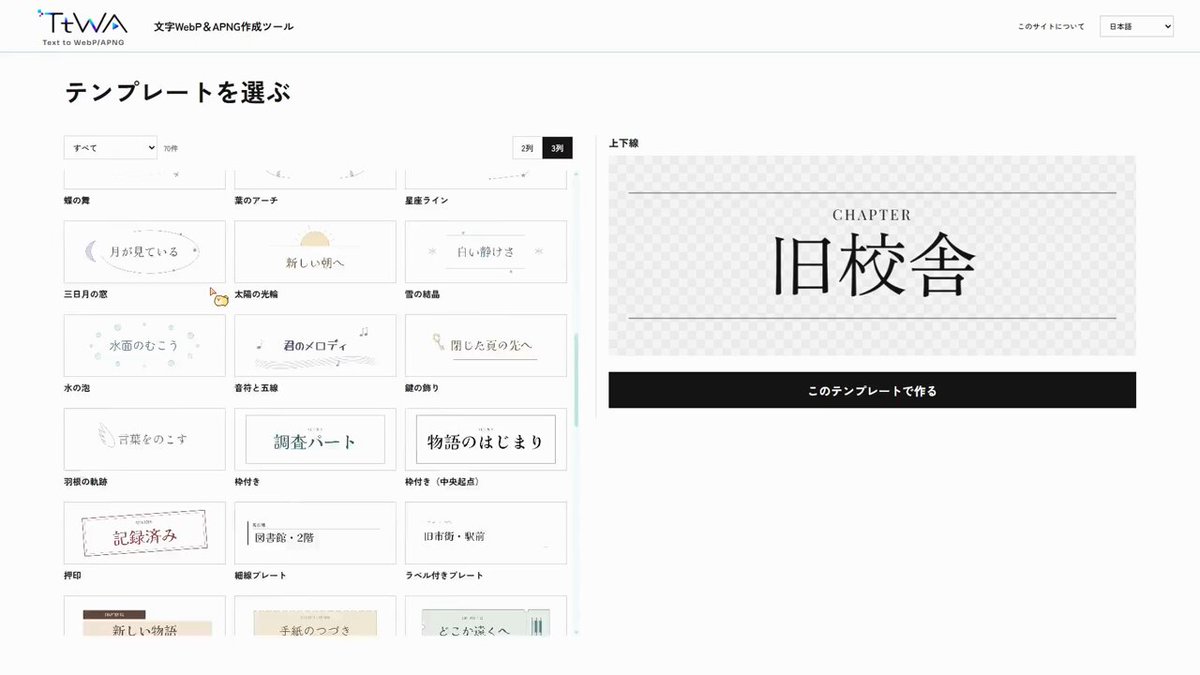
On October 5, 2026, developer and creator Maki (@Maki_trpg_c) officially released TtWA, a web-based text animation tool that allows creators to produce dynamic animated typography directly in their browser without installing specialized software. Available at ttwa.maki01.net, TtWA is tailored for content creators seeking quick, transparent-background text animations for OBS live streams, video editing cut-ins, and virtual tabletop setups such as Ccfolia.
Image source: @Maki_trpg_c / X
Creating animated typography traditionally required heavyweight motion graphic suites like Adobe After Effects or complex multi-step rendering pipelines. For solo creators, streamers, and virtual tabletop game masters who simply need a clean transparent motion title or announcement cut-in, this steep learning curve and software overhead created significant friction. TtWA addresses this practical bottleneck by delivering a streamlined web environment where typing text and choosing a motion preset instantly yields production-ready motion graphics.
Core Export Capabilities: WebP, APNG, and Transparent MOV
The primary advantage of TtWA lies in its flexible support for modern transparent file formats optimized across both web platforms and video editing timelines.
- WebP and APNG (Animated PNG) Support: Generates lightweight animated image formats optimized for web platforms and browser-based virtual tabletops. Users can drop transparent animated titles into platforms like Ccfolia without ballooning file sizes.
- Transparent MOV (Alpha Channel Video) Export: Outputs alpha-channel video ready for immediate compositing across standard non-linear video editors (NLEs) or OBS Studio broadcasting scenes without requiring green-screen chroma keying.
- Ready-to-Use Motion Presets: Includes a library of typography animation templates—such as pop-ins, fades, and kinetic reveals—allowing users to produce polished motion graphics without manually configuring keyframes or easing curves.
Multilingual Typography and Current Korean Font Support
TtWA was built with international usability in mind, providing language and typography support across multiple regions.
- Four-Language Support: The tool handles UI workflows and text rendering in Korean, Japanese, English, and Chinese, enabling creators across different regions to work without language barriers.
- Korean Font Availability and Caveats: According to the creator (@Maki_trpg_c), Korean font rendering is supported out of the box, ensuring Korean text displays properly. However, as noted in the creator's release notes, the selection of available Korean typefaces is currently somewhat limited compared to primary fonts.
- Client-Side Browser Processing: Because rendering relies on client-side browser performance, export times and responsiveness may vary depending on local hardware capabilities, selected resolutions, and animation duration.
Practical Applications and Zero-Install Accessibility
TtWA requires no account registration, paid subscription, or local desktop software installation. Creators can immediately start designing by visiting the official web portal (ttwa.maki01.net).
- Live Streamers and Broadcasters: Quickly creating dynamic alert banners, stream titles, and transparent text overlays for OBS Studio or PRISM Live Studio without complex graphic setups.
- Video Editors and Short-Form Creators: Generating transparent MOV cut-ins and animated title cards for YouTube, Reels, and TikTok without booting dedicated VFX plugins.
- TRPG and Virtual Tabletop GMs: Crafting scenario introductions, battle start announcements, and location headers as APNG or WebP files for platforms like Ccfolia.
Sources
- TtWA Official Website: ttwa.maki01.net
- Creator Official X Announcement (@Maki_trpg_c): TtWA Release Post