Qwen Code: An Open-Source AI Coding Agent CLI Spanning Terminals and Editors
An overview of Qwen Code, an open-source AI coding agent supporting Auto-Memory, MCP, SubAgents, and multi-LLM protocols across terminals, desktops, and IDEs.
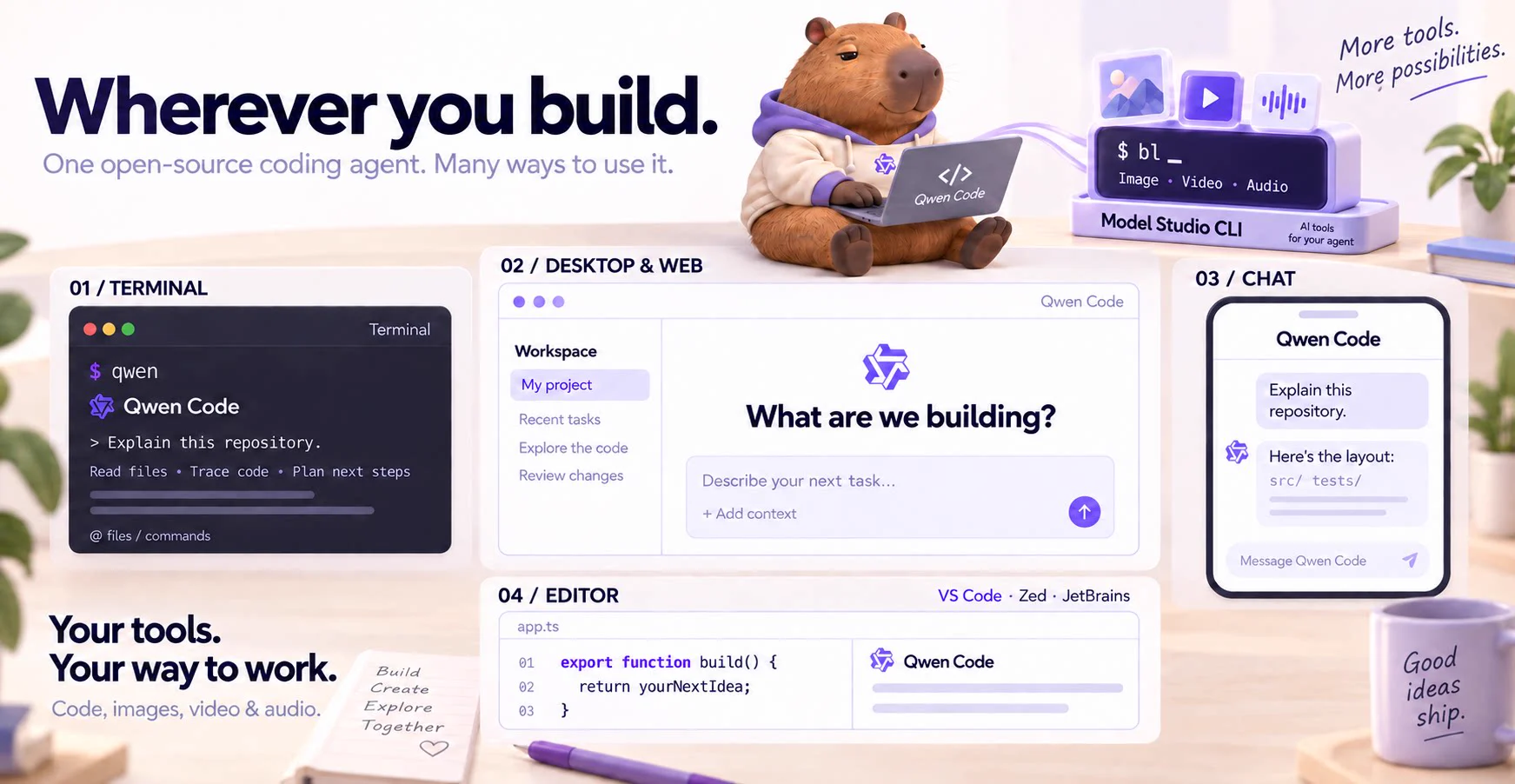
Qwen Code (QwenLM/qwen-code) is an open-source AI coding agent designed around the terminal while extending into code editors, a desktop application, a browser-based Web UI, and chat integrations. Released under the Apache License 2.0, the project avoids locking developers into a single large language model (LLM) vendor by letting users switch across multiple cloud APIs and local model backends at runtime. Created in June 2025, the repository remains actively maintained, with stable release 0.27.3 published on November 13, 2026 to refine its Web Shell interface and background task handling.
Image source: QwenLM
Unlike a plain terminal chatbot that only answers text prompts, an AI coding agent inspects repository files, executes shell commands, and coordinates multi-step edits directly inside a project workspace. Qwen Code packages this agent execution harness as open-source software so developers can combine their preferred interface with whichever model provider fits their setup.
Core Architecture and Multi-Protocol Model Support
A central design choice in Qwen Code is runtime protocol flexibility. Rather than tying its workflow to one proprietary backend, it supports OpenAI, Anthropic, Gemini, and Qwen APIs alongside local inference servers such as Ollama and vLLM, allowing developers to switch providers mid-workflow.
Several agentic building blocks work out of the box from the first session:
- Auto-Memory and Skills: Mechanisms for retaining context across sessions and loading reusable task routines.
- SubAgents: Delegation support for splitting complex coding tasks across specialized sub-agents.
- MCP (Model Context Protocol): Built-in support for the open protocol that connects AI models to external tools and data sources in a standardized way.
- Experimental Orchestration: Higher-level capabilities such as Agent Teams, Agent Arena, and Dynamic Workflows are also bundled in the codebase, though official documentation marks them as experimental or opt-in.
Alongside the main release line, the maintainers also offer Qwen Code 1.0 Preview (v1.0.0-preview), an open-source preview track that merges the agent harness capabilities of Qoder with Qwen Code.
Installation and Everyday Developer Workflow
Qwen Code offers multiple installation paths depending on your operating system and package manager. Developers can use a standalone shell script, install via Homebrew on macOS or Linux, or install globally through npm. When installing via npm, Node.js 22.0.0 or newer is strictly required.
# Standalone installer for macOS / Linux
curl -fsSL https://qwen-code-assets.oss-cn-hangzhou.aliyuncs.com/installation/install-qwen-standalone.sh | bash

# Homebrew installation (macOS / Linux)
brew install qwen-code

# npm installation (requires Node.js 22+)
npm install -g @qwen-code/qwen-code@latest
After restarting the terminal so environment variables take effect, navigating to a project directory and running qwen launches an interactive agent session. Running /auth inside the session lets you sign in with a Qwen Plus or Pro subscription or configure an external provider API key before asking the agent to explain or modify the repository.
Beyond the command line, Qwen Code adapts to several everyday surfaces. Developers can download a standalone desktop app for macOS, Windows, and Linux, or integrate the agent into VS Code, Zed, and JetBrains IDEs. Running qwen serve --open launches a browser-based Web UI, and built-in channel integrations connect workflows to messaging platforms including Telegram, DingTalk, WeChat, and Feishu.
Notable Changes in v0.27.3 and Practical Caveats
The changelog for stable release 0.27.3 (dated November 13, 2026) highlights ongoing work on multi-session management, background task visibility, and external channel automation:
- Web Shell and Session List Refinements: Status chips above the Web Shell composer now track unfinished background workflows, shells, monitors, and local agents in place of the older status-bar task pill. Sidebar session lists also expand 10 sessions per click with a remaining count indicator rather than rendering every session at once.
- Managed MCP Inventory Limits: Managed MCP now counts up to 32 live selections, preserves a 16-enabled cap, and retains up to 96 removed-entry snapshots so configurations can be recovered cleanly.
- Channel Notifications and Verification Flow: A send-only
dingtalk-webhookchannel posts Markdown task notifications to DingTalk group robots, while the sandboxed/verifyflow deepens Git checkouts to include pull request and base history when handling force-pushes or missing commits.
Before adopting Qwen Code for critical workflows, a few documented caveats are worth noting. The browser Web UI (qwen serve --open), Dynamic Workflows, and internal flags such as experimental.unifiedAgentLoop remain explicitly labeled as experimental and may change across updates. In addition, while the repository README and changelog thoroughly document supported features and configuration paths, independent comparative benchmarks against competing coding agents are not established in the primary repository documentation.
Sources
- Official GitHub Repository: QwenLM/qwen-code