Orkas: An Open-Source Local-First Desktop AI Team Coordinating 16 Specialist Agents and Local CLI Tools
An architectural overview of Orkas, an MIT-licensed local-first desktop AI platform where a central Commander breaks goals into to-dos and coordinates 16 built-
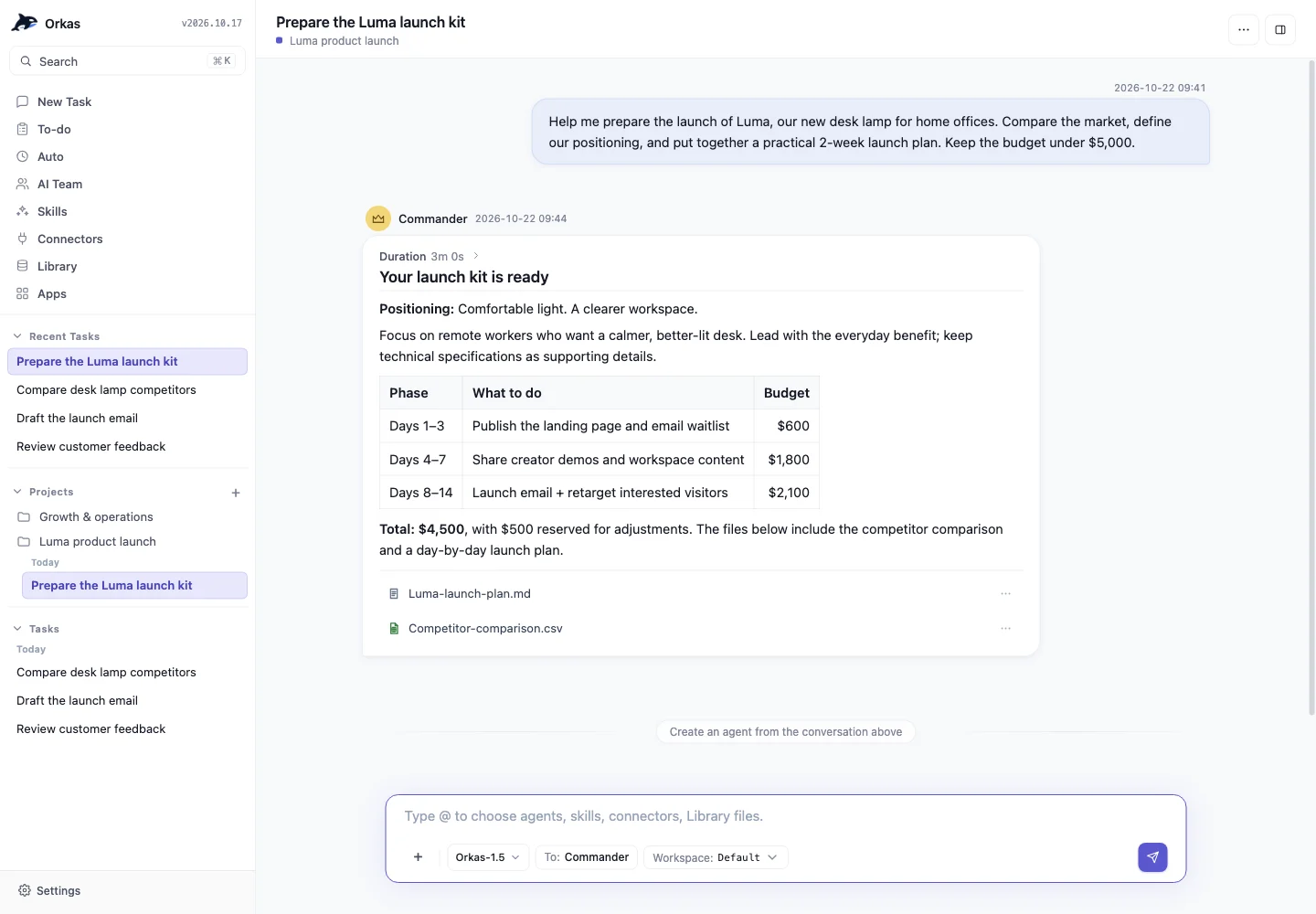
Orkas is an open-source, MIT-licensed desktop AI application designed to act as a coordinated team rather than a single-turn chat interface. Available as a free packaged desktop app for macOS and Windows as well as an open-source repository, it centers on a central "Commander" agent that breaks user goals into structured to-do lists and delegates work across 16 built-in specialist agents and locally installed command-line (CLI) AI tools.
Image source: https://github.com/Orkas-AI/Orkas
In typical AI workflows, handling multi-step projects—such as researching a market, drafting copy, generating media, and modifying code—requires switching between separate interfaces and repeatedly re-explaining context. Orkas addresses this friction by keeping goals, rules, memory, and files inside persistent local projects on the user's computer while coordinating both built-in specialists and external terminal-based agents under a single plan.
How the Commander Coordinates 16 Built-In Agents and Local CLI Sessions
At the core of Orkas is a multi-agent orchestration workflow led by the Commander. When given an objective, the Commander analyzes the scope, creates a shared to-do list split between human users and AI agents, and assigns each task to the appropriate specialist.
Out of the box, the application ships with 16 built-in specialist agents, each equipped with its own skills, memory, and tools. Users can also browse over 30 additional agents in the Orkas marketplace or ask the Commander to build custom agents by describing a needed role.
- Research and Analysis:
DeepResearcherproduces source-verified research reports that flag contradictions;SeoGeoAgentaudits URLs for technical health, Core Web Vitals, and AI-answer (GEO) citability; andStockAnalyserruns equity research, factor screens, backtests, and portfolio risk checks. - Content, Design, and Media:
ContentWriterdrafts articles and newsletters;PptMakerbuilds editable PPTX slide decks;ImageStudiogenerates posters and infographics;VideoStudiohandles narration, captions, dubbing, and reference-video recreation using user footage;VoiceStudiomanages multi-voice audio and mixing; andUIDesignercreates editable HTML-first interfaces from PRDs, screenshots, or Figma material. - Engineering and Office Deliverables:
ProductDeveloperperforms repository-aware coding, bug fixes, refactoring, and reviews, whileOfficeWorkercreates, edits, and checks Word, Excel, PowerPoint, and PDF documents individually or in batches. - E-Commerce Operations: Five dedicated e-commerce agents cover product sourcing (
ECommerceResearcher), brand-voice listings and scripts (ECommerceWriter), customer review root-cause analysis (ECommerceReviewer), sales and refund reconciliation (ECommerceAnalyzer), and catalog or pricing execution through user-connected tools (ECommerceOperator).
Alongside its native agents, Orkas integrates directly with local CLI agents—terminal-based tools that operate directly on local files and development environments. If a user already has coding agents such as Claude Code, Codex, or OpenCode, or personal agents like OpenClaw and Hermes-Agent installed on their machine, Orkas launches them as local sessions alongside its built-in specialists. This allows the Commander to keep one unified plan across tools—for example, routing a bug fix to a coding CLI agent while assigning release notes to a writing agent in the same chat.
Project Continuity, Scheduled Automations, and Local-First Storage
Rather than resetting context after every prompt, Orkas structures ongoing work around persistent state and controlled automation.
- Persistent Projects: Every project stores its own goals, rules, memory, and files, allowing new conversations to pick up where previous sessions left off without re-briefing.
- To-Dos and Auto-Advance: Each project maintains a shared task list for people and agents. When Auto-advance is enabled, the agent team automatically picks up the next pending item and returns completed deliverables for human review.
- Scheduled Automations: Routine tasks can be scheduled to run hourly, daily, weekly, or monthly on the user's machine. Starting in v1.9, scheduled automations automatically catch up on their most recent missed run within a 12-hour window when the computer wakes from sleep or Orkas starts.
- External Connectors with Approval Gates: Orkas connects to external tools including Gmail, Google Calendar, Sheets, Drive, Notion, Slack, Shopify, and Stripe. By default, it pauses to ask user permission before sending messages, posting content, or deleting records.
Under its local-first architecture, conversations, files, knowledge bases, and custom agent definitions remain on the user's local disk by default. When configured with user-supplied API keys, model requests travel directly from the local machine to the chosen AI provider; only the built-in Orkas model routes through Orkas's managed model service.
Setup Paths, Model Flexibility, and Verified Limitations
Users can download the prebuilt macOS or Windows desktop installer for free, which includes 500 starter credits for the built-in Orkas model so the app works immediately without an external API key.
For teams or developers who prefer their own model providers, Orkas provides a unified model setting across the Commander and built-in agents supporting API keys from Claude, OpenAI, Gemini, DeepSeek, Kimi, GLM, Qwen, MiniMax, and Doubao, as well as local OpenAI-compatible endpoints (local HTTP interfaces exposed by tools running on the user's machine). Voice input is also supported in both the packaged app and source builds once an Orkas API Key is configured under Settings -> Models and system microphone access is granted.
Before adopting the tool, several documented constraints and boundaries should be noted:
- Packaged App vs. Open-Source Build Differences: According to the official repository documentation, shared projects (inviting teammates or virtual assistants to collaborate on to-dos), optional cloud sync, and publishing local internal tools as public web apps are available only in the packaged desktop release and are not supported when building directly from the open-source code.
- Prerequisite Local Installation for CLI Agents: Orkas orchestrates local sessions for Claude Code, Codex, OpenCode, OpenClaw, and Hermes-Agent, meaning those CLI tools must already be installed and configured on the user's machine before Orkas can invoke them.
- Media Input Scope and Unverified Metrics:
VideoStudio's reference-video recreation requires a readable local video file and does not include built-in downloading from social media share links. Additionally, this overview is based strictly on the repository's documented architecture and feature specifications; token consumption overhead across multi-agent runs and long-term execution reliability have not been independently benchmarked.
Sources
- Official GitHub Repository: Orkas-AI/Orkas