Creating Motion Videos with DeepSeek v4.1 Flash Without Opus 5.5: OpenDesign Motion Workflow Tips
A practical guide to OpenDesign Motion, the open-source alternative to Claude Motion, demonstrating how to generate complete motion graphics videos using the li
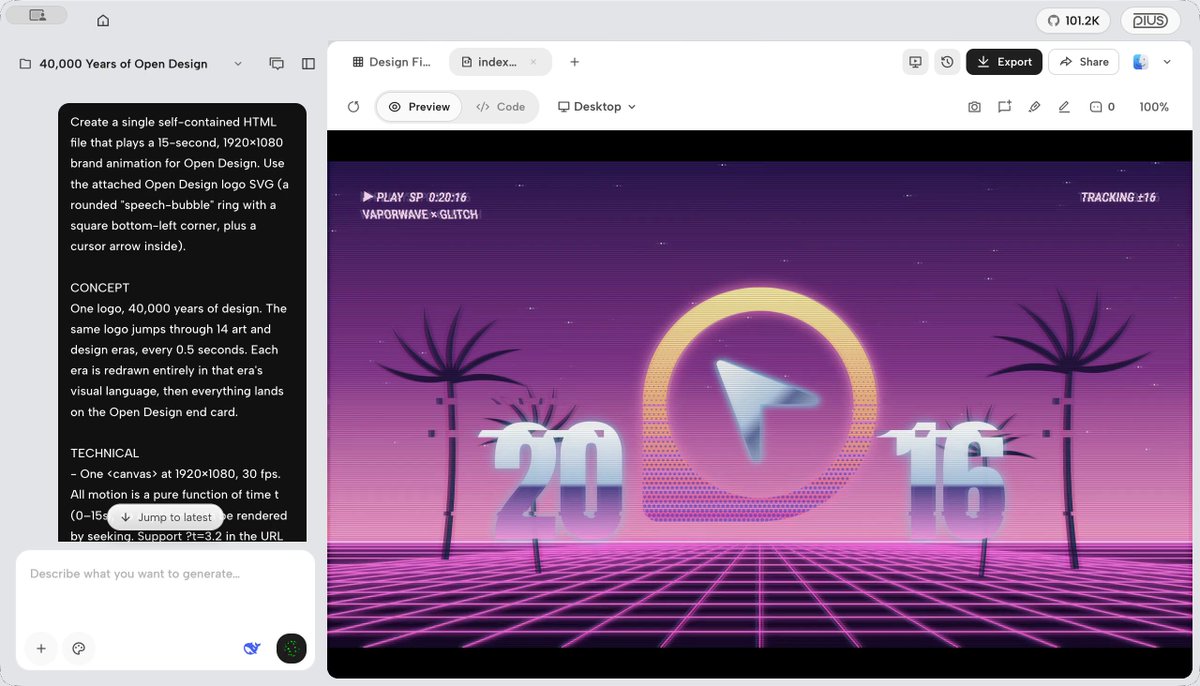
The OpenDesign team (@OpenDesignHQ) has demonstrated that creators can generate complete motion graphics videos from a single prompt using the lightweight DeepSeek v4.1 Flash model on OpenDesign Motion—without requiring high-cost proprietary models such as Claude Opus 5.5.
Image source: @OpenDesignHQ (X)
Positioned as an open-source alternative to Claude Motion, OpenDesign Motion enables developers and motion designers to craft algorithmic animations through an open architecture. The release of three public demonstration videos showcases OpenDesign's claim that cost-effective, flash-class models can rival flagship models like Opus 5.5 in motion coordination and design fidelity.
OpenDesign Motion’s Open Architecture (BYOA and BYOM)
The primary technical pillar of OpenDesign Motion is its commitment to vendor neutrality, avoiding lock-in to any single model provider or runtime ecosystem.
- BYOA (Bring Your Own Agent): Creators can hook their existing coding agents, task orchestrators, or local tooling directly into the OpenDesign Motion environment.
- BYOM (Bring Your Own Model): Rather than being tied to a single proprietary model, the framework allows users to connect any chosen model (any model)—such as DeepSeek v4.1 Flash—to generate and orchestrate motion specifications.
- Code-Driven Motion Orchestration: Without managing complex nonlinear editor (NLE) plugin stacks, users can go from a conceptual prompt to rendered keyframes and vector animations using only their chosen model and OpenDesign's runtime.
Moving away from lock-in to a single model, this architecture gives creators the flexibility to select their preferred model according to workflow requirements and budget.
Teardown of the Three DeepSeek v4.1 Flash Demos
To prove the practical capabilities of the lightweight model, OpenDesign published three distinct video demonstrations created entirely with DeepSeek v4.1 Flash:
- Demo 1 (End-to-End Motion Generation): From the initial natural language idea to the final rendered video clip, no Opus 5.5 was used, relying entirely on DeepSeek v4.1 Flash. The demo illustrates typographic transitions and synchronized geometric motion graphics.
- Demo 2 (Self-Generated Launch Video): OpenDesign Motion tasked its own system with producing its official launch announcement video using DeepSeek v4.1 Flash. The resulting video displays structured kinetic typography and cohesive layout choreography.
- Demo 3 (Multi-Scene Visual Consistency): Highlighting the core philosophy that "beautiful motion design shouldn't be tied to one model," this showcase demonstrates multi-scene motion styling orchestrated through DeepSeek v4.1 Flash.
OpenDesign stated that DeepSeek v4.1 Flash can produce motion videos on par with Opus 5.5. Following the demos, individual community replies similarly noted that the output matched Opus 5.5 quality, while other developers expressed interest in testing the workflow.
Practical Implementation Tips and Production Caveats
When integrating DeepSeek v4.1 Flash with OpenDesign Motion into real-world production pipelines, teams should keep several operational considerations in mind:
- Modular Scene Prompting: While lightweight flash models excel in fast turnaround and low token costs, dense multi-layered typography or intricate vector choreography benefits from modular scene breakdowns. Specifying explicit keyframe milestones, easing properties, and duration budgets per scene prevents context degradation.
- Staged Preview Verification: In programmatic motion workflows, rendering consistency depends on local runtime environments, browser engines, and deterministic code execution. Implementing staged keyframe preview passes before executing full-sequence renders ensures animation timing matches expectations.
- Tooling Environment & Token Optimization: Initial user feedback has focused on desktop ergonomics (such as requests for a native dark mode in the Windows client) and optimizing token efficiency during code synthesis. Checking official documentation and repository guidelines for model-specific system prompts ensures predictable output quality.
Original source
- OpenDesign Official X (@OpenDesignHQ): https://x.com/OpenDesignHQ/status/2111024434958275063