Implementing 500 Art Styles Without LoRAs: Krea 2 Prompt Style Library and Clio Preview
Explore the 500-style prompt library for Krea 2 created by Reddit user u/Dear-Spend-2865 alongside the open-source ComfyUI tool clio-style-preview. Learn how lo
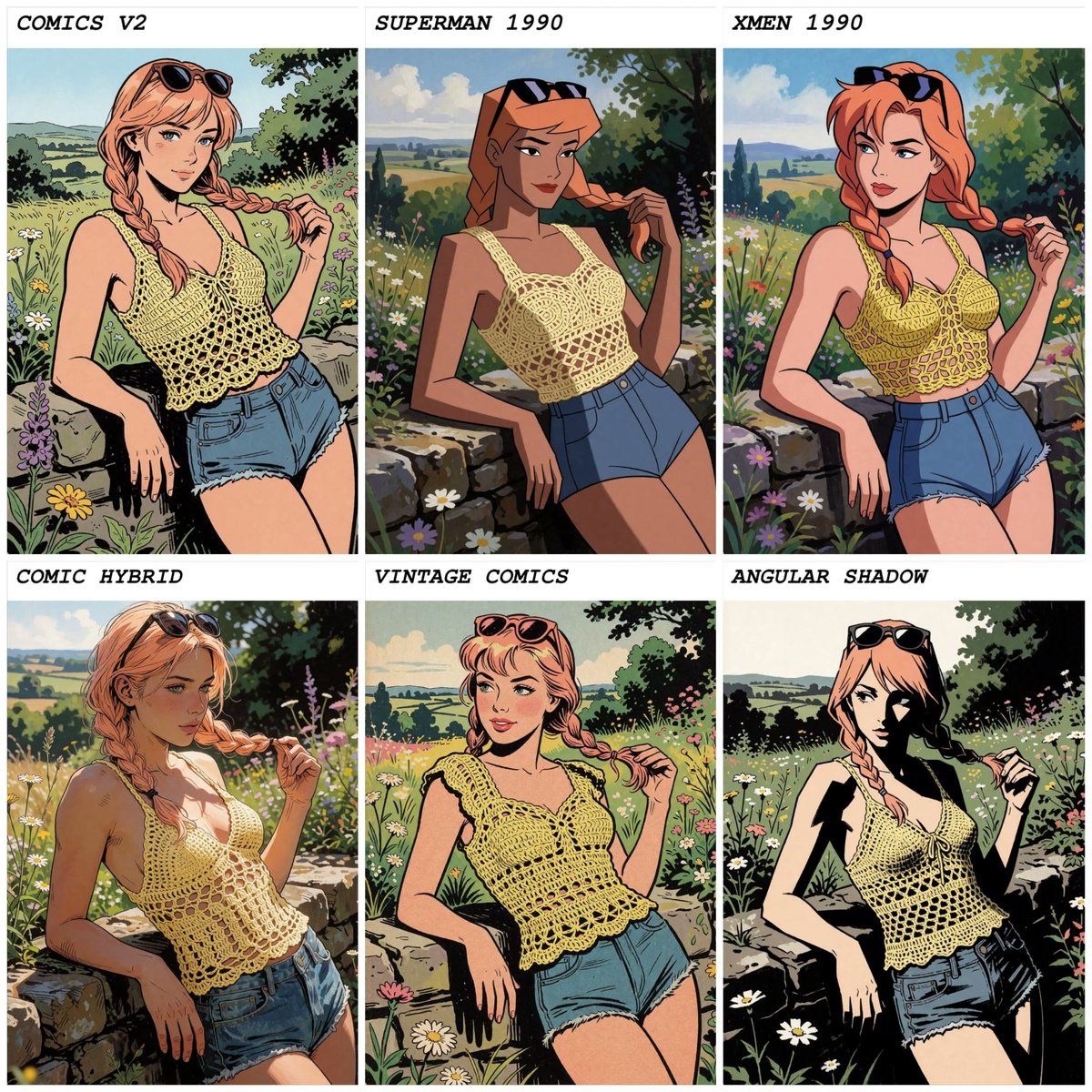
On October 5, 2026, Reddit user u/Dear-Spend-2865 from the Stable Diffusion community released an extensive 500-style prompt catalog for Krea 2 (and KREA 2 Turbo). Distributed as spreadsheets and .txt wildcard files, this open collection demonstrates that nuanced artistic aesthetics can be reliably steered entirely through long-form natural language prompts, eliminating the need to train or load dedicated LoRA weights.
Image source: Brie Wensleydale (@SlipperyGem) / u/Dear-Spend-2865
The newly expanded library leverages the architectural evolution of modern diffusion models, breaking free from traditional token limits. Paired with the open-source ComfyUI extension and interactive matrix viewer clio-style-preview (developed by lumenastrum on GitHub), creators now have an integrated workflow to visually compare hundreds of styles across identical seeds and inject them directly into local pipelines.
Dense 400–1,400 Character Prose Meets Krea 2's Long-Context Text Encoder
In earlier generation pipelines powered by SD 1.5 or SDXL, the classical CLIP text encoder's 77-token ceiling severely limited descriptive fidelity. Achieving distinctive rendering styles, complex brushwork textures, or niche visual aesthetics routinely necessitated collecting dozens of training images and fine-tuning individual LoRA adapters.
In contrast, Krea 2 and KREA 2 Turbo utilize Qwen-family long-context text encoders capable of parsing extensive paragraphs. The library created by u/Dear-Spend-2865 capitalizes directly on this capability:
- Dense Prose Paragraphs: Rather than loose comma-separated tags, each artistic style is defined by a dense descriptive prose passage ranging between 400 and 1,400 characters.
- Pure Textual Control Without LoRAs: Fine nuances—including lighting direction, painterly stroke granularity, camera lens characteristics, chromatic balances, and film grain—are resolved natively through the model's text encoder.
- Spreadsheet and Wildcard Formats: Formatted for direct use as
.txtwildcard files in ComfyUI or structured spreadsheets, allowing creators to feed raw, unedited style prose without relying on arbitrary prompt rewriting by third-party LLMs.
Preventing Style Contamination: The Delimited Template and the Medium-Silent Rule
Deploying long-form style prompts introduces a common failure mode: prompt contamination, where nouns within the style descriptor are misinterpreted by the diffusion model as literal scene objects, or where conflicting medium specifiers clash. To maintain crisp visual fidelity, the library author and the Clio project team established two critical prompt engineering rules.
First is the delimited template format (Style: {style}. Subject: {prompt}).
When applying styles rooted in object-based physical media or brand motifs (such as LEGO blocks or Funko figurines), unsegmented prompts often cause the character itself to be rendered as an actual toy figure or plastic brick. Placing Style: first and clearly demarcating Subject: isolates the aesthetic descriptors, ensuring the model treats the keywords as artistic treatments rather than physical scene geometry.
Second is the "medium-silent" rule for subject prompts. If a user specifies a medium inside the subject—such as "photo of an astronaut" or "oil illustration of a cathedral"—that descriptor will directly clash ("arm-wrestle") with the style paragraph's own internal medium definition (e.g., vintage print, watercolor wash, or claymation). Keeping the subject prompt strictly "medium-silent" by omitting terms like "photo of" or "digital painting of" guarantees that the style descriptor maintains uncompromised authority over the final medium.
Open-Source Clio Style Preview Tool and Practical Workflow Considerations
To navigate and evaluate 500 distinct visual descriptors without wasting extensive compute time, the open-source community created clio-style-preview, providing streamlined tooling for production environments:
- ComfyUI Dropdown Node: Creators can browse and select styles directly from a searchable ComfyUI dropdown menu, featuring a
✨ noneoption that passes the raw prompt through untouched for rapid A/B testing. - Interactive Web Gallery: The companion web gallery displays styles rendered against fixed subjects and seeds using split-screen comparison sliders, enabling artists to verify aesthetic behavior before committing to full-resolution rendering passes.
- Local Wildcard Extensibility: New
.txtwildcard entries can be dropped directly into local directories and registered via JSON configuration updates, making the node immediately aware of new styles without restarting the entire ComfyUI server.
For production adoption, several practical caveats apply. The 500-style collection remains an active community-driven refinement effort; certain styles remain tightly coupled to specific structural motifs (such as mechanical apparatus details) or exhibit heightened sensitivity to facial features, which can be stabilized by adding explicit facial descriptors to the subject prompt. Additionally, because the live Clio web gallery initially launched with baseline sets (covering roughly 280 to 397 styles), the full 500 catalog is currently best accessed by manually importing the wildcard .txt files. While the prompts can be tested on other long-context models such as Kroma (0.3 txtfusion) or Qwen 2.1, varying diffusion backends and text comprehension levels may produce divergent results, particularly with simplified comic or line-art styles.
Sources
- GitHub: lumenastrum/clio-style-preview
- Reddit r/StableDiffusion (u/Dear-Spend-2865): Styles library for Krea 2 (500 styles)
- X (@SlipperyGem): Krea 2 Style Catalog Update Announcement
- Web Gallery: Clio Style Preview Gallery