Kargul Calender Design Prototype: Open-Source Next.js 16 and React 19 Calendar UI
Marcel (@marcelkargul) has open-sourced a calendar workspace prototype built with Next.js 16, React 19, Tailwind CSS v4, and shadcn/ui. The project runs entirel
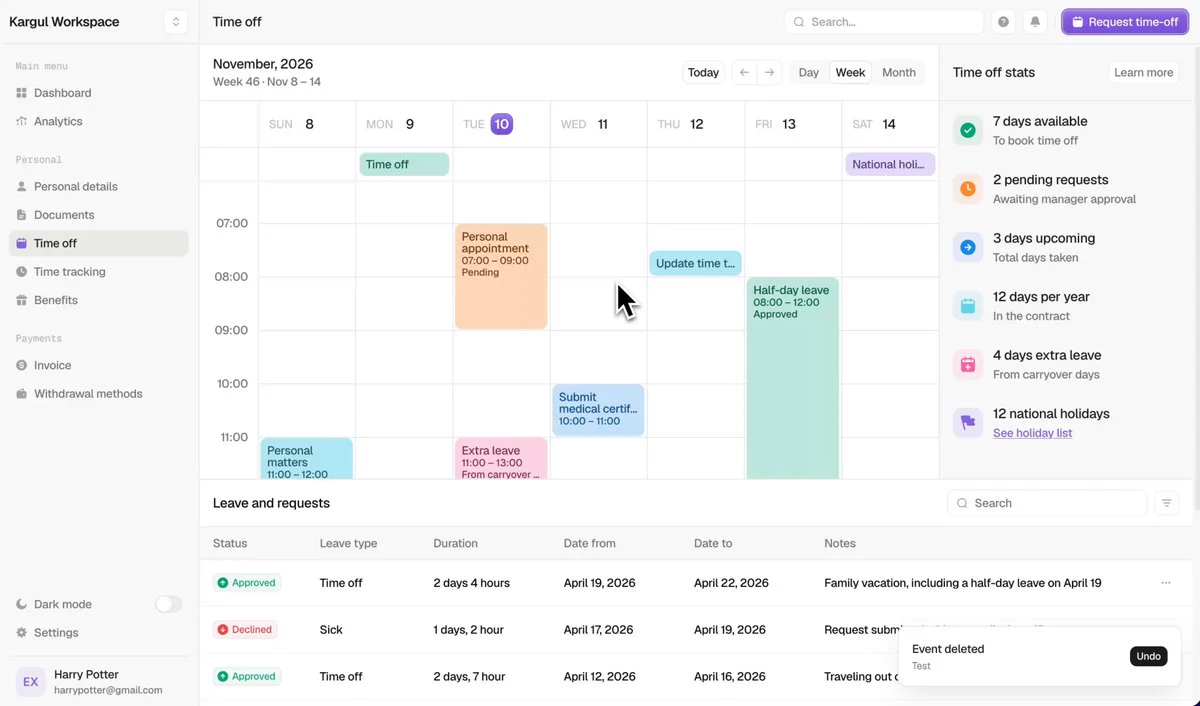
On October 27, 2026, Marcel (@marcelkargul) announced that he had open-sourced 'Kargul Calender Design Prototype,' a Figma-based people-operations workspace prototype available under the MIT license.
Image source: @marcelkargul
The project translates the "Dashboard – calendar" Figma design into an interactive web application. It runs entirely in the browser without a backend, and its data persists to browser localStorage.
Front-End Architecture: Next.js 16, React 19, and Tailwind CSS v4
The codebase uses Next.js 16 (App Router, Turbopack), React 19, and TypeScript.
The styling layer uses Tailwind CSS v4 with design tokens mapped from the Figma variables. UI elements use themed shadcn/ui components built on Radix primitives. State management uses Zustand with its persist middleware and browser localStorage. Additional utilities include a ⌘K command palette powered by cmdk, Sonner toasts, and dark mode managed by next-themes.
Interactive Calendar Mechanics and Time-Off Workflows
The prototype supports these calendar and leave-management interactions:
- Calendar Views: Includes Week, Day, and Month display modes. Users can drag across empty grid slots to create events, move existing cards across dates, and drag the bottom edge to resize durations. Concurrent events automatically arrange side by side, complemented by an all-day lane displaying public holidays, a live current-time indicator line, and origin-aware popovers.
- Time-Off System (
/time-off): Serving as the default route, the leave dashboard provides an interactive request dialog that calculates working days by skipping weekends and holidays while previewing the post-request balance. It includes summary stat panels, a searchable and sortable requests table with edit/cancel capabilities, and a manager approval preview. - Keyboard Shortcuts and Shell: Supports global shortcuts including
⌘Kfor workspace-wide search,Nfor a new event,Rfor leave requests,Tfor today,D/W/Mfor view switching, and arrow key navigation.
Local Setup and Client-Side Prototype Boundaries
The repository provides these local setup commands:
npm install
npm run dev
After starting the development server, open http://localhost:3000. The default demo state comes from src/lib/seed.ts and represents the week of November 8–14, 2026, with November 10 selected and allowance figures of 7 available, 2 pending, and 3 upcoming. Users can return to the initial design state via Settings → Data → Reset demo data or by clearing browser site data.
Sources
- Original source: kargulstudio/calender-app-design
- X announcement: Marcel (@marcelkargul)