Safely Integrating TypeSafe Jev Router into Codex: A 7-Step Rollback-Ready Setup Guide
A practical step-by-step guide to configuring the TypeSafe Jev model router in OpenAI Codex for dynamic model tiering without overwriting global configs, featur
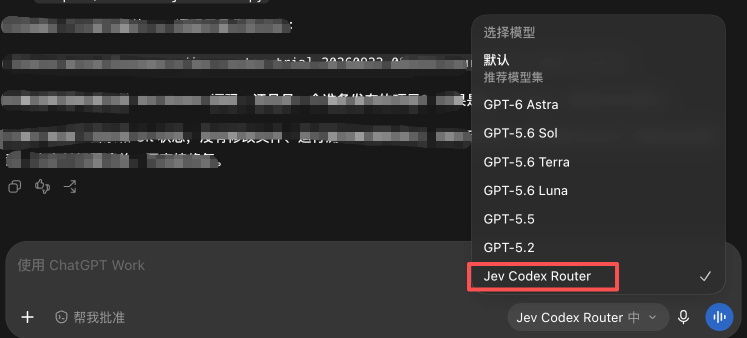
AI engineer and tech creator David (@AI_DVD6) has shared a verified 7-step rollback-safe installation workflow for integrating TypeSafe's Jev decision model into the OpenAI Codex CLI, allowing the agent to automatically select the optimal model tier and reasoning effort per task while keeping local configurations pristine and fully reversible.
Image source: @AI_DVD6 / X
In standard AI coding agent workflows, developers typically pin their CLI session to a single fixed model, such as gpt-5.6-luna, gpt-5.6-sol, or gpt-6-astra. This static configuration often introduces friction: routine inspection or repetitive tool executions end up burning tokens on expensive heavy-reasoning engines, while challenging architectural refactorings or subtle bug investigations can stall when handled by lightweight models with limited inference capabilities. By placing TypeSafe's fast decision-making model Jev as an intelligent routing proxy in front of Codex, developers can dynamically allocate compute per task without sacrificing system stability.
Automatic Transmission Routing and the Four Safety Principles
The fundamental mechanism behind this setup is configuring the Codex model selector to Jev Codex Router, delegating the model assignment decision to Jev's structured evaluation engine at the beginning of each turn rather than locking in a single model choice upfront.
This architecture operates much like an automatic transmission in a modern vehicle. At the beginning of each user turn, Jev evaluates the prompt complexity and surrounding context to choose the appropriate model tier and reasoning effort in real time. If a user turn consists of consecutive deterministic tool calls, the router maintains the existing lightweight model to minimize latency and token expenditure. When a new problem, unexpected error, or significant shift in conversation context emerges, the system immediately reassesses task difficulty and upshifts to a deeper reasoning model.
Rather than relying on unverified curl | bash one-liners from online forums, which risk polluting global environments and causing configuration drift, @AI_DVD6's implementation is grounded in four foundational safety principles:
- Preserve original Codex configuration: The primary
~/.codex/config.tomlfile is never overwritten or permanently mutated. - Prevent permanent model locks: The router is not installed as an irrevocable global default, remaining confined to an isolated test environment.
- Eliminate secret leaks: API keys and credential tokens are kept strictly isolated from Git repositories, terminal command histories, and system logs.
- Guarantee seamless rollback: The entire test harness can be completely dismantled and restored to its pre-installation state in seconds.
Steps 1 to 4: Environment Scaffolding, Checksum Backup, Commit Pinning, and Script Conflict Bypass
The first half of the 7-step workflow focuses on directory isolation, cryptographic configuration backups, and safely circumventing a known installation script bug in the open-source repository. Prerequisites include a macOS terminal, an active Codex login session, Node.js 22.19 or higher, Python 3.12, Git, and a valid TypeSafe API key.
Step 1: Scaffolding a timestamped trial workspace
Create an isolated directory structure tagged with a precise timestamp, and restrict file permissions on the credentials folder so unauthorized background processes cannot inspect sensitive keys. If your Node.js version is older than 22.19, switch to Node 24 via nvm:
export TRIAL_ROOT="$HOME/Documents/jev-router-trial-$(date +%Y%m%d-%H%M%S)"
mkdir -p "$TRIAL_ROOT"/{backup,logs,private,source}
chmod 700 "$TRIAL_ROOT/private"

node --version
python3 --version
git --version

# If Node version is outdated, switch to Node 24
nvm install 24
nvm use 24
Step 2: SHA-256 integrity backup of Codex configuration
Before making any operational adjustments, copy your active Codex configuration into the backup directory and generate an immutable SHA-256 checksum to guarantee verifiable recovery:
cp -p "$HOME/.codex/config.toml" \
  "$TRIAL_ROOT/backup/config.toml"

/usr/bin/shasum -a 256 \
  "$TRIAL_ROOT/backup/config.toml" \
  > "$TRIAL_ROOT/backup/config.sha256"

# Verify backup integrity (must output OK)
/usr/bin/shasum -a 256 -c \
  "$TRIAL_ROOT/backup/config.sha256"

# Record active model configuration without modifying any files
grep -E '^(model|model_provider|model_reasoning_effort)' \
  "$HOME/.codex/config.toml"
Step 3: Pinning verified Git commit and reviewing scripts
To guard against unexpected breaking updates on the upstream main branch, clone the repository and lock the working tree to the verified commit hash 8701ef788aa8cb0948f299538747fb01029d32b8:
git clone \
  https://t.co/0PgYHbnQ7k \
  "$TRIAL_ROOT/source/jev-codex-router"

git -C "$TRIAL_ROOT/source/jev-codex-router" \
  checkout 8701ef788aa8cb0948f299538747fb01029d32b8

# Inspect documentation and scripts prior to execution
sed -n '1,240p' \
  "$TRIAL_ROOT/source/jev-codex-router/README.md"
sed -n '1,260p' \
  "$TRIAL_ROOT/source/jev-codex-router/install.sh"
sed -n '1,220p' \
  "$TRIAL_ROOT/source/jev-codex-router/server/INSTALL.md"
Crucial Caveat: Do not execute the root install.sh script directly. In the pinned commit, the root script prematurely terminates model discovery before attempting to activate the ChatGPT session, creating an execution order conflict. Following verified manual installation steps bypasses this ordering defect completely.
Step 4: Installing router dependencies in an isolated package tree
Confine dependency resolution strictly to the router subdirectory to keep your global npm environment untouched:
export REPO_ROOT="$TRIAL_ROOT/source/jev-codex-router"
export ROUTER_ROOT="$REPO_ROOT/router"

cd "$ROUTER_ROOT"
npm ci --include=dev
Steps 5 to 7: Local Proxy Execution, Secret Isolation, and Rollback Verification
The concluding phase of the setup covers running the local router proxy as a background process, injecting credentials safely, and executing a clean, zero-residue rollback once experimentation is complete.
Under the hood, TypeSafe Jev does not expose an OpenAI-compatible text generation endpoint like /v1/chat/completions. Instead, its HTTP interface accepts evaluation requests at POST https://api.typesafe.ai/v1/systemone and returns typed decisions (Choice, Score, Noul) along with probability distributions. The jev-codex-router operates as a local loopback proxy positioned between Codex and upstream APIs, consulting Jev on every user turn to route requests to the most suitable model tier dynamically.
Steps 5 and 6 Overview: Isolated secret injection and session launch
Rather than exporting credentials to shell initialization files or saving them into globally accessible dotfiles, store your TypeSafe API key exclusively in a scoped configuration file inside the permission-locked $TRIAL_ROOT/private folder. When starting Codex, pass the local proxy endpoint (http://127.0.0.1:port) as an environment override for that specific session. This ensures that secret keys are neither indexed by Git nor preserved in shell history buffers.
Step 7: One-click rollback and complete workspace cleanup
When your trial session concludes, restoring your workstation to its original state requires just three deterministic commands. Stopping the local background process and restoring the verified configuration backup removes all router settings without leaving orphaned files or configuration drift:
# 1. Terminate running router background processes
pkill -f "jev-codex-router" 2>/dev/null || true

# 2. Restore verified original Codex configuration
cp -p "$TRIAL_ROOT/backup/config.toml" "$HOME/.codex/config.toml"
/usr/bin/shasum -a 256 -c "$TRIAL_ROOT/backup/config.sha256"

# 3. Clean up temporary trial directory when no longer needed
rm -rf "$TRIAL_ROOT"
By adhering to rigorous checksum validation, commit pinning, and directory-level isolation, developers can test dynamic model routing in Codex with full confidence that their baseline environment remains completely secure and instantly recoverable.