Free Browser Alternative to Photoshop's Relight Beta: ImageFlow Relight Launches
A free browser-based ImageFlow Relight has launched as an alternative to Photoshop beta's paid relighting feature Relight. Usage, credit differences, and the br
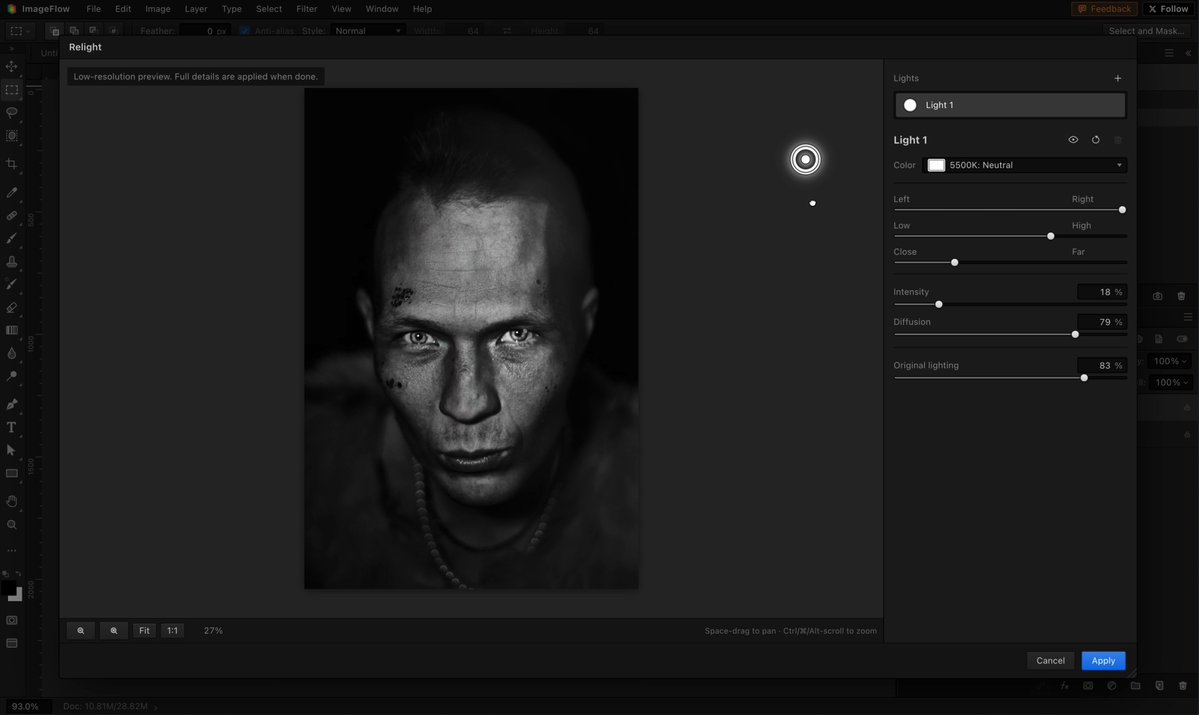
Developer Yassine Bouanane (@ybouane) announced on October 7, 2026 that a free Relight feature has officially launched inside ImageFlow, his browser-based image editor. It is positioned as a free browser alternative to Relight, the generative-AI relighting feature Adobe added to the Photoshop beta about a week earlier.
Image source: @ybouane (X post demo video)
In the announcement post, the author drew two contrasts. First, while Adobe's Relight consumes generative credits on top of a subscription for each final render, the ImageFlow version is free. Second, while Adobe's approach uploads photos to its servers to run the AI model, the ImageFlow version runs entirely in the browser with nothing uploaded. Note that both the "better version" framing and the fully-in-browser claim are the author's assertions, not independently verified facts.
Photoshop Beta Relight: Free Previews, 30 Credits per Done
Adobe Relight is a generative-AI relighting feature added to the Photoshop beta (27.10.0/27.12.0) around September 28, 2026. Reports describe up to three interactive lights with adjustable position, intensity, color, and diffusion, applied through a separate Relight layer that preserves the original pixels.
- Low-resolution previews are free to adjust.
- Clicking Done to render the final image costs 30 generative credits, and each subsequent re-edit plus Done costs another 30 credits.
- Some reports note user complaints that the 30-credit charge limits testing and feedback collection while the tool is still in beta.
Credit allotments differ by plan, so subscription and credit details should be read as third-party reporting and help-page citations, not universal terms.
ImageFlow Relight: How to Use It and Its Confirmed Limits
The author's usage instructions are simple: open an image at imageflow.dev and select Image → Relight. He notes it works best on portrait photos.
- Price: The author announced the ImageFlow version as free.
- Execution: The author claims it runs entirely in the browser with no photo uploads to a server. This has not been independently verified.
- Editing model: Asked whether it is adjustment-layer-based and non-destructive, the author replied that it currently rerenders the layer.
- Best subjects: Asked about product photos, he said it works but fits opaque box-like shapes rather than glass.
- Follow-up: On October 8 the author announced further improvements to the relight effect, and said in a reply that a desktop version is a priority he hopes to release soon.
Some replies dispute the quality, arguing Adobe's version is better and more precise. The "better" verdict is the author's subjective claim, so no quality ranking is established fact.
Sources
- Yassine Bouanane (@ybouane): Free browser Relight launch announcement in ImageFlow (2026-10-07)
- Yassine Bouanane (@ybouane): Usage guide: Image → Relight
- Yassine Bouanane (@ybouane): Reply: it currently rerenders the layer
- Fstoppers: Photoshop Can Now Move the Light in Your Photo (2026-10-04)
- INCPak: Photoshop Beta Relight Adds Movable Lights, With a 30-Credit Final Render
- photoedithelp: Adobe Relight in Photoshop