Connecting Google Antigravity to Colab MCP: Building a Cloud A100 Lab with Google AI Ultra
A practical guide to connecting Colab MCP in Google Antigravity, using Google AI Ultra A100 GPUs and 24-hour background execution to offload heavy workloads wit
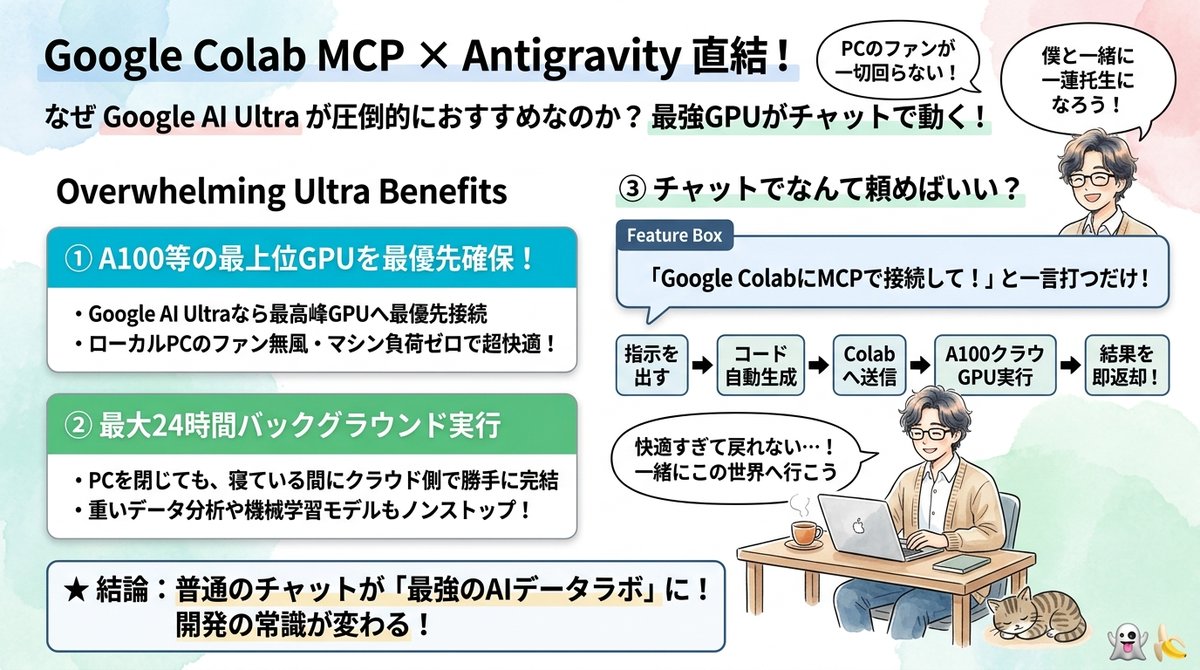
AI engineer and creator Mojofull (@furoku) has shared a compelling workflow combining Google Colab's official Model Context Protocol (MCP) support with the Google AI Ultra plan, allowing developers to connect Google Antigravity directly to cloud A100 accelerators and offload heavy compute tasks without taxing local hardware.
Image source: @furoku (X)
When developers orchestrate complex scripts, diffusion pipelines, or large-scale data processing workloads with local AI coding agents, hardware bottlenecks quickly become unavoidable. Running demanding Python routines locally drives laptop cooling fans into overdrive, generates intense heat, and depletes system VRAM, frequently locking up machines for hours. This workflow bridges the autonomous orchestration of Google Antigravity with the remote execution capabilities of Google Colab via MCP, transforming a simple chat interface into a dedicated cloud data laboratory while leaving local machines completely quiet and unburdened.
One Prompt to Cloud Accelerators: The Antigravity and Colab MCP Synergy
Google Colab's official Model Context Protocol (MCP) support provides an open standard bridge that enables agentic coding environments like Google Antigravity to interface directly with remote Colab notebook runtimes in the cloud.
Traditional cloud compute setups typically demand tedious infrastructure maintenance: provisioning remote virtual machines, generating and distributing SSH keys, configuring remote development environments, and handling custom reverse proxies or API wrappers. In contrast, the Colab MCP pipeline turns remote resource allocation into an effortless, prompt-driven action.
- One-Command Connection: Instructing Antigravity with a natural command such as
"Connect to Google Colab via MCP"mounts the remote Colab session and exposes its cloud compute capabilities directly to the agent conversation. - Zero Local Hardware Load: While Antigravity handles high-level code architecture, planning, and task decomposition, actual GPU execution, memory-heavy tensor manipulations, and package downloads happen entirely inside Google's cloud infrastructure. Local laptops run cool with zero fan noise, no battery drain, and no local memory bottlenecks.
- Autonomous Execution and Fast Feedback: Once Antigravity generates Python code and transmits it to Colab, execution takes place on cloud accelerators, and outputs stream straight back into the agent conversation window for rapid verification and debugging.
Practical Advantages of Google AI Ultra: A100 Access and 24-Hour Background Runs
The core catalyst behind this workflow is its synergy with Google's revamped AI subscription tiers, specifically the top-tier Google AI Ultra membership plan.
Google has integrated Colab into its primary consumer AI plans. According to official Google support documentation, subscribers gain prioritized access to faster accelerators and higher-specification compute instances. Crucially, Google AI Ultra members unlock both priority access to premium GPUs such as NVIDIA A100s and prolonged background execution privileges lasting up to 24 hours.
- Priority Allocation of Premium Cloud GPUs: Users bypass the aggressive preemption risks common to free or lower-tier Colab runtimes, running memory-intensive open-source model weights or large batch jobs comfortably on high-bandwidth A100 VRAM.
- Up to 24 Hours of Unattended Background Execution: On a local development machine, overnight jobs run the constant risk of crashing due to memory leaks, thermal throttling, or unexpected OS sleep states. With Colab's background execution, routines continue executing in the cloud for up to 24 hours even when local machines are closed or shut down.
- Integrated High-Capacity Storage: Workflows seamlessly link into the extensive Google Drive storage allocations included with Google AI plans, ensuring gigabyte-scale model checkpoints and generated datasets are stored securely in the cloud rather than consuming local SSD capacity.
Setup Steps and Workflow Caveats: Image Constraints and Session Handling
To deploy this workflow effectively within Google Antigravity, developers should keep several operational steps and technical caveats in mind:
1. Colab MCP Connection and Interactive Preparation
Colab's MCP capabilities link directly with an authenticated Google account and its corresponding AI plan tier. Before executing compute-heavy agent commands, ensure your Google Colab environment is active. Then, in the Google Antigravity chat interface, issue the connection instruction: "Connect to Google Colab via MCP". The session binds to the cloud runtime, establishing an immediate pipeline for remote script execution.
2. Environment Compatibility and Runtime Limitations
While cloud offloading eliminates local compute constraints, remote notebook environments come with distinct architectural boundaries:
- Preconfigured Environment Constraints: As highlighted in community feedback, workloads requiring deep kernel modifications, non-standard CUDA driver patches, or complex system-level C/C++ compilation may face restrictions within Colab's default container image.
- Session Continuity and Checkpointing: While background execution provides up to 24 hours of runtime, remote instances can experience transient network interruptions or resets. Always instruct the agent to include periodic checkpointing logic that saves intermediate outputs directly to Google Drive or remote object storage.
For developers seeking to overcome local hardware ceilings and orchestrate a powerful cloud data laboratory through a single chat interface, combining Google Antigravity with Colab MCP on the Google AI Ultra plan offers an accessible, high-performance solution with virtually zero local setup.