GenOffice: The Open-Source AI Office Suite with an Agent Inside Every Document
A comprehensive guide to GenOffice, an Apache-2.0 open-source office suite supporting native .docx, .xlsx, .pptx, PDF, and Markdown editing with byte-preserving
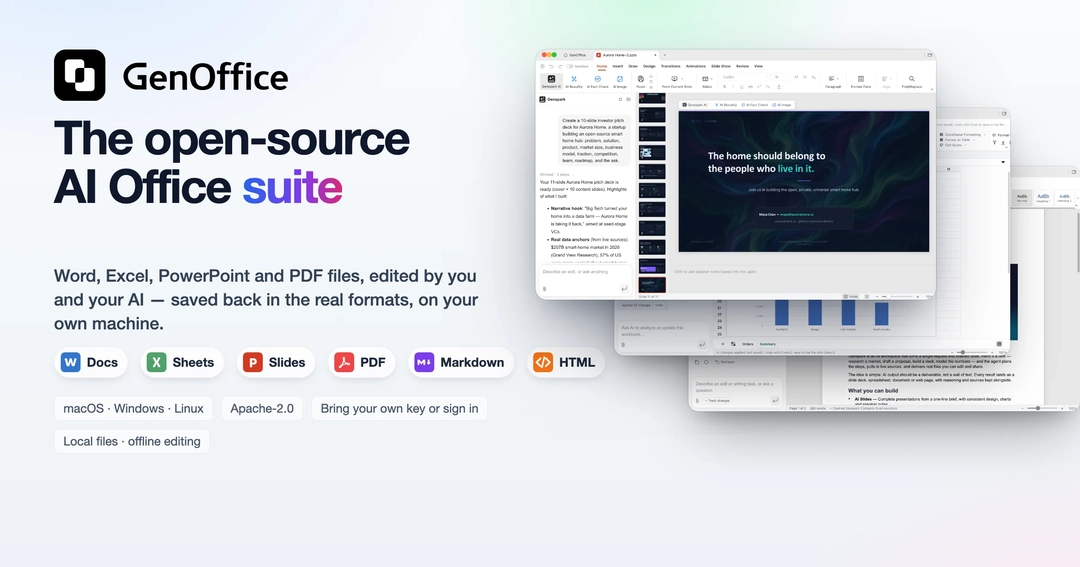
Most generative AI integrations in the modern document productivity landscape arrive as external web chat sidebars or mandatory cloud subscription tiers. GenOffice takes a fundamentally different route by integrating an AI agent directly into the native editing canvas while keeping the underlying document files intact and compatible with traditional productivity suites.
Image source: https://github.com/genspark-ai/genoffice
Released under the Apache License 2.0, the project has surpassed 12,000 GitHub stars and 1,700 forks on its official repository (genspark-ai/genoffice). Having evolved through steady release cycles since its inception in late July 2026, the project issued release v0.13.18 on November 12, 2026. The desktop software is distributed across macOS (Apple Silicon and Intel), Windows (x64 and Arm), and Linux (deb, rpm, AppImage).
Byte-Preserving Storage and Tracked Revisions
For decades, alternative office suites and format converters struggled with layout integrity when interacting with Microsoft Office documents. Opening, modifying, and re-saving complex documents in third-party editors often resulted in mangled tables, shifted margins, stripped macro bindings, or broken revision histories.
GenOffice avoids rewriting entire document archives from scratch. Instead, it employs a byte-preserving architecture: only the specific paragraphs, cells, or presentation slides modified by the user or the AI agent are rewritten. Untouched binary streams, styles, and legacy layout definitions remain unaltered byte-for-byte. As a result, edited files retain full fidelity when reopened in Microsoft Word, Excel, or PowerPoint.
The AI assistant interaction model is designed around editorial supervision rather than unmonitored text overwrites:
- Word-Style Track Changes: When the AI refactors an executive summary or inserts new bullet sections, edits appear as tracked changes rather than irreversible overwrites. Users can inspect diffs and roll back modifications with a single click.
- Context Masking: Users can hide sensitive paragraphs in Docs or specific cell ranges in Sheets from the AI model. The in-app AI assistant sees only designated placeholder tags, while the actual text and numbers remain stored safely inside the local file.
Docs, Sheets, Slides, and On-Device Document Conversion
GenOffice bundles six document editing surfaces into a single desktop application: word processing (Docs), spreadsheets (Sheets), presentations (Slides), alongside native PDF, Markdown, and HTML editors.
Docs mirrors Microsoft Word's layout metrics and line rendering engine, preserving two-column layouts, full-bleed images, shaded KPI callouts, and header-footer rules. It includes a built-in Mailings system to merge recipient lists from .xlsx or .csv files into standard MERGEFIELD templates, generating individual documents or batched outputs. Furthermore, Docs can instantly convert long-form text into an interactive, collapsible mind map diagram with direct block citations.
Sheets runs on an in-house Rust spreadsheet calculation engine. Unlike conventional AI tools that paste calculated summaries as static, lifeless numbers, the GenOffice agent writes genuine formulas—such as SUMIF or lookup logic—alongside native charts, pivot tables, slicers, and conditional formatting rules. It also preserves Excel rich values, enabling embedded images to sit directly inside table cells.
Slides generates complete presentation decks directly onto the editing canvas from simple conversational prompts. When requested to build an investor deck, the model plans the narrative outline, lays out individual slides sequentially, and formats design elements that remain fully editable by hand.
Additionally, format conversion runs completely on-device. Tasks such as converting PDFs into editable Word, Excel, or PowerPoint files, or transforming Markdown and HTML documents into native Word formats, execute locally without transmitting documents to third-party conversion servers.
Local-First Search, Document Q&A, and Flexible Model Providers
Privacy and data sovereignty form the core of the GenOffice runtime model. Documents remain on the local machine during opening, editing, indexation, and conversion. Only explicit AI reasoning requests leave the workstation, sent strictly to the inference endpoint selected by the user.
A built-in home screen search engine scans document names, folder structures, and full text across .docx, .xlsx, .pptx, PDF, Markdown, and HTML files using a local SQLite index with full support for CJK scripts. Top search hits can be reranked on-device through TypeSafe Jev, an embedded judgment model, ensuring the most semantically relevant file surfaces first. Users can star reference files and use the Ask AI interface to query multiple documents simultaneously, receiving answers backed by clickable citations linking directly to source sections.
Model connectivity supports two operational modes:
- Genspark Authentication: Users can log in directly through Genspark for immediate access without configuring personal API keys.
- BYOK (Bring Your Own Key): Users can supply their own API keys for Claude, OpenAI, Gemini, DeepSeek, Grok, Mistral, OpenRouter, or self-hosted local model endpoints compatible with the OpenAI API standard.
For technical teams, GenOffice ships with a dedicated genoffice command-line interface (CLI) and an agent skill. Coding assistants—such as Claude Code, Codex, Cursor, Gemini CLI, GitHub Copilot, and Windsurf—can read, generate, convert, and update Office documents on headless servers or local development environments without launching the graphical user interface.
Limitations and Operational Caveats
Deploying GenOffice within production or team workflows requires keeping several verified architectural constraints in mind:
- Import-Only File Formats: OpenDocument files (
.odt,.ods,.odp), legacy binary Office files (.doc,.xls,.ppt), and Hancom Office documents (.hwp,.hwpx) are supported for opening and reading only. Saving any changes forces an export into modern OOXML formats (.docx,.xlsx,.pptx). - Selective Masking Boundary: The feature that hides sensitive text selections or spreadsheet ranges applies exclusively to the desktop app's conversational AI panel. The
genofficeCLI, external Model Context Protocol (MCP) tooling, and headless export pipelines bypass this panel filter and read document contents directly from disk. - Memory Overhead: Housing multiple document layout engines, a local full-text search index, and an embedded spreadsheet runtime inside an integrated binary incurs noticeable idle memory usage compared to lightweight plain-text editors.
For developers, technical organizations, and privacy-conscious professionals seeking an alternative to recurring office cloud subscriptions, GenOffice provides a capable, self-directed working environment that keeps local files intact.
Sources
- GenOffice Official GitHub Repository: genspark-ai/genoffice
- GenOffice Official Website: genoffice.ai