DeepSeek Harness: Open-Source Plugin-First AI Agent Framework and Desktop App
DeepSeek AI has released DeepSeek Harness (dsh), an open-source agent harness with macOS and Windows desktop apps featuring an 'Everything is a plugin' architec
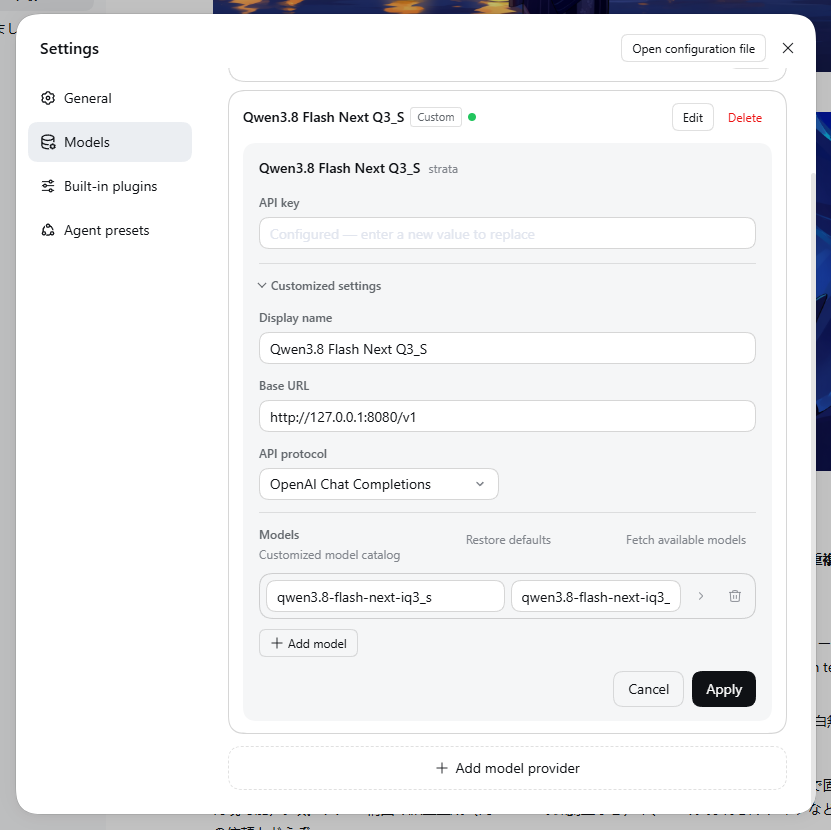
DeepSeek AI has officially unveiled DeepSeek Harness (dsh), an open-source AI agent framework built around a modular plugin architecture. Distributed under the MIT license, the framework is designed to keep the core execution engine minimal while allowing users to assemble capabilities as modular plugins. It offers both native desktop application packages for macOS and Windows, as well as a local web browser-based Web UI.
Image source: @Yacamochi_db / X
As LLM-driven coding agents and autonomous workspaces continue to expand, traditional agent runtimes have often imposed steep onboarding friction—requiring complex command-line configurations or relying on rigid monolithic architectures that make local model bridging and tool expansion cumbersome. DeepSeek Harness lowers these barriers by enabling users to install plugins directly from an intuitive graphical user interface (GUI) to configure web browsing, workspace integration, code diff reviews, and recurring tasks.
'Everything is a Plugin': Cordis-Powered Modular Agent Architecture
At the heart of DeepSeek Harness (dsh) is its architectural philosophy: 'Everything is a plugin.' The framework is built on Cordis, adopting an engine design rooted in research on programming paradigms for spatiotemporal composability.
Nearly every functional unit executed by an agent is abstracted into an independent plugin, allowing users to activate only the components they require.
- Modular Extension Framework: The core runtime remains lean, while model adapters, search connectors, and file manipulators are isolated as modular plugin packages for straightforward maintenance and customization.
- Workspace Navigation and Code Diff Visualization: A dedicated inspection panel on the right side of the GUI enables users to browse project directories and inspect proposed code changes (diffs) in real time before applying them.
- Multiformat Document and Data Analysis: Beyond plain text files, the workspace can ingest spreadsheets, PDFs, and structured documents for automated data synthesis, report generation, and data visualization.
- Automated Code Editing: Once the target workspace is initialized, the agent can autonomously trace project context and execute requested code modifications across files without extensive prompt engineering.
Desktop App, Web UI Execution, and Model Integration
DeepSeek Harness provides flexible runtime environments across both native desktop operating systems and Node.js-based environments.
With the release of the 0.2 preview series in late September 2026, packaged desktop installers became available for macOS (including Apple Silicon) and Windows. Users can run DeepSeek Harness as a standalone desktop application without manually configuring background environment variables or language dependencies.
For developers preferring a lightweight Node.js environment (LTS recommended), an official CLI package is also available via npm. Running a single command in the terminal launches the local Web UI immediately:
npx @deepseek-ai/dsh web
By default, this command initializes a local web server at http://127.0.0.1:3080 and automatically opens the interface in the system's default browser. For headless setups or remote forwarding, users can append --no-open to suppress the browser pop-up or use --port to designate an alternate listening port.
The framework also provides extensive flexibility for foundation model integration:
- Local and Remote LLM Connectivity: Through the configuration interface or configuration files (
config.yaml/ Settings menu), users can connect both cloud-hosted DeepSeek API models and local OpenAI-compatible endpoints, such as LM Studio, Strata, or locally hosted Qwen models. - Multimodal Vision Configuration: By specifying
input: [text, image]or enabling the vision toggle in model settings, users can configure multimodal workflows that process visual inputs alongside textual context.
Key Improvements in v0.2.0-rc.1 and Developer Preview Caveats
The recent v0.2.0-rc.1 release introduces several usability and stability enhancements aimed at production resilience:
- Zero-Key Web Search Integration: For DeepSeek account models, web search can now be used directly without configuring external search engine API keys. In addition, users can readily equip web search plugins such as
dsh-free-search(including alongside local models) to mitigate hallucinations with grounded web context. - Decoupled Scheduled Tasks: Recurring automated background tasks have been transitioned into an optional plugin package, keeping the base runtime lean and letting users opt in only when scheduling workflows are needed.
- Windows Sandbox Permission Diagnostics: A built-in diagnostic utility has been added to isolate and resolve Windows sandbox access-denied errors, streamlining troubleshooting for permission boundaries.
- Resilient Tool Failure Recovery: Recovery logic following external tool call failures has been refined to preserve conversational state and prevent unintended duplicate tool executions.
Operational Caveats for Early Adopters
As highlighted in the official repository README, DeepSeek Harness v0.2 is currently in 'developer preview'. Because the project is iterating rapidly, subsequent releases may introduce compatibility-breaking changes to configuration schemas or plugin APIs.
Additionally, in corporate intranet environments where outbound traffic must traverse an HTTP proxy, the built-in Node.js fetch implementation (undici) does not automatically recognize operating system proxy environment variables (HTTP_PROXY, HTTPS_PROXY). As documented in GitHub Discussion #4448, this can result in connection resets or transport errors when reaching external APIs unless an explicit proxy dispatcher (such as EnvHttpProxyAgent) is configured.
Sources
- GitHub: deepseek-ai/deepseek-harness Repository
- Official Documentation: DeepSeek Harness Documentation
- X: @Yacamochi_db Hands-on Review of DeepSeek Harness