Connecting 90 Grok Bots via DeepSeek DSH Custom Plugin Index: Practical Setup and Security Precautions
A step-by-step practical guide to registering and running 90 Grok Bots using DSH alpha.4's custom plugin index feature, alongside critical security guidelines f
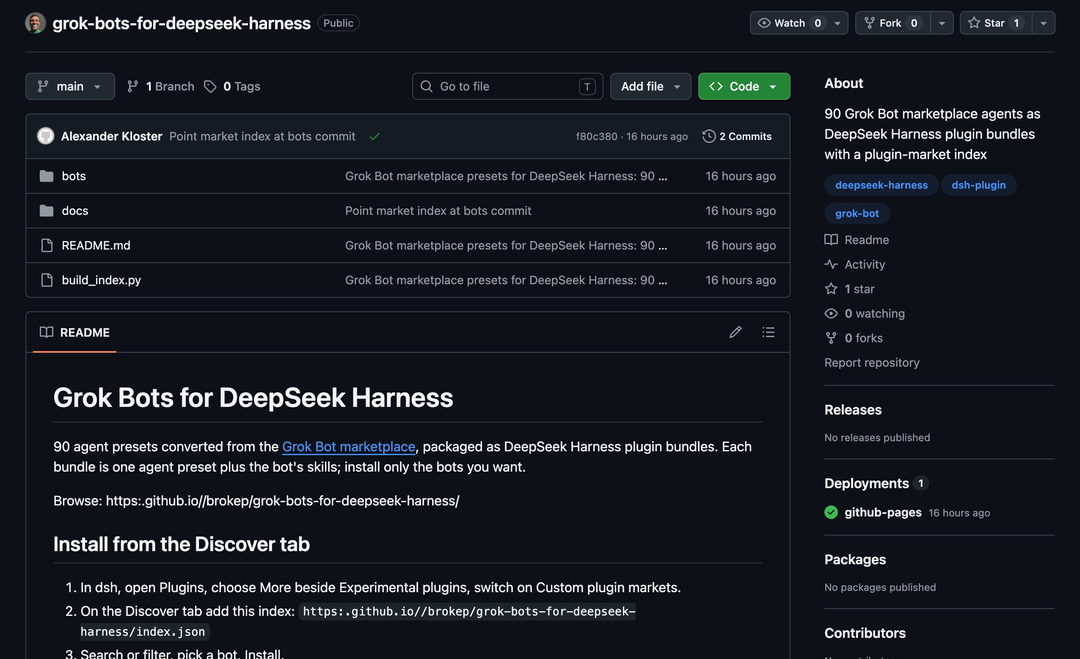
Chinese AI creator @xiangxiang103 (雨哥向前冲) shared a practical setup walkthrough and essential security guidance for integrating 90 Grok-ecosystem bots using the newly added custom plugin index feature in DeepSeek DSH alpha.4.
Image source: X @xiangxiang103
The standout enhancement in the DSH alpha.4 release is native support for custom plugin index sources. Previously, DSH users could only install plugins vetted and hosted on official registries. With this update, DSH shifts toward an open ecosystem where developers and community members can host their own plugin catalogs and distribute custom tooling.
Within two hours of the official alpha.4 rollout, community developers repackaged an entire collection of 90 bots from the Grok Bot ecosystem into a compatible custom index. This integration allows practitioners to run ready-made agent workflows on top of DeepSeek's cost-effective model infrastructure.
Notable bot capabilities ported in the collection include:
- Polishing prose and eliminating artificial AI phrasing (De-AI editing)
- Stress-testing startup concepts and identifying business model flaws
- Reviewing investor slide decks and pitch presentations from a venture capital perspective
- Running automated website audits and health checks
- A total of 90 community-ported bots available in the catalog (such as Imogen, verified by the author)
Four Steps to Register Custom Plugin Indexes in DSH alpha.4
Setting up the third-party plugin index and deploying bots in DSH alpha.4 follows a tested four-step workflow:
- Upgrade DSH: Ensure your DSH environment is updated to
alpha.4. - Enable Custom Plugin Market: In the DSH web interface, navigate to the Plugins menu. Click More adjacent to the Experimental Plugins section, and toggle on Custom Plugin Market.
- Add the Custom Index Source: Go to the Discover tab, select Add Index Source, and paste the community index endpoint:
https://t.co/X7iMwgrwYg - Search and Enable Bots: Search for your desired bot (e.g., Imogen) in the catalog, click Install, and activate it immediately. The catalog lists 90 distinct bots ready for deployment.
Essential Security Precautions for Running Third-Party Alpha Bots
While highlighting the speed of community adoption and operational flexibility, the author issued strong security cautions for developers experimenting with the setup:
- Unofficial Community Port: The 90-bot repository is an unofficial community port without formal vendor licensing or rigorous upstream security audits.
- Experimental Alpha Stage: Both DSH alpha.4 and the imported index operate in early preview status, carrying risks of unhandled edge cases or runtime instability.
- Local Execution Privileges and API Key Protection: Because installed bots can execute shell commands and read or write local files, they possess significant system-level access. Never grant third-party bots access to directories containing production API keys, credentials, or sensitive environment configurations.
Primary reference resources:
- DSH alpha.4 release notes: https://t.co/8W68COQvqq
- 90 Grok Bot plugin repository: https://t.co/RLPVF760qc
- Plugin index configuration URL: https://t.co/X7iMwgrwYg