ComfyUI: The Open-Source Node Engine for Local AI Image and Video Generation Without Subscriptions
ComfyUI is a modular node-graph engine and GUI that runs open-source diffusion models locally on consumer hardware down to 4GB VRAM using asynchronous weight st
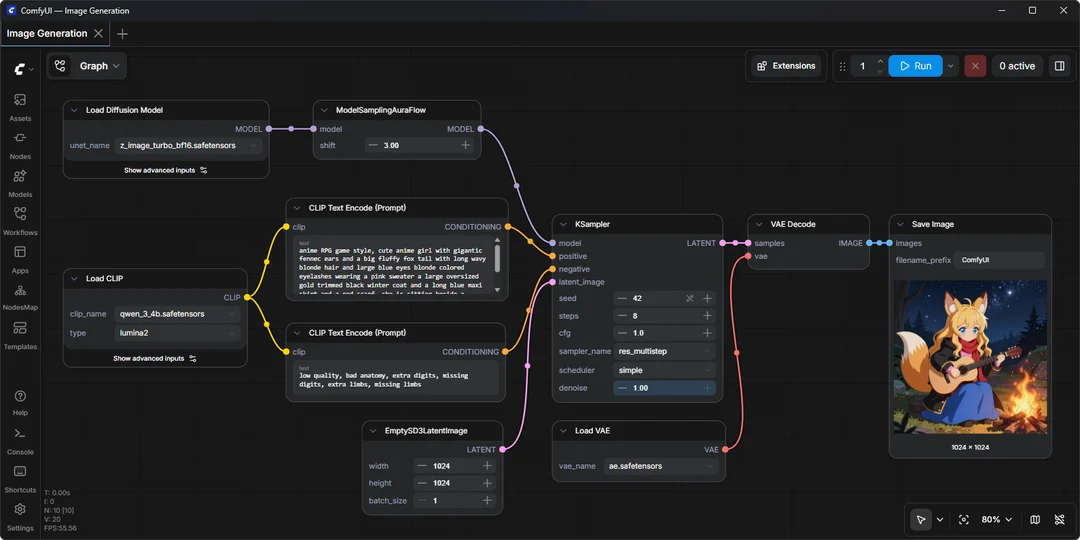
Rather than paying recurring monthly fees for cloud-based generative media platforms, creators are increasingly turning to open-source software that harnesses their own hardware. ComfyUI serves as a visual node-graph user interface and backend execution engine designed to give creators granular control over every step of generative image and video pipelines.
Image source: Comfy-Org
Typical closed-source image platforms hide generative mechanics behind simple text boxes, executing predefined server-side scripts that restrict user control over intermediate processing steps. ComfyUI breaks each operational phase—model checkpoint loading, text token encoding, conditioning guidance, sampling, and latent decoding—into modular visual nodes. By connecting these building blocks directly, creators can build tailored workflows that match their exact production requirements.
Asynchronous Weight Streaming on Hardware Down to 4GB VRAM
A major barrier to running modern diffusion and generative video architectures locally has been video memory (VRAM) constraints. When multi-gigabyte neural network checkpoints exceed available GPU memory, systems immediately encounter Out of Memory (OOM) errors and abort computation.
ComfyUI resolves this bottleneck through built-in asynchronous weight streaming and intelligent model offloading. The engine dynamically stages neural network weights from system memory (RAM) to GPU VRAM only when specific computation layers require them, clearing memory blocks immediately after use. This architecture enables consumer workstations with as low as 4GB VRAM and 8GB system RAM to run large open-source diffusion models without exhausting hardware resources.
- VRAM Utilization: Offloads unused components to system RAM and streams active layers on demand, maximizing GPU compute saturation on modest machines.
- Partial Graph Re-execution: Modifying a single prompt or parameter does not restart the entire workflow; the execution engine caches untouched nodes and only processes downstream changes.
- Cross-Platform Accelerator Support: Operates natively across NVIDIA GPUs, AMD ROCm, Intel hardware, Apple Silicon Unified Memory, and Ascend processors.
Native Ecosystem Support for Image and Video Architectures
ComfyUI natively integrates modern open-source foundation models across still image generation, frame-based video production, 3D asset extraction, and audio synthesis within a single visual graph.
- Image Architectures: Direct support for Flux.1, Flux.2, SDXL, Stable Diffusion 3.5, and Stable Diffusion 1.5 checkpoints.
- Video Generation: Executes compute-heavy video models including Wan 2.1, Wan 2.2, HunyuanVideo 1.5, and LTX-Video for native multi-frame visual synthesis.
- Integrated Conditioning Blocks: Connects LoRA adapters, ControlNet guidance, inpainting masks, and latent upscalers directly into interconnected nodes.
Workflows created in ComfyUI export directly as portable JSON files or embed into the metadata of generated PNG files. Dragging a previously exported image into the canvas instantly restores the complete node tree, seeds, sampler settings, and model configurations used to produce it.
Offline Operational Safeguards and Enterprise Boundaries
For projects bound by sensitive intellectual property guidelines or air-gapped security mandates, ComfyUI offers command-line switches to prevent external network traffic.
# Fully disable network calls and execute in offline mode
python main.py --offline

# Disable third-party commercial API nodes while maintaining local nodes
python main.py --disable-partner-nodes
Running with --offline prevents underlying scripts from attempting automated external model downloads or telemetry checks, ensuring total data privacy on internal networks.
Despite these advantages, physical hardware limits apply: rendering high-resolution video frames or running multi-billion-parameter models on entry-level GPUs will involve longer computation queues than dedicated cloud infrastructure. Additionally, optional partner nodes accessing proprietary third-party models (such as Nano Banana or Seedance) operate as API bridges and still require external account keys and provider fee structures.
Verified Setup Workflow
ComfyUI provides several operational paths depending on user familiarity with local Python environments. For users seeking a frictionless configuration, official desktop applications eliminate manual environment configuration.
- Install Base Application: Download and install the official ComfyUI desktop application for Windows or macOS, or clone the manual repository for Linux and custom GPU drivers.
- Position Model Checkpoints: Place downloaded open-source model weights (
.safetensorsfiles) inside the localmodels/checkpoints/directory. - Load Workflow and Execute: Open the interface, load a template from the workflow library or construct custom node connections, and press
Ctrl + Enterto queue the graph for local rendering.
With additional features like App Mode for packaging complex graphs into streamlined user interfaces and local API endpoints for pipeline integration, ComfyUI functions both as an interactive desktop environment and a robust local automation engine.
Sources
- Comfy-Org Official GitHub Repository: Comfy-Org/ComfyUI
- RoundtableSpace on X: 2026-10-20 ComfyUI Local Workflow Guide