ComfyUI: Building a Local AI Production Pipeline with Asynchronous Weight Streaming and Node Graphs
ComfyUI is an open-source node-graph inference engine for diffusion models that runs state-of-the-art models like Flux.1/2 and Wan 2.1/2.2 on hardware with as l
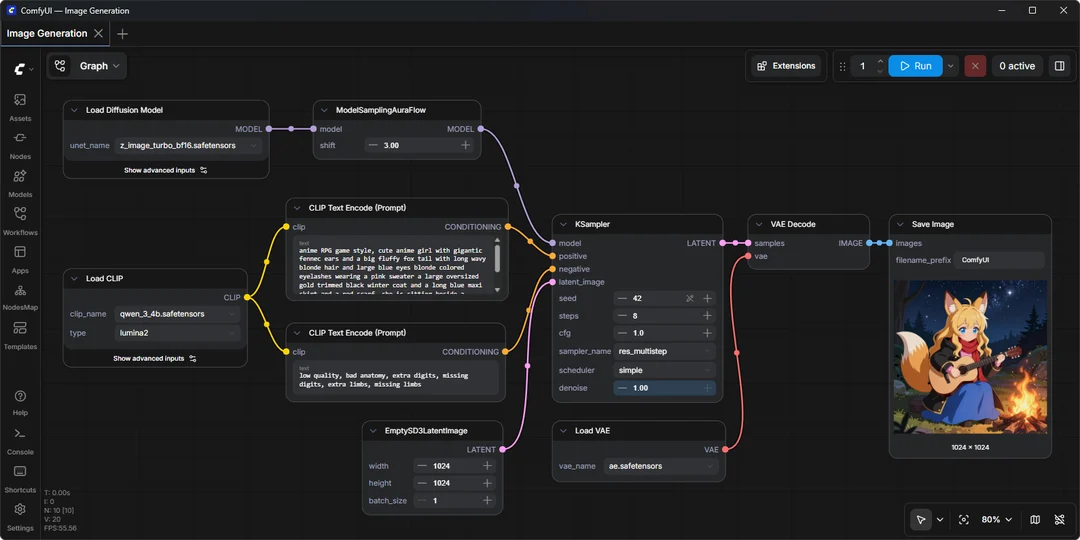
ComfyUI is an open-source backend inference engine and graphical user interface that structures diffusion model pipelines into visual node graphs.
Image source: Comfy-Org
In contrast to cloud-hosted generation services built on recurring subscriptions, ComfyUI runs directly on local hardware, giving creators low-level control over model checkpoints, conditioning, and pipeline execution.
Node Graph Architecture and Low-Resource Optimization
The core of ComfyUI centers on its modular graph interface and resource management mechanisms. Creators connect individual components—such as checkpoint loaders, text encoders, samplers, and VAE decoders—on a shared visual canvas.
- Asynchronous Weight Streaming: By streaming model layer weights dynamically from system RAM to VRAM during execution, the engine runs large open-source diffusion architectures on systems with as little as 4GB of VRAM and 8GB of system RAM.
- Partial Graph Re-execution: Modifying a single parameter in an existing workflow recalculates only downstream dependent nodes, bypassing redundant inference steps.
- Embedded Workflow Metadata: Generated media formats (such as 16-bit PNG and 32-bit EXR) preserve complete graph topologies and seed values within their metadata, allowing users to reload complete pipelines by dragging outputs back onto the canvas.
Model Ecosystem and Network Isolation
ComfyUI provides native support across image and video generative architectures:
- Image Generation and Editing: Out-of-the-box node support covers Stable Diffusion 1.5/XL/3.5, Flux.1, Flux.2, Qwen Image, and Hunyuan Image 2.1, alongside dedicated editing pipelines.
- Video Generation: The engine supports Wan 2.1/2.2, HunyuanVideo 1.5, LTX-Video 2/2.3, and CogVideoX for local frame generation.
- Offline Air-Gap Mode: Launching with the
--offlineflag blocks core network calls, restricting execution to local weights. To selectively block optional external API integrations while leaving network adapters available, users can specify--disable-partner-nodes.
Deployment Paths and Operational Caveats
ComfyUI supports three primary operational paths:
- Desktop Application: Packaged installers available for Windows and macOS via the official project website.
- Manual and Portable Installations: Git repository clones paired with virtual PyTorch environments, supporting NVIDIA, AMD, Intel, and Apple Silicon compute backends.
- Cloud Infrastructure: The managed Comfy Cloud service provides remote execution instances for setups without dedicated local accelerators.
Verified Constraints
While asynchronous streaming enables execution on entry-level GPUs, physical compute limits and memory bandwidth bottlenecks increase per-generation latency when offloading weights across system RAM. Additionally, connecting third-party partner nodes or closed-source commercial models requires registering separate external API keys.
Sources
- GitHub Repository: Comfy-Org/ComfyUI