How to Build 75-90s Cartoon Explainer Videos with Claude Opus 5.5: A 4-Stage Workflow
A practical guide to building 9:16 cartoon explainer videos with Claude Opus 5.5, Kokoro ONNX TTS, Playwright, and FFmpeg through a structured 4-stage approval
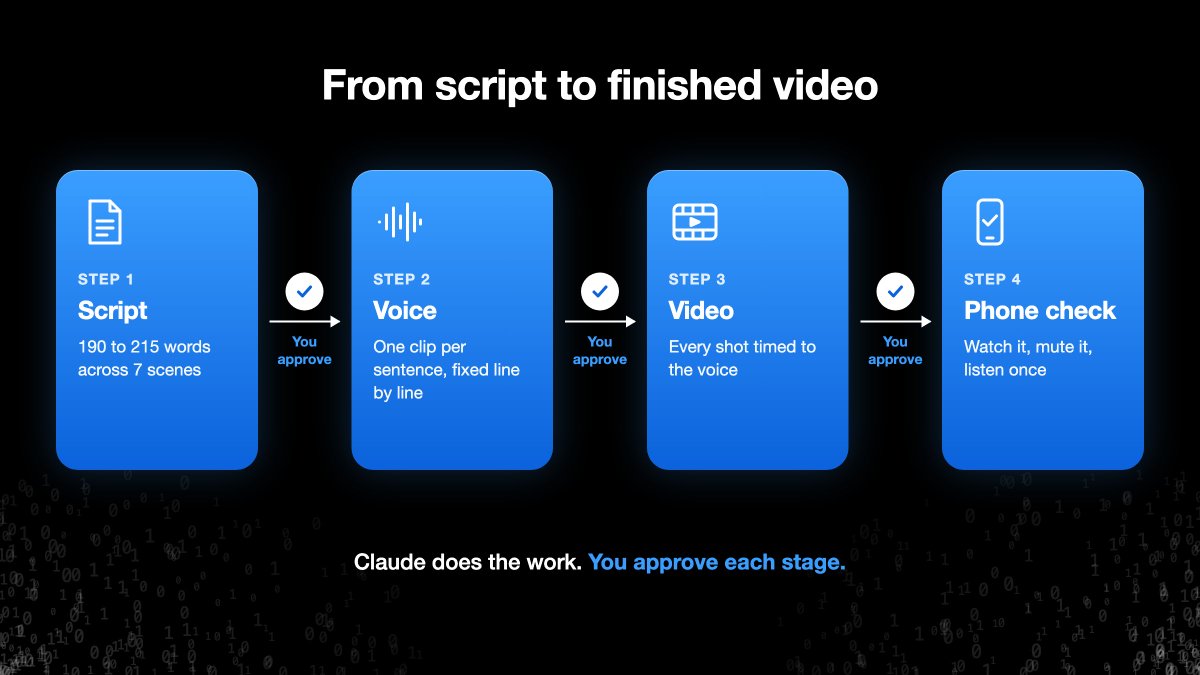
Technical tutorial channel AI Guides (@free_ai_guides) has published a comprehensive 4-stage prompt and code execution workflow for building 75-90 second vertical (9:16) cartoon explainer videos directly with Claude. Rather than relying on heavyweight diffusion video generators that suffer from character drift and high compute costs, this pipeline combines Claude Opus 5.5 code execution with Kokoro lightweight speech synthesis, Playwright headless canvas rendering, and FFmpeg video encoding to produce consistent, distortion-free vector animated shorts.
Image source: AI Guides (@free_ai_guides) on X
Pipeline Requirements and the Three Core Engines
The foundation of this automated workflow replaces probabilistic pixel generation with programmatic canvas drawing, ensuring that character expressions and proportions remain perfectly consistent throughout the video. The setup requires four foundational assets alongside three dedicated processing engines.
- Execution Environment and Core Assets: A Claude environment equipped with Python code execution (such as Claude Opus 5.5), a character model sheet defining four core facial expressions (neutral, shocked, laughing, and crying), structured reference materials for the topic, and a multi-step master prompt.
- Voiceover Synthesis Engine: Speech generation runs locally via
kokoro-onnx. The dependencies are installed in Python usingpip install kokoro-onnx soundfile --break-system-packages. - Model Checkpoints and Voice Tuning: The synthesis script loads the full-precision checkpoint
kokoro-v1.0.onnxpaired with the voice definition filevoices-v1.0.bin. The workflow specifies theam_michaelvoice persona with a speech pacing speed setting of0.95 x 1.25. - Loudness Normalization and Audio Mastering: The generated narration is normalized to
-16 LUFSwith a-1.5 dBtrue peak ceiling to prevent distortion across mobile social platforms. Community feedback also noted that fine-tuning dialogue audio levels during post-production further refines overall polish.
Single HTML Canvas and Playwright-FFmpeg Rendering Architecture
Visual motion and final video assembly operate through a deterministic, code-driven rendering pipeline centered on a single HTML5 canvas rather than complex standalone video editing software.
- Single Canvas Viewport: A single vertical canvas at 1080x1920 resolution hosts all vector graphics, character states, background elements, and typography at a constant 24 frames per second.
- Code-Drawn Vector Characters: Character art is drawn entirely via canvas code based on the model sheet's four emotional states (neutral, shocked, laughing, crying). Drawing vector primitives directly in code guarantees zero character morphing or facial drift across scene transitions.
- Playwright Headless Frame Capture: Playwright launches a headless Chromium instance to render and capture every canvas frame sequentially at 24fps, writing the animation frames to disk as an ordered image sequence.
- FFmpeg Assembly, Captions, and Subtitle Export: FFmpeg joins the captured image sequence with the mastered Kokoro narration track into an H.264 video with AAC audio inside an MP4 wrapper. It burns high-contrast subtitles directly into the video frames while simultaneously exporting standalone
.srtsubtitle files.
Four-Stage Approval Workflow and Practical Optimization
To prevent compounding errors and excessive re-renders, the entire pipeline is structured around an explicit four-stage human verification process that validates each asset before advancing to the next.
- Stage 1: Script Approval: The narrative script is strictly constrained to 190-215 words and structured across seven narrative scenes: Hook, Familiar World, Disruption, Mechanism, Discovery, Consequence, and Recap. The script is broken into 25-35 individual visual shots, intentionally incorporating exactly one 2-3 second hold shot to let viewers digest critical information.
- Stage 2: Voiceover Verification: The synthesized audio is checked against the 75-90 second duration target. Individual sentences are audited for speech pacing, targeting approximately 4.6 syllables per second (SPS). If any sentence exhibits pacing or articulation flaws, only the flagged sentence is re-recorded rather than regenerating the complete track.
- Stage 3: Video Alignment and Mobile Safe Zones: Visual shot transitions are timed precisely to the cadence of voiceover sentences. Essential graphics and subtitles respect strict mobile interface safe zones: preserving a 250px margin at the top and a 420px margin at the bottom to avoid occlusion by platform UI elements.
- Stage 4: Real-Device Phone Check: The rendered MP4 is transferred to an actual smartphone for final review, confirming text legibility, audio clarity, and visual pacing on small mobile screens before final delivery.
Original source
- AI Guides Official X (@free_ai_guides): How to Make a Cartoon Explainer Video with Claude