Claude Opus 5.5 Motion Graphics Gallery: Practical Tips for 226 Prompts and Skills
A practical guide to exploring the 226 Claude Opus 5.5 motion graphics gallery, pairing visual outputs with prompts and skills for UI state morphing and paramet
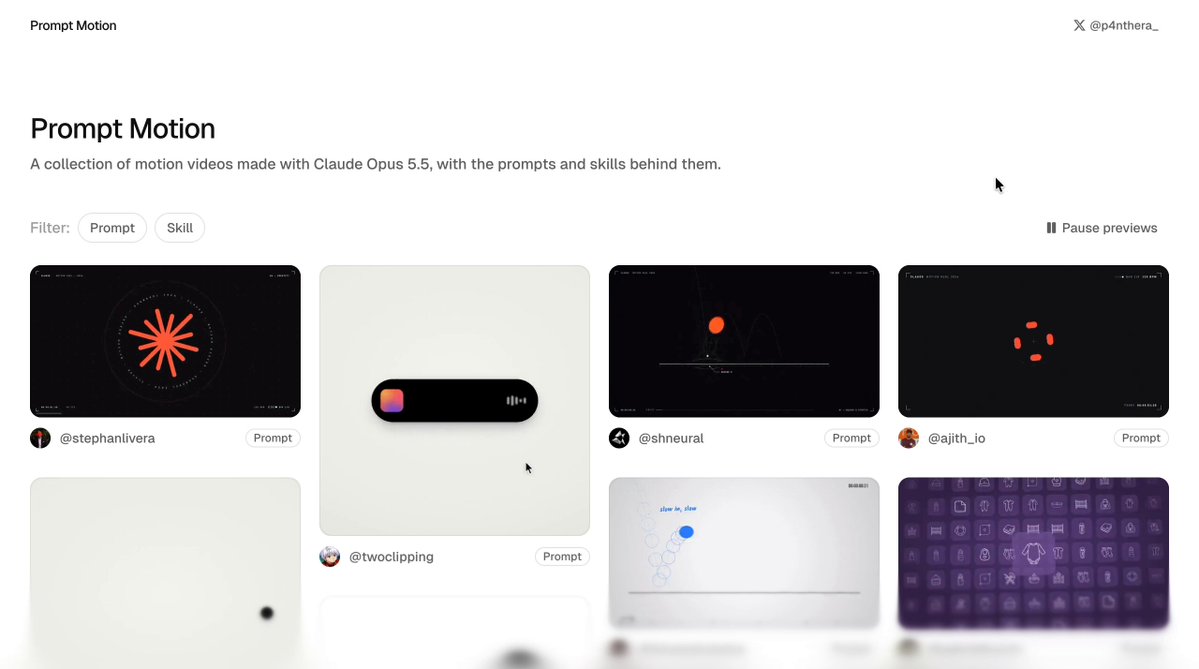
Creator @p4nthera_ (@p4nthera_) has released an open gallery archive curating motion graphics created with Anthropic's Claude Opus 5.5 model, displaying each visual animation alongside the exact prompt or agent skill that produced it. The collection features 226 entries sourced from community posts on X, with full creator attribution maintained across the archive.
Image source: @p4nthera_ via X
Conventional prompt sharing often isolates text prompts without displaying their actual rendered results, or conversely shares eye-catching animations without disclosing the underlying instructions and parameters. By arranging motion graphics alongside their generating prompts and agent skills, this gallery provides designers, developers, and prompt engineers with a practical reference library for rapid prototyping and interactive animation design.
1. Architecture of the 226 Motion Graphics and Prompt-Skill Archive
The primary architectural strength of the gallery (gallery link) lies in the direct, side-by-side pairing of Claude Opus 5.5 motion graphics with their generation specifications:
- Full Creator Attribution: Each of the 226 curated pieces credits the original creator who shared the work on X, establishing provenance and reliable sourcing for every visual reference.
- Prompts and Agent Skills Displayed in Parallel: Beyond plain-text natural language prompts, entries include the specific agent skill definitions or tooling configurations utilized to drive motion rendering engines and UI frameworks.
- Direct Reverse-Engineering Workflow: Users can immediately review the pacing, easing curves, and layout transitions of the rendered animation, then cross-reference the exact prompt phrasing and technical constraints that produced that behavior.
2. A Three-Step Workflow: Output Analysis, Prompt Cross-Check, and Custom Adaptation
Community practitioners analyzing the archive recommend a structured three-step methodology—"rendered output → prompt dissection → custom adaptation"—to maximize practical learning from the collection:
- Deconstructing UI State Transitions: For interface morphing effects, such as expanding menus or transforming button states, examine how the prompt specifies the sequence of interface states from initial trigger through intermediate easing to the final resting state.
- Isolating Single-Variable Adjustments: When testing motion rhythm and dynamic styling, change only one parameter or variable at a time (such as timing intervals, color palettes, or physical damping constants). Modifying multiple variables simultaneously obscures which specific instruction governs the animation's timing and aesthetic feel.
- Pre-Defining Aspect Ratio and Duration: When crafting motion clips or video assets, fix the target canvas aspect ratio and exact timeline duration within the initial prompt or specification, rather than generating unconstrained output and attempting to crop it after the fact.
3. Practical Considerations and Prompt Reproducibility
When translating prompts from the gallery into production workflows or local agent pipelines, several operational factors should be evaluated:
- Distinguishing One-Shot Outputs from Iterative Tuning: While some gallery entries originate from clean zero-shot prompts, others may incorporate intermediate adjustments or multi-turn agent steering. Practitioners should test the raw prompts directly to gauge any disparity between out-of-the-box execution and the curated showroom renders.
- Model Version and Environment Dependencies: All entries are calibrated for Claude Opus 5.5. Running these prompts or agent skills against alternative model tiers or differing agent harnesses may alter code execution behavior, tool calls, and easing calculations, making environment validation essential.
Original source
- @p4nthera_ on X: Claude Opus 5.5 Motion Graphics and Prompts Gallery
- Motion Graphics Gallery: p4nthera Gallery Link