How to Make a 24-Second Cinematic Video From 4 Reference Images With a Copy-Paste AI Video Prompt
A reusable AI video prompt workflow that turns four reference images, used in order, into a 24-second cinematic video.
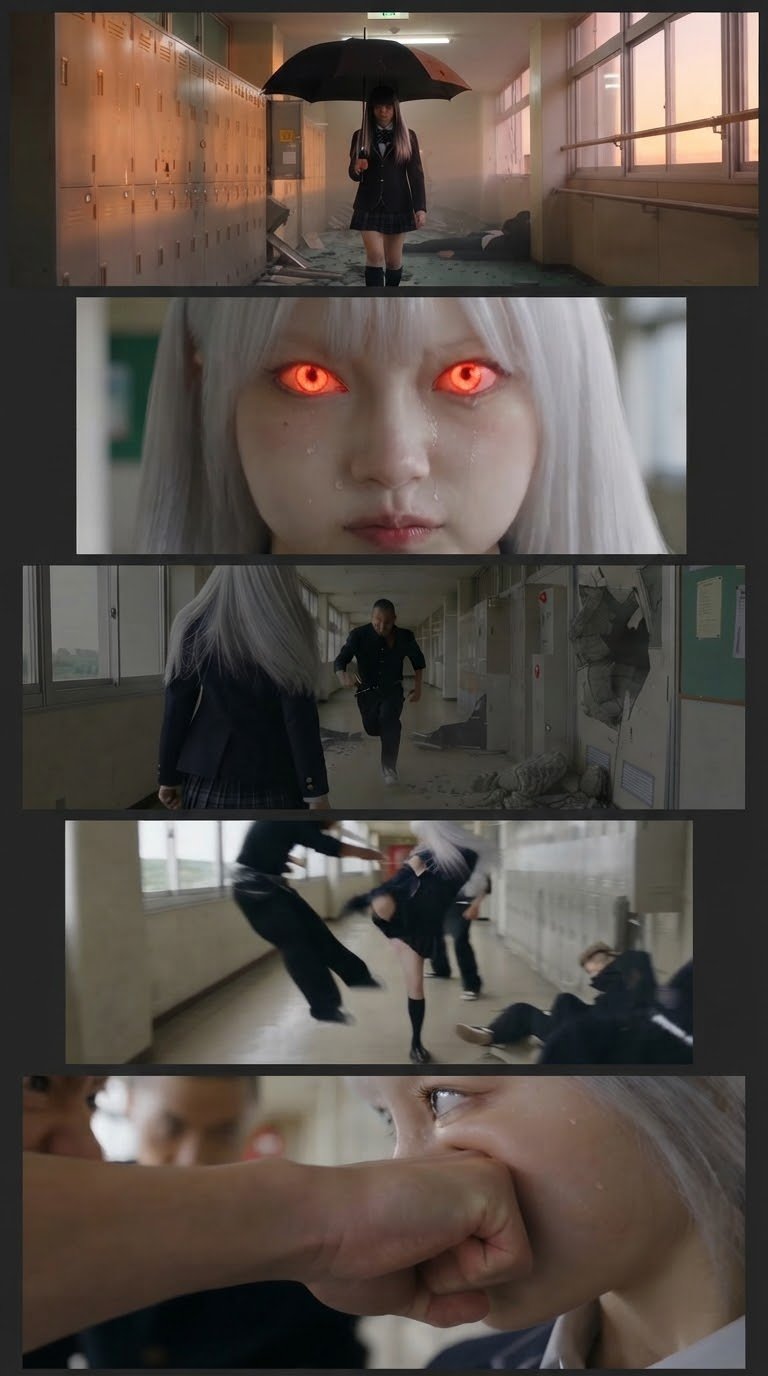
This is an image-to-video prompt workflow published on X by @Soaima_Ai on October 11, 2026. The idea is to feed in four reference images in a fixed order and produce a 24-second cinematic video. The original author presents it as a four-step flow: open Gemini, Grok, or GPT Image 2.0, upload your image, paste the prompt, then generate your image and video.
Image source: @Soaima_Ai on X
Taken as written, the original steps are: first, open Gemini, Grok, or GPT Image 2.0. Second, upload your image. Third, paste the prompt. Fourth, generate your image and video. It is better understood as a generic reference-ordering prompt technique than as a result tied to one specific tool.
The prompt as verified (up to the confirmed range)
The follow-up reply from the same author gives the prompt titled "Cinematic AI Video Prompt — Supernatural School Girl". According to the confirmed text, it instructs the model to create a cinematic, ultra-realistic 24-second video using the four reference images in the exact sequence provided. It also requires keeping the same silver-white-haired girl, facial features, black school uniform, and school hallway consistent throughout the video.
- Scene 1 (0–6 seconds): Close-up of the silver-haired girl in a school hallway. She looks emotional with tears on her cheeks while a bully stands close to her. Focus on her eyes and facial expressions, with a slow cinematic camera push-in.
- Scene 2 (6–12 seconds): Wide-angle shot of the school corridor. The girl suddenly reacts with confidence and performs a fast, choreographed martial-arts move, making the attacker stumble backward.
The collected copy of the follow-up prompt is confirmed only up to the "Other stud…" passage, and scene directions after that point are not inside the supplied collection. To reproduce anything past the 12-second mark, check the remaining instructions directly in the original thread.
Points to keep when trying it
- The core is stating the order of the four references plus the appearance, costume, and background consistency in the prompt.
- Keep the per-scene camera directions (close-up push-in, wide angle) in their given order.
- Do not extend scenes beyond the confirmed range on your own; check the original source first.
Original source
- Original post by @Soaima_Ai (2026-10-11): https://x.com/Soaima_Ai/status/2109269135524053113
- Follow-up prompt reply by @Soaima_Ai: https://x.com/Soaima_Ai/status/2109269142880874575