AI Agent Session Center: Manage Multi-Terminal Coding Agents from One Dashboard
An open-source local dashboard that monitors approval-pending and input-blocked sessions across Claude Code, Codex, and Gemini CLI with prompt queuing.
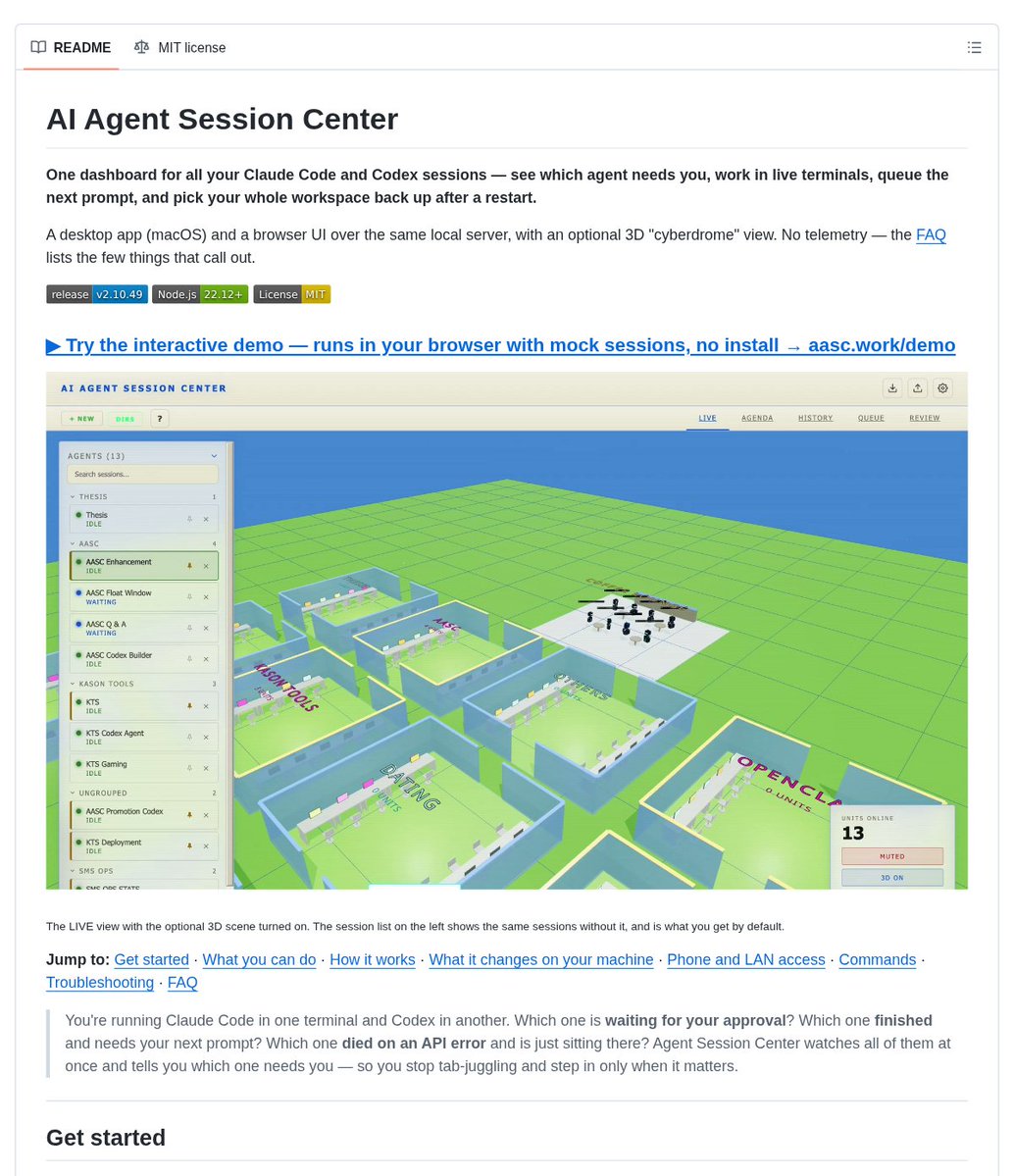
AI Agent Session Center, an open-source local dashboard designed to eliminate multi-terminal tab fatigue and track the real-time execution states of parallel AI coding agents, has been released.
Image source: Dan Kornas (@DanKornas) / coding-by-feng
As running multiple CLI-based coding agents—such as Claude Code, Codex, and Gemini CLI—becomes standard practice for feature development, test authoring, and refactoring, tracking agent progress across numerous terminal tabs introduces severe context-switching overhead. Developers frequently struggle to pinpoint which agent is blocked waiting for approval, which has finished its prompt run, or which is caught in a runaway loop burning tokens.
AI Agent Session Center addresses this friction by aggregating session states and live terminal views into a unified web dashboard running locally at http://localhost:3333.
Non-Invasive Hook-Based State Tracking and Low Latency
A core engineering principle of AI Agent Session Center is avoiding modifications to underlying agent binaries or core source code, relying instead on official, lightweight hook mechanisms.
- Atomic Configuration Registration: The tool registers read-only hooks via atomic file writes into configuration files (such as
~/.claude/settings.json) without altering CLI executables. - Read-Only Message Queue: Runtime events emitted by agent processes are collected through a local file-backed message queue (
/tmp/claude-session-center/queue.jsonl). - 3–17ms WebSocket Latency: Captured session state transitions are broadcast to the browser dashboard over WebSockets with minimal latency between 3ms and 17ms.
- Categorized State Indicators: Sessions are clearly categorized into distinct states—including Working, Waiting, Approval Pending, Input Blocked, Idle, and Ended—making it immediately obvious when human intervention is required.
Rather than merely dumping raw stdout text, the dashboard surfaces whether an agent is actively executing tools or waiting for human decisions.
xterm.js Terminal Streaming and Prompt Queuing
Integrated interactive features allow developers to inspect and drive individual agent terminals directly from the web interface.
- xterm.js Terminal Emulation: View live terminal output and send keystrokes directly into any active agent session within the browser.
- Smart Prompt Queue: Enqueue subsequent instructions while an agent is executing long-running tasks; queued prompts dispatch automatically upon task completion.
- Crash Detection and Recovery: Detects unexpected process drops or frozen states, surfaces immediate visual alerts, and assists in session recovery.
- Lightweight Local Runtime: Runs locally with minimal background resource footprint.
Installation and Quick Start
AI Agent Session Center runs in Node.js environments and can be launched via pnpm or npm.
# Clone the repository and install dependencies
git clone https://github.com/coding-by-feng/ai-agent-session-center.git
cd ai-agent-session-center
pnpm install

# Start the dashboard server on port 3333
pnpm start
Navigate to http://localhost:3333 in a web browser to view the active session dashboard and monitor running agent hooks.
Sources and References
- GitHub: coding-by-feng/ai-agent-session-center - Open-source repository and documentation
- X (Twitter): Dan Kornas (@DanKornas) - Project release announcement and demo video