10-Step Guide to Reverse-Engineering Closed-Source Apps with AI Agents and Open-Source 'REA'
A comprehensive 10-step practical workflow for using REA alongside Claude Code, Codex, and Cursor to analyze and reconstruct internal application logic across E
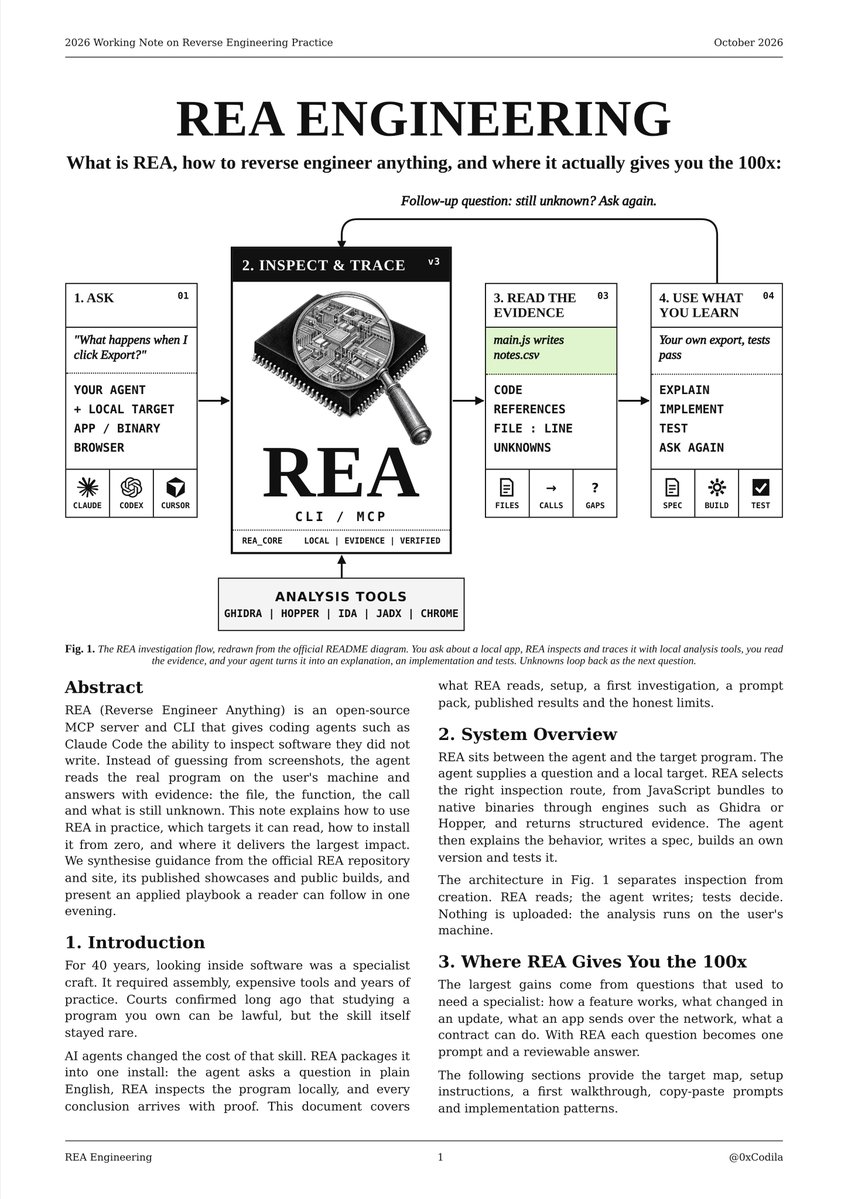
Creator @0xCodila has released a 10-step blueprint demonstrating how to reverse-engineer closed-source applications at the source-code level by combining AI coding agents—including Claude Code, Codex, and Cursor—with the open-source REA toolkit.
Image source: @0xCodila via X
While traditional reverse engineering often requires manual inspection and interpretation of raw decompiler outputs, REA enables modern AI coding agents to bypass vague guesswork and pinpoint exact file paths, function signatures, call stacks, and line numbers directly. Synthesized from a 10-page research blueprint, here is the complete 10-step practical workflow.
Step 1: Core Concept Behind REA
The fundamental goal of REA is shifting AI agents from guessing how an application might work to directly inspecting its actual structure. Instead of hypothesizing, your agent locates the exact file, function, and call within the binary or package hierarchy.
Step 2: Supported Application Targets
REA supports reverse engineering across a wide array of application packaging formats and execution environments:
- Electron Desktop Apps: Notion, Slack, Discord, and similar platforms
- Web Applications and Static Web Assets
- Native Binaries: Windows
.exeand macOS applications - Game Engines: Unity game packages
- Mobile Packages: Android APKs
- Blockchain Systems: Smart contracts
Step 3: One-Command Setup for AI Coding Agents
Integrating REA into your development environment requires a single setup command:
npx rea-agents@latest setup
After approving runtime permissions and restarting your agent client, the REA toolchain activates across Claude Code, Codex, and Cursor.
Step 4: Starting Free with Electron Applications
Electron applications represent the lowest barrier to entry. Because Electron apps store their entire client-side source tree bundled inside a single app.asar archive, REA can extract and inspect the internal JavaScript/TypeScript logic statically without ever executing the application itself.
Step 5: First Reverse-Engineering Trace (Event to Storage)
In a practical starter exercise tracing the official Notes app, REA demonstrates complete execution tracking from the initial button click in the UI down to the disk-write operation, providing exact source-code line numbers for every intermediate step.
Step 6: Practical Prompt Patterns and Extraction Tasks
With concrete structural data extracted by REA, development workflows can tackle specific reverse-engineering prompts:
- Rebuilding Discord's Typing Indicator: Tracing and reconstructing the typing indicator feature.
- Decoding Calculator's Percentage (%) Button: Decoding the calculation logic behind the percentage button.
- Finding Every Tracker in an APK: Identifying all trackers embedded within an Android APK.
Step 7: Advanced Workflows (Diffing and Crash Triage)
Beyond basic code reading, REA incorporates specialized operational workflows:
compare_application_versions: Compares consecutive software updates to uncover what vendor patches actually altered under the hood.trace_crash: Investigates unhandled exceptions and crashes to locate the exact failing call stack and originating bug.
Step 8: Systematic Reconstruction Over Blind Copying
As an example of reconstructive fidelity, a developer using AI agents rebuilt a Touhou game in approximately 12 days, reproducing 696 out of 697 functions exact. This highlights that disciplined re-implementation is achievable rather than superficial copying.
Step 9: Building Systems, Not One-Off Prompts
Rather than relying on ad-hoc prompts, reproducible results depend on a standardized engineering loop. Whether conducting a feature rebuild, update diff, security audit, or token scan, every task follows a disciplined three-phase cycle:
- Target: Pinpoint the target binary, asset file, or subsystem boundaries.
- Prompt: Instruct the AI agent to draft an explicit, formal implementation specification based on REA findings.
- Verify: Prove correctness by executing test suites and validating runtime behavior.
Step 10: Recognizing Technical and Legal Limits
Engineers must account for fundamental boundaries when deploying this toolchain:
- No Server-Side Extraction: Client-side packages contain no backend server code or proprietary cloud API logic.
- Stripped C++ Binaries: There is no automated shortcut or magic for stripped C++ binaries.
- Division of Responsibility: REA extracts the data (Read), Claude establishes the specification (Spec), the engineer implements the architecture (Build), and automated test suites validate behavior (Prove).
- Licensing and Legal Compliance: Rebuilding proprietary features requires strict adherence to software license agreements (EULAs), trade secret provisions, and copyright law.
Original Source
- @0xCodila Official Thread on X: REA 10-step Guide Post
- REA 10-Page Research Blueprint Document: Google Drive Research Document