Microsoft Announces End of Servicing for Windows 11 24H2 Home and Pro, Recommends Free 26H2 Upgrade
Microsoft has officially concluded monthly security update servicing for Windows 11 24H2 Home and Pro editions. Here is how to upgrade to 26H2 or 25H2 for free
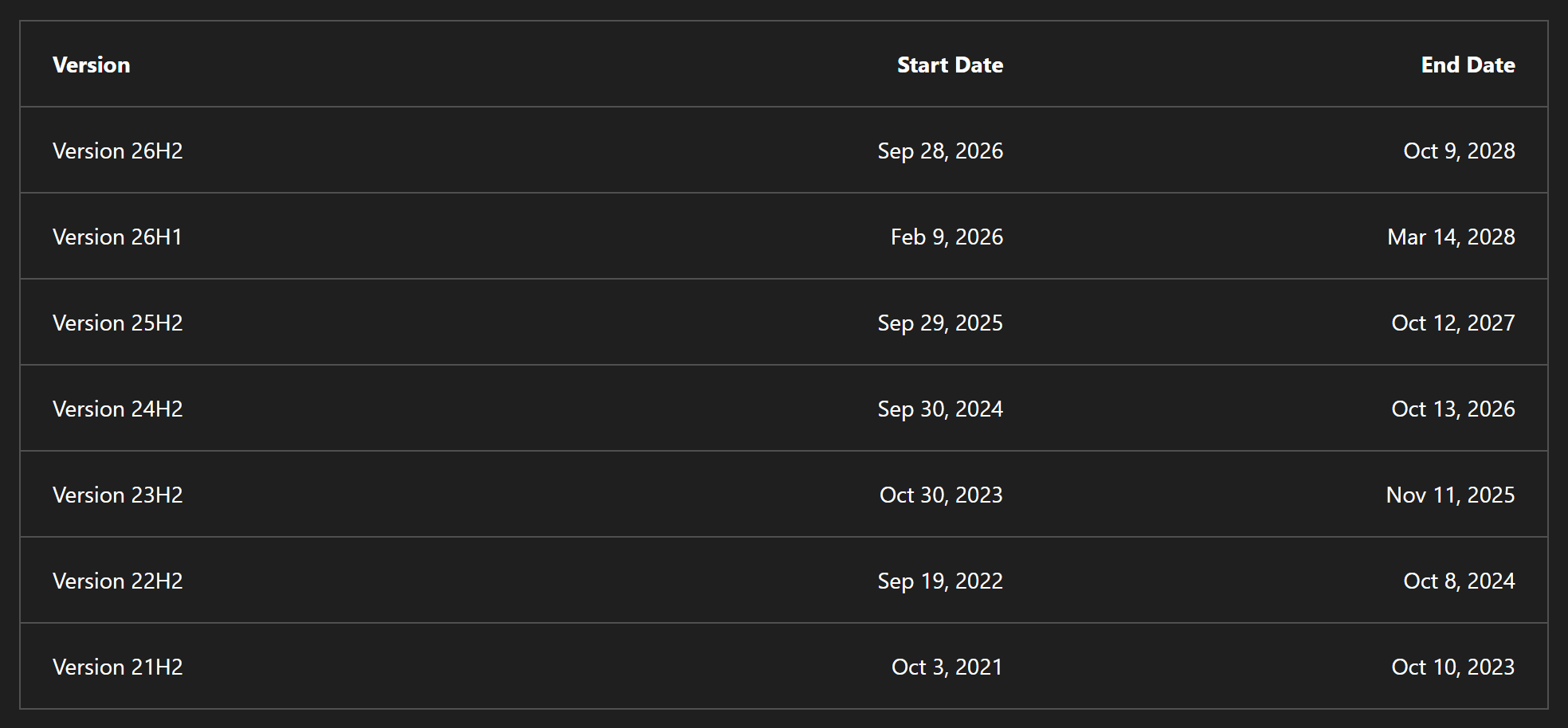
On October 13, 2026 (US local time), Microsoft officially announced the end of monthly security update servicing for Windows 11 version 24H2 Home and Pro editions. According to Microsoft's lifecycle policy schedule, official support concludes at 22:59:59 KST on October 14, 2026, marking the October 2026 release as the final regular security patch for 24H2 Home and Pro installations.
Image source: @OopsUpdate via X
With official servicing coming to a close, users running Windows 11 24H2 Home or Pro must transition to a newer release—such as Windows 11 26H2 or 25H2—via Windows Update to continue receiving critical monthly security protections, following Microsoft's recommendation to upgrade for free.
End of Servicing for 24H2 Home and Pro and Free Upgrade Options
Windows 11 feature updates follow established servicing lifecycles by edition. The current end-of-servicing milestone applies specifically to version 24H2 Home and Pro editions:
- End of Servicing Date: October 13, 2026, US local time (October 14, 2026, at 22:59:59 KST per official lifecycle tables)
- Target Editions: Windows 11 24H2 Home and Windows 11 24H2 Pro
- Recommended Action: Free update to Windows 11 26H2 or Windows 11 25H2 via Windows Update
Devices that remain on 24H2 Home or Pro will no longer receive monthly security updates, making an upgrade necessary for ongoing protection.
Single-Restart Deployment and a New 24-Month Lifecycle Through October 2028
According to Microsoft Vice President John Cable, Windows 11 26H2 is delivered as a free package, allowing for short download times and completing installation with a single PC restart.
Upgrading to Windows 11 26H2 also resets the support clock for Home and Pro users:
- Lifecycle Reset: A fresh 24-month servicing window begins upon installing 26H2.
- New Support Deadline: Monthly security updates are officially guaranteed through October 10, 2028, per Microsoft lifecycle documentation.
This transition allows users to maintain regular security update coverage through October 10, 2028, with a single restart.
Verifying Your Current Version and Managing Safeguard Holds
Checking whether a PC is currently running Windows 11 24H2 involves a few straightforward steps:
- Check Edition and Version: Right-click the Start button and select
Settings > System > About. Under 'Windows specifications', confirm whether the edition is Home or Pro and verify the version number. - Enable Prompt Delivery: Navigate to
Settings > Windows Updateand turn on the toggle for 'Get the latest updates as soon as they're available'. Enabling this preference ensures the download and install option for 26H2 becomes visible as soon as the device is eligible. - Handling Safeguard Holds: Windows 11 26H2 is distributed through a phased rollout. If a device has a safeguard hold, the 26H2 update may not appear immediately. In that case, users can update to 25H2 first or wait for the phased rollout.