10 Free Open-Source GitHub Repositories for Video and Audio Automation
Discover 10 free open-source GitHub tools curated by Rimsha Bhardwaj to automate video subtitles, cut silences, suppress audio noise, and streamline editing wor
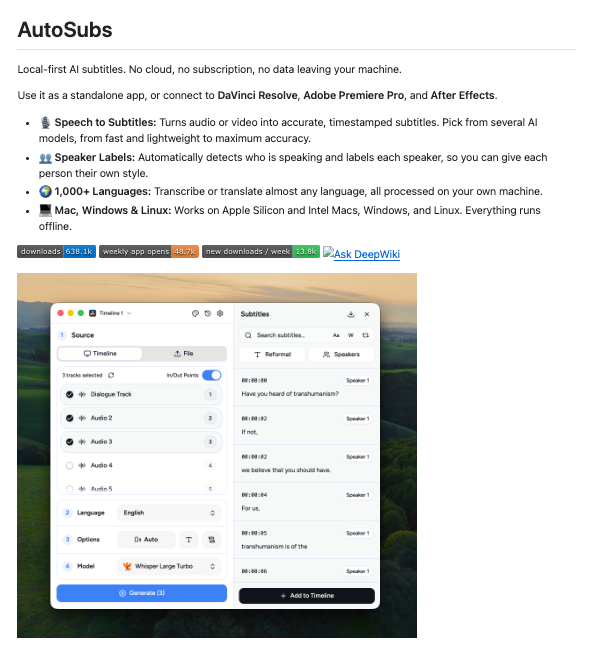
Image source: X @heyrimsha
Video editing often involves repetitive manual tasks like cutting out silence, cleaning background noise, aligning subtitles, and rough cuts, which consume significant creator time. Tech creator Rimsha Bhardwaj (@heyrimsha) shared ten free open-source GitHub repositories designed to automate these bottlenecks and accelerate editing workflows without relying solely on commercial suites.
Audio Cleaning and Silence Removal Tools
First is Auto-Editor, a free command-line tool that automatically cuts dead air from recordings, letting users adjust kept pauses and export editable timelines for Premiere Pro, DaVinci Resolve, or Final Cut.
Second, AutoSubs generates subtitles locally, identifies speakers, and sends captions directly into DaVinci Resolve, Premiere Pro, or After Effects.
Third, DeepFilterNet suppresses background noise in voice recordings locally to clean up audio tracks before video reinsertion.
Fourth, Audio Separator splits vocals and instrumental music into separate tracks using pretrained models, allowing independent processing instead of fighting the whole mix.
Scene Detection and Transcript-Driven Editing
Fifth is PySceneDetect, which detects scene changes and splits long videos into individual clips, exporting timestamps without manual cut marking.
Sixth, FFsubsync fixes subtitles appearing too early or late by automatically aligning an existing subtitle file with speech in the video.
Seventh, FunClip cuts videos by selecting words from transcripts. Users pick passages or speakers, exporting matched footage with subtitles.
Eighth, StoryToolkitAI searches footage by meaning, finding relevant moments and assembling story selections exportable to editing software.
Transcoding Utility, Automated Assembly, and Caveats
Ninth is Shutter Encoder, a desktop interface built around FFmpeg that converts and compresses footage without memorizing command-line options.
Tenth is Editly, which assembles videos from reusable instructions, combining clips, images, titles, transitions, and music with automatic audio ducking and normalization.
While these tools streamline editing, practical caveats exist. Command-line utilities like Auto-Editor require terminal comfort, and local AI tools depend on hardware capability. Validating each tool in your workflow is recommended.