SEEDOC - Quest for the Golden Ratio
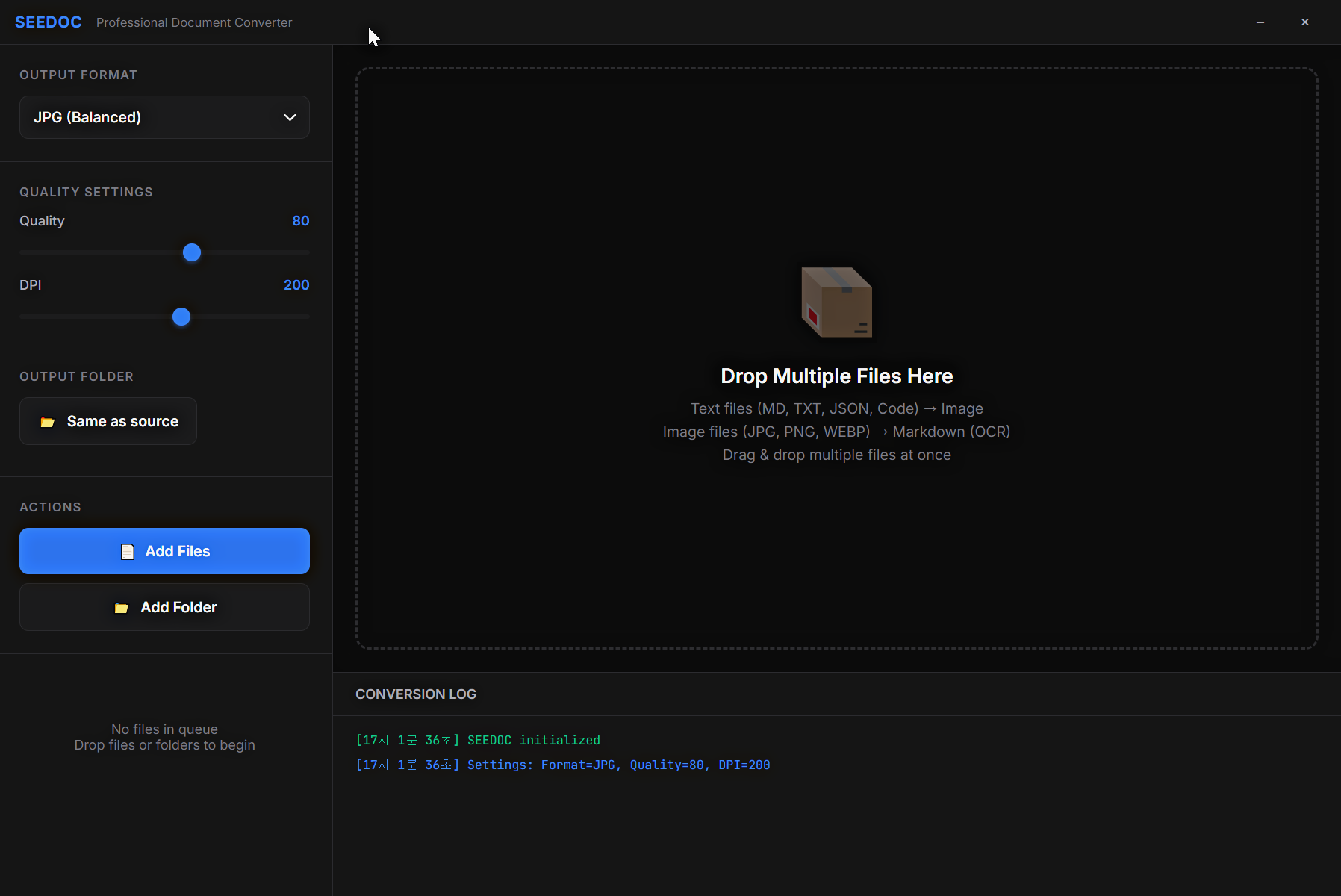
MD→JPG conversion quality measurement tool for Vision AI optimization. The unsung hero behind discovering the golden ratio.
🎯 The Day We Found the Golden Ratio
Remember why we chose Vision JPG? To discover the Ultra Compact Golden Ratio (1600px, Q60, 65000px, line_spacing +1px), we needed countless experiments.
That's when we created SEEDOC - a simple app that converts MD files to JPG/PNG/WEBP/TIFF and measures how accurately Vision AI reads them.
Original Purpose: Testing DeepSeek OCR Actual Result: Proof that JPG format is optimal for Vision 💪
💡 Why We Needed SEEDOC
Problem: Difficulty Measuring Quality
Vision AI optimization must satisfy all of these simultaneously:
- Readability: AI accurately recognizes text
- File Size: Token efficiency (smaller is better)
- Speed: Conversion time (faster is better)
Testing hundreds of setting combinations required a repeatable tool.
Solution: SEEDOC's Core Features
✅ 4 Format Support: JPG, PNG, WEBP, TIFF ✅ Quality/DPI Control: 50-100 quality, 72-300 DPI ✅ Batch Processing: Multiple file conversion ✅ OCR Reverse: Image → MD (accuracy verification)
🔬 Experiment Process
Step 1: Format Comparison
Test Document: 5000 lines of code
Conversion Settings: 1600px, Q60~100, DPI 150~300

Results:
- JPG: 232KB, Vision readability 100%
- PNG: 1.2MB, Vision readability 100%
- WEBP: 180KB, Vision readability 95% (slight blur)
- TIFF: 3.5MB, Vision readability 100%
Conclusion: JPG wins in size-to-quality ratio 👑
Step 2: Discovering the Golden Ratio
After hundreds of tests with SEEDOC:
- 1600px width: Minimum width maintaining readability
- Q60: Sweet spot between compression vs quality
- 65000px height: Optimal size for Vision single page
- line_spacing +1px: 19% savings in line spacing
232KB → 3 pages = 5,400 tokens (88% savings!) 🚀
🛠️ How to Use SEEDOC
Basic Usage
- Add Files: Drag & drop (MD, TXT, code files)
- Adjust Settings:
- Format: Select JPG
- Quality: 60
- DPI: 200
- Auto Convert: Automatic processing when added to queue
- Check Results: Generated in same folder as original
OCR Reverse (For Verification)
Drag an image to generate MD file via Tesseract OCR:
- Auto-detect Korean/English
- Preserve code blocks
- Maintain table structure
Purpose: Verify Vision AI reading accuracy
📊 Performance Comparison
<div className="grid grid-cols-5 gap-3 my-0 text-sm"> <div className="font-bold border-b-2 border-primary pb-2">Format</div> <div className="font-bold border-b-2 border-primary pb-2">Size</div> <div className="font-bold border-b-2 border-primary pb-2">Vision Readability</div> <div className="font-bold border-b-2 border-primary pb-2">Speed</div> <div className="font-bold border-b-2 border-primary pb-2">Use Case</div> <div className="font-bold">JPG</div> <div>⭐⭐⭐</div> <div>⭐⭐⭐⭐⭐</div> <div>⭐⭐⭐⭐</div> <div className="text-primary font-semibold">Vision AI (Optimal!)</div> <div>PNG</div> <div>⭐</div> <div>⭐⭐⭐⭐⭐</div> <div>⭐⭐⭐</div> <div>Archiving</div> <div>WEBP</div> <div>⭐⭐⭐⭐</div> <div>⭐⭐⭐⭐</div> <div>⭐⭐⭐⭐</div> <div>Web Sharing</div> <div>TIFF</div> <div>⭐</div> <div>⭐⭐⭐⭐⭐</div> <div>⭐⭐</div> <div>Professional</div> </div>🎬 Conclusion
SEEDOC isn't a flashy app. But it's the unsung hero that accomplished the critical mission of discovering the golden ratio.
Thanks to it, we achieved:
- Established optimal Vision JPG settings
- 90% token savings
- Large codebase analysis capability
A simple tool, but with enormous impact. 💕
🔗 Links
- Download: SEEDOC v1.0.0 (78MB, Windows Portable) - No installation needed, run immediately!
- GitHub: <a href="https://github.com/tau-breath/SEEDOC" target="_blank" rel="noopener noreferrer">tau-breath/SEEDOC</a>
- Tech Stack: Electron + Sharp + Tesseract.js
P.S. We now use different scripts for MD-JPG conversion, but without SEEDOC, there would be no golden ratio. Thank you, SEEDOC! 👋