prompt2rig: Realtime 3D Motion Extraction and Mixamo Retargeting from Prompts
An open-source pipeline pairing fal video generation with GVHMR and WiLoR to lift 3D body and finger motion from text prompts or video clips onto rigged Mixamo
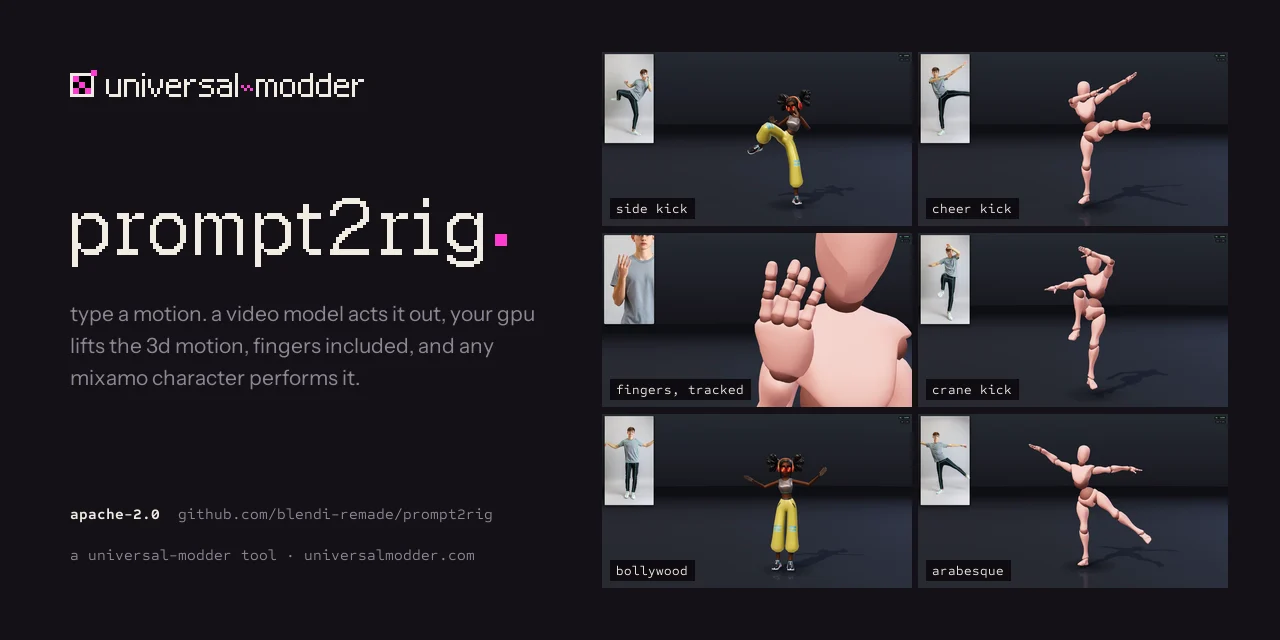
prompt2rig is an open-source pipeline designed to extract 3D body and finger motion from text prompts or video clips in real time, mapping them directly onto rigged characters such as Mixamo models. Announced by @BlendiByl in October 2026, the pipeline automates text-to-3D animation creation and runs its motion-recovery stage on a single GPU.
Image source: https://github.com/blendi-remade/prompt2rig
Image Credit: blendi-remade/prompt2rig
The pipeline combines cloud-based video generation with local GPU motion recovery to turn creative ideas into 3D animations rapidly.
Core Pipeline and Workflow
prompt2rig connects generative video models with local motion estimation models in a unified pipeline.
- Video Generation (fal Cloud): Uses
FLUX 3 Maxfor the most realistic motion orH3 Max Turbofor the fastest loop and stream modes. All clips initiate from a standard performer setup: a single person, full body, plain backdrop, and static camera optimal for pose estimation. - Realtime Preview (Browser): Delivers immediate motion preview using browser-based MediaPipe Pose.
- HQ Motion Recovery (Local GPU): Uses GVHMR to process the entire clip at once, outputting joint rotations on a fixed-proportion body and recovering a gravity-aware root path. The project says this avoids jitter, limb stretching, and twisted forearms.
- Finger Tracking (WiLoR): Tracks the palm and all 15 finger joints per hand in parallel with GVHMR using WiLoR (or MediaPipe Hands) for fine-grained finger details.
Installation and Requirements
Running the high-quality (HQ) pass locally requires an NVIDIA GPU, uv, and ffmpeg.
git clone https://github.com/blendi-remade/prompt2rig && cd prompt2rig
cp .env.example .env          # Add your FAL_KEY
node server.mjs               # http://localhost:5177 (web server & live preview)
HQ pass and manual model setup:
hq\setup.ps1 # venv, CUDA PyTorch, GVHMR + checkpoints
- SMPL-X Model: Place the
SMPLX_NEUTRAL.npzfile inhq/body_models/smplx/(requires free registration at smpl-x.is.tue.mpg.de). - Hand Models: Run
hq\.venv\Scripts\python hq\setup_hands.py [MANO_ZIP_PATH]to set up WiLoR weights and the MANO model. MediaPipe Hands serves as a fallback if MANO is omitted.
Next, start the local worker alongside the web server:
hq\.venv\Scripts\python hq\worker.py # Starts worker on 127.0.0.1:5178
Usage and Export
Prompts where subjects face the camera with limbs clear of the body—such as dances, kicks, kata, and sport mimes—retarget well.
- Character Swapping: Use built-in textured Mixamo rigs (X Bot, Michelle, Soldier) or load any Mixamo
.fbxor.glbfile in T-pose from mixamo.com. - Stream Mode: Create continuous performances where each clip picks up from the final frame of the preceding one.
- GLB Export: Export the skinned character along with its animation as a
.glbfile for use in Blender or Unity.
Sources
- GitHub: blendi-remade/prompt2rig
- X (Original Source): @BlendiByl's prompt2rig Announcement