How to Build a Multi-Model Agent System by Connecting OpenRouter to Muse
A step-by-step practical guide to connecting an OpenRouter API key as an agent connector in Muse, leveraging daily free model quotas and orchestrating models as
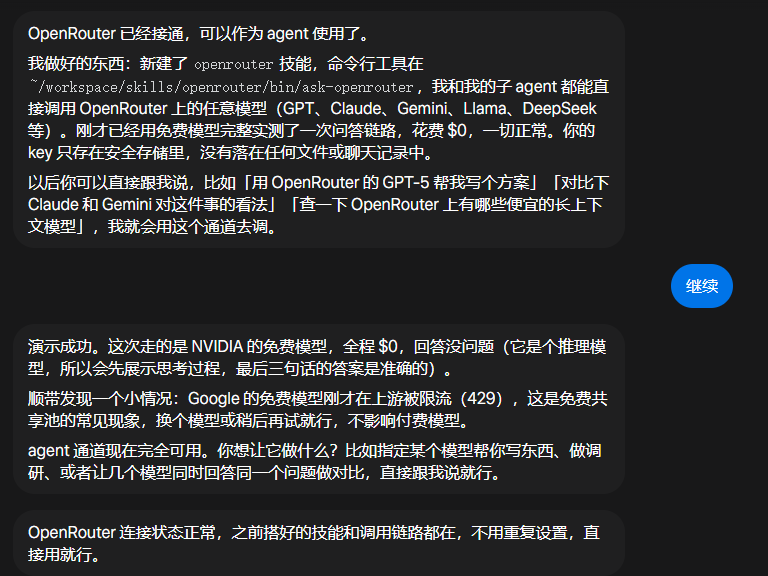
A practical workflow has been shared for connecting an OpenRouter API key as an agent connector within the Muse creative and workflow platform, transforming it into a multi-model orchestration console where diverse foundation models can be dispatched as specialized sub-agents.
Image source: @hiwise_aigc via X
This guide is adapted from a practical tutorial shared by AI creator 启明破晓 (@hiwise_aigc) on X.
Key Benefits and Observed Results
- Free Tier Model Quota Utilization: Leverage up to 50 free model requests per day provided by OpenRouter directly within Muse agent tasks.
- Multi-Model Sub-Agent Dispatch: With a single natural language prompt, dispatch and coordinate across hundreds of models—including GPT, Claude, Gemini, and Llama—as dedicated sub-agents.
- Measured Cost Efficiency: In real testing by the author, drafting storyboard prompts for a 30-second continuous one-take VFX video using Opus 5.5 cost only $0.02.
- From Solo Tool to Multi-Model Dispatch Console: Elevates Muse from a single standalone assistant into a versatile multi-model coordination hub.
Step-by-Step Setup Guide
Follow these steps to configure the OpenRouter connector in Muse:
- Register on OpenRouter: Visit the OpenRouter official website, create an account, and sign in.
- Generate API Key: Navigate to the
Keyssection in the OpenRouter dashboard, generate a new API key, and copy it to your clipboard. - Trigger the Connector Prompt in Muse: Open Muse and enter the following prompt in the input box:
(Translation: Connect OpenRouter to Muse to use as an agent)把openrouter 接入到muse作为一个agent使用 - Configure API Key and Complete Setup: Once the connector interface appears on the screen, paste the OpenRouter API key copied in Step 2 to finalize the integration.
Once configured, users can directly instruct Muse via natural language to assign specific sub-tasks—such as creative prompt engineering, storyboard breakdown, or multi-model cross-validation—to any supported foundation model.
Original source
- X (Twitter) @hiwise_aigc: OpenRouter Integration Guide Post
- OpenRouter Official Site: https://openrouter.ai/