Microsoft Skill Recorder: Turn Recorded Work into AI Agent Skills
Explore Microsoft's open-source Skill Recorder, which uses screen recordings and optional session terminal capture to create agent skills with GitHub Copilot CL
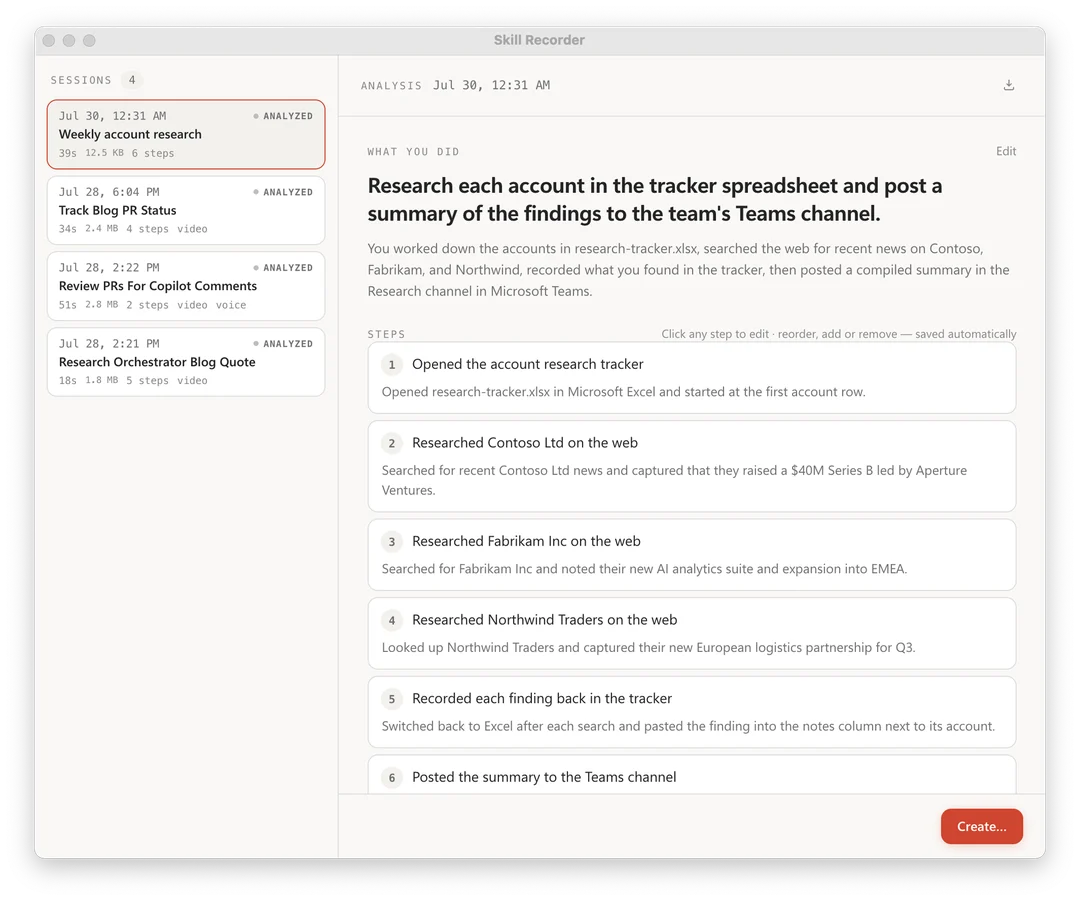
Microsoft's open-source Skill Recorder is a desktop app that turns recorded screen work, voice commentary, and optional session terminal activity into AI agent skills. The official GitHub v0.7.0 release dates to September 21, 2026. This guide covers the existing workflow: capture a session locally, then use GitHub Copilot CLI to reconstruct intent and ordered steps.
Image source: https://github.com/microsoft/skill-recorder
Session Recording and Copilot CLI Analysis
Skill Recorder captures clicks, window switches, URLs, and voice commentary locally. Terminal activity is recorded only when enabled for the app-owned session. Users record via shortcuts like ⌘⇧R or Ctrl+Shift+R, managing microphones and terminal capture via a floating bar.
GitHub Copilot CLI (v1.0.78+) analyzes the session into intent and ordered steps. Users can edit the sequence and export a SKILL.md file or scheduled automation.
Native Tool Focus and Generalization
The app favors native agent tools over brittle UI clicks:
- Native Tools: Steps prioritize CLI tools like gh or web-fetch over repeating mouse clicks.
- Generalization: Recording one form submission teaches the agent to handle similar workflows.
Developers can preview SKILL.md instructions before export.
Platforms, Installation, and Security
Skill Recorder supports macOS, Windows 11 (x64/ARM64), and Ubuntu. Setup uses a commit-pinned command from releases to build locally without global dependencies.
A GitHub account with Copilot is required. Capture is local, but Analyze sends timelines, snapshots, and terminal text to GitHub cloud. Users must keep tokens and passwords off screen.